Vouchernaut Weekly

The week, sorted.

One email every Thursday at 7am, free. Here's what's in it:

  • New guides
  • Real price drops
  • Fresh codes
  • Sales ahead
Add stories from the magazineOptional
Stories to add

Pause or stop it from any email. I never sell or share your address. See this week's · Privacy

  1. Software
  2. AI assistants & agents
  3. Appy.AI
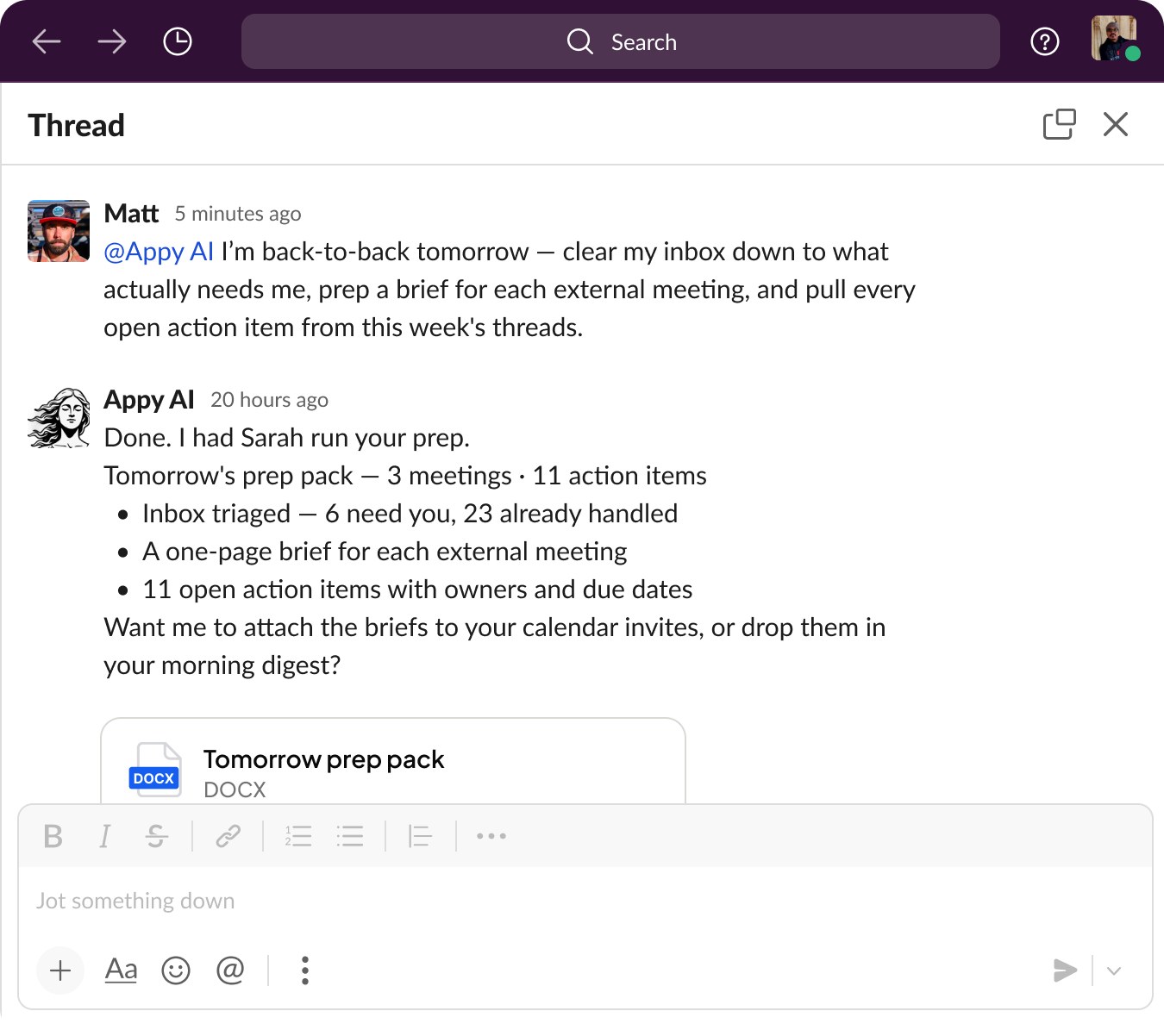
Slack thread where Appy.AI reports that Sarah triaged the inbox and prepared briefs for tomorrow's meetings, with a DOCX prep pack attached

Meeting prep delivered in a Slack thread

A team of named AI coworkers, coordinated by Violet, that handle marketing, sales, finance and admin tasks in Slack and Teams

from$50a month

Prices in US dollars as Appy.AI's pricing page showed them on 11 October 2026.

  • Web
  • Slack

What Appy.AI does

Appy.AI gives small and mid-size businesses a team of named AI coworkers, led by a coordinator called Violet, that take on marketing, sales, finance and admin tasks from Slack or Microsoft Teams. It suits lean teams that want work delegated in chat rather than another app. New workspaces get $100 of credits with no card; the paid plan is $50 a month for 20,000 credits shared by unlimited users.

  • Violet, the coordinator

    You tell Violet what you need in plain English. She plans the work, hands each part to the right specialist and reports back with the result and a suggested next step.

  • Department specialists

    Ready-made coworkers cover finance, marketing, sales and operations, from a bookkeeper and payroll specialist to a social media lead and an executive assistant. You can also create a custom coworker by asking.

  • Works in Slack and Teams

    Tagging Appy.AI in a Slack channel or messaging it in Microsoft Teams starts a task, and the work happens in the thread where the team can see and comment.

  • Files and media

    Coworkers produce finished spreadsheets, PDFs and documents, PowerPoint decks, images and short videos, and keep every output in one gallery.

  • Scheduled and triggered tasks

    Recurring jobs wake agents on a schedule, such as Monday prospecting or a daily briefing, and tasks can be started by events in other systems.

  • Memory and reference library

    Violet remembers your business across conversations, and a shared library of price lists, product documents and policies is available to every agent.

  • Audit trail

    Every task has an owner, status and history, every asset is tied to the agent that made it, and the audit log can't be edited or deleted.

Works with

  • Slack
  • Microsoft Teams
  • Gmail
  • Outlook
  • Google Drive
  • OneDrive
  • Google Sheets
  • Excel
  • QuickBooks
  • Stripe
  • PayPal
  • Ramp
  • Brex
  • Gusto
  • HubSpot
  • Salesforce
  • Pipedrive
  • Apollo
  • Notion
  • Mailchimp
  • Google Ads
  • Meta Ads
  • Zendesk
  • Intercom

How much Appy.AI costs

Starter

Free

$100 of credits once, no card needed, no renewal

  • Shared workspace credits
  • Unlimited users
  • No support

AI Workforce

$50a month

20,000 credits a month, shared by the workspace

  • Slack and Microsoft Teams agents
  • Persistent workspace memory
  • Unlimited users
  • Priority support
  • Advanced analytics
  • Unused credits roll over

Prices in US dollars; VAT and annual billing not mentioned. Extra credits can be bought at any time. Fees are non-refundable under the terms. Prices in US dollars, from Appy.AI's pricing page on 11 October 2026. Appy.AI may charge VAT on top, and prices can change.

Appy.AI pros and cons

Pros

  • $100 of free credits with no card to try real tasks
  • One $50 monthly price covers unlimited users
  • Unused credits roll over from month to month
  • Named specialists for finance, marketing, sales and operations
  • No-training commitment and UK transfer terms in its DPA

Cons

  • No reviews found on G2, Capterra, Trustpilot or Product Hunt
  • Priced in US dollars only, with no annual discount shown
  • The pricing page doesn't say how many credits typical tasks use
  • The free credits don't renew and come without support
  • Fees are non-refundable under the terms

Good for

  • Small businesses that want admin, marketing and sales tasks handled from Slack or Teams
  • Teams that want flat pricing however many colleagues use it
  • Founders who want finished files such as decks, reports and spreadsheets from a chat request

Look elsewhere if

  • Buyers who want independent reviews before choosing a tool
  • Teams that don't use Slack or Microsoft Teams day to day
  • Organisations that need confirmed UK or EU data hosting

What reviewers say about Appy.AI

What members think

Rating Appy.AI

Not enough ratings yet. Shopped here? Yours helps the next person.

Appy.AI: what to know before you pay

How much does Appy.AI cost in the UK?

Appy.AI has one paid plan, AI Workforce, at $50 a month for 20,000 credits shared by the whole workspace, with unlimited users. Prices are only shown in US dollars, so a UK card is charged in dollars and your bank may add a foreign transaction fee. The pricing page doesn't mention VAT or annual billing.

The Starter option is free but isn't an ongoing plan: it gives $100 of credits once, with no renewal and no support. AI Workforce adds the Slack and Microsoft Teams agents, workspace memory, priority support and analytics. More credits can be bought at any time from the dashboard.

How do Appy.AI credits work?

Credits are used each time a coworker finishes a task, such as drafting content, sorting email or building a report, and unused credits roll over to the next month. The pricing page doesn't say how many credits typical tasks use, so it is worth watching the usage dashboard during the free $100 before relying on 20,000 credits being enough.

Because credits belong to the workspace rather than to each person, adding colleagues doesn't raise the bill. That differs from tools priced per seat.

What can Appy.AI's coworkers do?

You describe a goal to Violet in plain English, she splits it into tasks and hands them to specialists, and the finished work comes back in the same Slack or Teams thread. The coworkers on Appy's site include:

  • Finance: a financial analyst, a bookkeeper and a payroll specialist
  • Marketing: a market strategist, a social media lead and a content strategist
  • Sales: a business development rep, an account executive and a competitive researcher
  • Operations: an executive assistant, a customer support rep and a business operations analyst

They can produce spreadsheets, PDFs, PowerPoint decks, images and short videos, run on a schedule, and connect to over 900 apps including Gmail, Outlook, HubSpot, QuickBooks, Stripe, Notion and Google Ads. Recent updates added a shared reference library, a database for each agent and texting Violet by SMS or iMessage.

Is Appy.AI worth paying for?

It is hard to judge from reviews, because none were found: Appy.AI has a G2 page with no ratings and no Trustpilot or Product Hunt reviews. The company states it has raised $8.2 million and lists a small product and engineering team.

At $50 a month for unlimited users, the price is low for a team, and the $100 of free credits is enough to try real tasks first. Its legal terms say fees are non-refundable, so testing on the free credits before subscribing is the safer route.

Appy.AI vs Viktor vs Lindy: which is better?

All three are AI agents you message at work, and Appy.AI and Viktor are priced almost the same. Viktor charges $50 a month per workspace with shared credits, works in Slack or Teams and focuses on reports, tool updates and building apps. Appy.AI organises its agents as named specialists by department, coordinated by Violet.

Lindy charges $29.99 per active user, so it costs more as a team grows, but adds meeting recording and a Gmail extension. Marblism and Chipp are other options: Marblism sells ready-made AI employees for small businesses, and Chipp builds custom agents and software for a business.

Is Appy.AI safe to use with business data?

Appy.AI's data processing addendum commits that neither it nor its sub-processors will use customer personal data to train AI models. It covers UK data protection law and uses the UK addendum to the EU standard contractual clauses for transfers out of the UK.

The company behind it is AppyPeople, Inc., under Delaware law, and it publishes a trust centre. Its site doesn't say where data is hosted, so UK firms with residency requirements should ask before connecting finance or customer systems. Every action is kept in an audit log that can't be edited or deleted.

  • Viktor

    An AI agent you message in Slack or Microsoft Teams that runs reports, updates tools and builds apps across 3,200+ integrations

    from $50 a month per workspace 4.8 on G2 (63)
  • Lindy

    An AI assistant in Slack, Gmail and iMessage that records meetings, sends daily briefs, drafts replies and runs scheduled tasks

    7-day free trial · from $29.99 a month per active user 4.9 on G2 (171)
  • Marblism

    Seven AI agents for small businesses that handle email, social posts, leads, SEO articles, phone calls, websites and contracts

    from $24 a month 4.8 on Trustpilot (1,161)
  • Free plan

    Runable

    A general AI agent that builds websites, apps, slide decks, videos, carousels and research reports from a plain-English prompt

    Free plan · from $15 a month 3.8 on App Store (62)
  • Chipp

    AI agents for websites, Slack, Teams, messaging and phone, plus an AI software factory that writes and ships code for you

    from $299 a month

Questions about Appy.AI

Are there any Appy.AI discount codes?

We don't currently list a confirmed discount code. That doesn't mean the store has no promotions; check its website for current prices.

Does Appy.AI have a free plan?

Not an ongoing one. The Starter option gives $100 of credits once, with no card needed, and doesn't renew. After that the AI Workforce plan is $50 a month.

Can you cancel Appy.AI at any time?

Yes. There are no long-term contracts, and your coworkers stay active until the end of the billing period. The terms say fees are non-refundable unless the law requires otherwise.

Do unused Appy.AI credits roll over?

Yes. Appy.AI says unused credits roll over, and you can buy more credits at any time from the dashboard.

Do you need a developer to set up Appy.AI?

No. Appy.AI says connecting tools, setting up coworkers and adding them to Slack or Teams takes under 30 minutes with no technical skills.

Where can you use Appy.AI?

In Slack and Microsoft Teams by tagging Appy.AI in a channel or message, in its web dashboard and desktop app, and by text message to Violet's phone number.

Cookie settings

These choices apply to this browser. They do not change your email subscription.

Essential: always on. Used for editor sessions and remembering this choice.