Vouchernaut Weekly

The week, sorted.

One email every Thursday at 7am, free. Here's what's in it:

  • New guides
  • Real price drops
  • Fresh codes
  • Sales ahead
Add stories from the magazineOptional
Stories to add

Pause or stop it from any email. I never sell or share your address. See this week's · Privacy

  1. Software
  2. Social media & creator tools
  3. Buffer
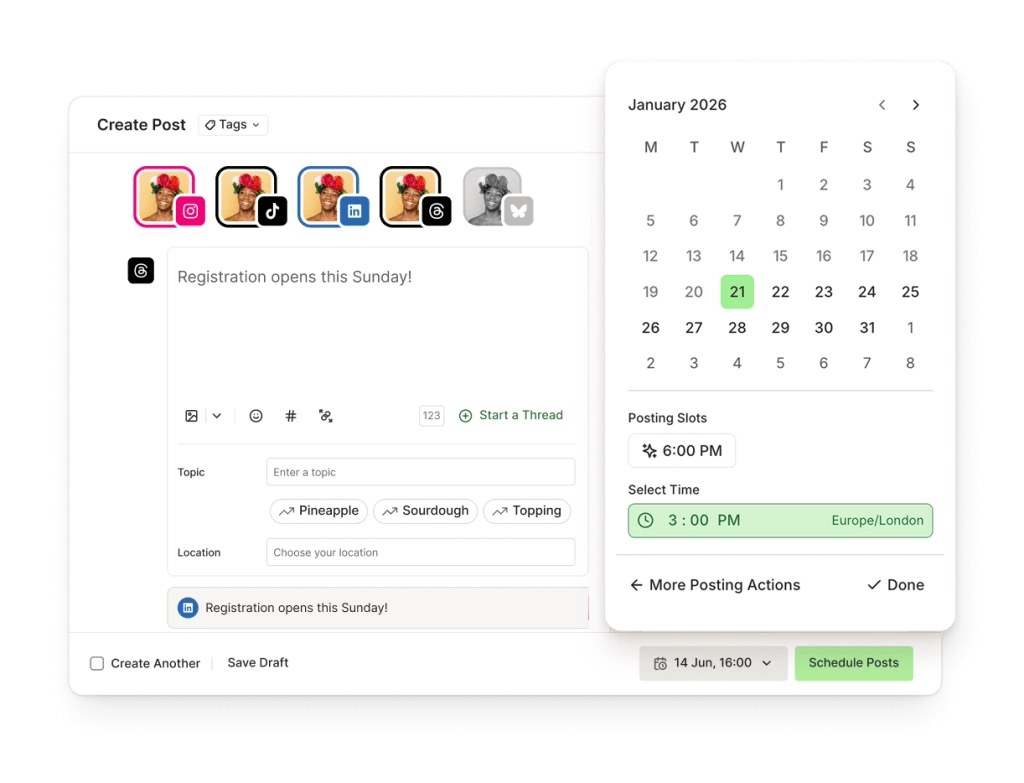
Buffer's Create Post window with a calendar for picking the publishing date, posting slot and time

Scheduling one post to several networks

Schedules, publishes and analyses posts across 12 social networks from one calendar, with a free plan for three channels

from$5a month per channel, billed yearly

Buffer has a free plan and a 14-day free trial with no card needed. Prices in US dollars as Buffer's pricing page showed them on 11 October 2026.

  • Web
  • iPhone and iPad
  • Android
  • Chrome extension
  • API

What Buffer does

Buffer is a social media scheduler for planning, publishing and analysing posts across 12 networks, including Instagram, TikTok, LinkedIn, Threads and Bluesky. It suits solo creators, small businesses and charities that want a simple calendar rather than an enterprise suite. A free plan covers three channels. Paid plans start at $6 a month per channel, or $5 a month billed yearly, which Buffer says saves two months. Charities get 50% off.

  • Publishing and scheduling

    Write a post once, adjust it for each network and schedule it into posting slots or a set time. Buffer publishes to Instagram, Facebook, TikTok, LinkedIn, X, YouTube, Threads, Pinterest, Google Business Profile, Bluesky, Mastodon and Substack.

  • Ideas board and templates

    The Create area stores content ideas on a board with columns and tags, with a template library and feeds to pull ideas from. The AI Assistant can suggest ideas from a short description of your business and audience.

  • Insights

    Analytics show top posts, posting volume and audience growth for every channel together or one at a time. Paid plans add advanced analytics, and Team adds branded reports.

  • Community inbox

    Comments from connected channels arrive in one inbox, sorted by post, with AI reply suggestions and saved replies. The free plan includes five AI reply suggestions a week.

  • Team collaboration

    The Team plan adds unlimited users, access levels and an approval workflow so drafts can be checked before they publish. There is no extra charge per user.

  • Start Page

    A free link-in-bio page builder that sits alongside the scheduler, for linking from Instagram or TikTok profiles.

  • API and MCP server

    Every plan includes API keys with a monthly request allowance, and Buffer offers an MCP server so AI assistants such as Claude can draft and schedule posts in your account.

  • Mobile apps and browser extension

    Apps for iPhone and Android let you schedule and reply on the go, and a browser extension shares pages straight into the queue.

Works with

  • Canva
  • Zapier
  • Make
  • n8n
  • IFTTT
  • Microsoft Power Automate
  • Dropbox
  • Google Drive
  • Google Photos
  • OneDrive
  • Unsplash
  • Bitly
  • Feedly
  • WordPress
  • ChatGPT
  • Claude
  • Cursor
  • Perplexity
  • Raycast
  • Quuu
  • Nelio Content
  • Evergreen Content Poster
  • WriteStack

How much Buffer costs

Billing

Free

Free

Up to 3 channels

  • 10 scheduled posts per channel at a time
  • 100 ideas and 3 tags
  • 1 user
  • AI Assistant
  • Insights with 30 days of history
  • Community inbox
  • 1 API key, 3,000 requests a month

Essentials

$6a month per channel

Lower price per channel above 10 channels

  • Unlimited scheduled posts per channel
  • Unlimited ideas
  • 1 user
  • AI Assistant
  • Advanced analytics
  • Hashtag manager
  • First comment scheduling
  • 3 API keys, 7,500 requests a month

Team

$12a month per channel

Everything in Essentials, for any number of users

  • Unlimited team members
  • Access levels
  • Content approval workflows
  • Branded reports
  • Advanced analytics
  • 5 API keys, 15,000 requests a month

Prices in US dollars. UK consumers pay VAT at the standard rate; businesses can add a VAT number for reverse charge. Yearly billing saves two months. Nonprofits and charities get 50% off paid plans. Prices in US dollars, from Buffer's pricing page on 11 October 2026. Buffer may charge VAT on top, and prices can change.

Buffer pros and cons

Pros

  • Free plan connects three channels and includes Insights and the community inbox
  • Per-channel pricing keeps small setups cheap: two channels on Essentials cost $10 a month billed yearly
  • Team plan includes unlimited users, approvals and access levels with no per-seat fee
  • Covers 12 networks, including Bluesky, Mastodon, Threads and Google Business Profile
  • Mobile app rated 4.7 out of 5 on the UK App Store from over 9,500 ratings
  • 14-day trial without entering card details, then a drop to the free plan

Cons

  • Priced in US dollars only, with VAT added for UK consumers
  • Costs climb with channel count: 10 channels on Team are $120 a month billed monthly
  • Essentials allows only one user, so any second person means paying Team rates
  • Reviewers on Trustpilot describe the analytics as basic
  • Some reviewers report scheduled posts failing to publish and needing manual checks
  • Free plan caps each channel at 10 scheduled posts at a time

Good for

  • Solo creators and small businesses posting to one to five social accounts
  • Small teams that need approvals and access levels without paying per user
  • Charities and nonprofits, which get 50% off paid plans
  • People active on newer networks such as Bluesky, Threads and Mastodon

Look elsewhere if

  • Agencies that need in-depth, client-ready analytics or social listening
  • Businesses managing dozens of accounts, where per-channel pricing adds up
  • Teams who need several people editing the same post at once

What reviewers say about Buffer

“Not only is this a great app to help manage your socials, plan ideas and turn them into posts and increase engagement”

“Thanks to Buffer, I can automate and schedule all my posts on social networks. The interface is intuitive.”

★★★★★ · Freelance marketing, Product Hunt, 2 June 2025

“Buffer does not support real-time collaborative editing. If 2 people are working in the same post there’s no concurrency control”

What reviewers like

  • Quick to learn, with a clear visual calendar
  • Managing several networks from one dashboard
  • A free plan that covers the basics for small accounts
  • Affordable for individuals and small teams
  • Helpful customer support

What reviewers complain about

  • Analytics and reporting are thin next to bigger suites
  • Occasional posts that fail to publish
  • Costs rise quickly as channels are added
  • Features moved from the free plan to paid ones over the years
  • Trouble connecting some accounts

What members think

Rating Buffer

Not enough ratings yet. Shopped here? Yours helps the next person.

Buffer: what to know before you pay

How much does Buffer cost in the UK?

Buffer charges in US dollars per connected channel: Essentials is $6 a month per channel and Team is $12, or $5 and $10 a month when billed yearly. UK consumers pay VAT on top at the standard rate.

A channel is one social account, such as a single Instagram profile or a LinkedIn page. Someone running Instagram, Facebook and LinkedIn for one shop would pay $18 a month on Essentials billed monthly, or $15 a month billed yearly, before VAT. Buffer says the price per channel falls once you connect more than 10 channels, which matters for agencies. Because the price is in dollars, the amount on a UK card statement moves a little with the exchange rate. Businesses can add a VAT number for reverse charge, according to Buffer's pricing FAQ.

Is the free version of Buffer enough?

For one person posting a few times a week to three accounts or fewer, often yes. The free plan connects up to three channels and holds 10 scheduled posts per channel at a time, refilling as each one goes out.

It also includes 100 saved ideas, the AI Assistant, basic Insights with 30 days of history, the community inbox and one API key. What it leaves out is the reason most people upgrade: unlimited scheduled posts, advanced analytics, hashtag manager and first comment scheduling all sit on Essentials. Free accounts have a single user, so a business with a second person posting needs Team.

Buffer vs Postiz: which is better?

Buffer is the easier pick for non-technical users who want a polished hosted app with mobile apps, while Postiz appeals to people who want an open-source tool they can host themselves.

Buffer has been running since 2010 and has large review bases: its mobile app scores 4.7 out of 5 on the UK App Store from over 9,500 ratings and 4.1 on Google Play from more than 57,000. Postiz is newer, can be self-hosted for free, and leans into AI and automation. Zernio is another option, aimed more at developers who want to post through an API. Buffer also offers an API and an MCP server, so it now covers some of that ground, but it remains a product built first for marketers.

Is Buffer worth paying for?

For small accounts, the per-channel pricing usually works out cheaper than tools that charge per seat. Where it gets expensive is at scale: 10 channels on Team cost $120 a month billed monthly.

On Product Hunt, one reviewer praises the intuitive interface and being able to schedule posts across social networks. A common complaint is analytics: reviewers on Trustpilot describe reporting as basic next to more in-depth platforms. A smaller group report scheduled posts that fail to publish and need checking by hand. If detailed reporting matters more than ease of use, it is worth weighing those reviews before paying for a year.

How do you get Buffer cheaper?

The maker states three ways to pay less. None needs a code.

  • Yearly billing, which Buffer prices at two months free, cutting Essentials from $6 to $5 a month per channel.
  • Buffer's nonprofit discount of 50% on paid plans for charities and nonprofit organisations.
  • Connecting only the channels you post to often, since every channel is billed separately.

The 14-day free trial of the paid plans is a sensible way to test advanced analytics and approvals first. Buffer says that if no payment details are added by the end, the account moves to the free plan rather than being charged.

  • Postiz

    Social media scheduler for 30+ networks that AI agents can drive through MCP, a CLI and an API; open source to self-host

    7-day free trial · from $23 a month 3.6 on Trustpilot (11)
  • Free plan

    Zernio

    Social media API for posting, scheduling, analytics, messages and ads across 16 networks, priced per connected account

    Free plan · from $1 a month per account 4.8 on Trustpilot (207)

Guides that cover Buffer

Questions about Buffer

Are there any Buffer discount codes?

We don't currently list a confirmed discount code. That doesn't mean the store has no promotions; check its website for current prices.

Does Buffer have a free trial?

Yes. Buffer offers a 14-day free trial of its paid plans. If you don't add payment details by the end, the account moves to the free plan.

Which social networks does Buffer support?

Buffer lists Instagram, Facebook, TikTok, LinkedIn, X, YouTube, Threads, Pinterest, Google Business Profile, Bluesky, Mastodon and Substack.

Does Buffer charge VAT in the UK?

Buffer applies the UK standard VAT rate for consumers in the United Kingdom. Business customers can enter a VAT number to have VAT excluded through reverse charge.

Does Buffer work on iPhone and Android?

Yes. Buffer has iOS and Android apps alongside the web app and a browser extension. The iPhone app is rated 4.7 out of 5 on the UK App Store.

Is there a limit on posts on Buffer's paid plans?

Paid plans have unlimited scheduled posts, subject to a fair use cap of 5,000 posts per channel. The free plan holds 10 scheduled posts per channel at a time.

Cookie settings

These choices apply to this browser. They do not change your email subscription.

Essential: always on. Used for editor sessions and remembering this choice.