

Free
Free
Personal use only
- Studio Mode with full editor
- 4K 60fps export to any format
- Shareable links up to 5 minutes
- Team workspaces
- Community support
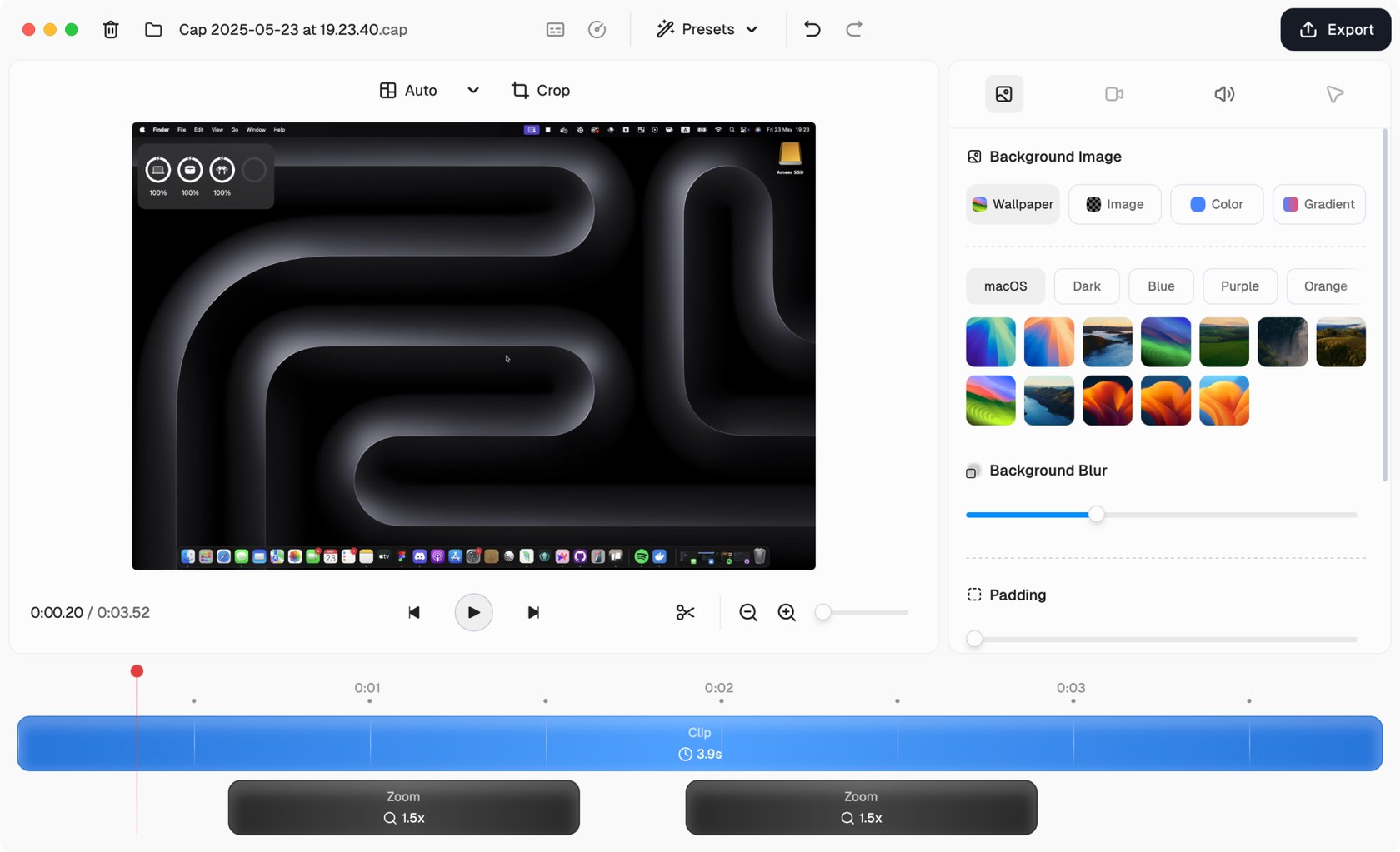
Editing a recording in Studio Mode
Open source screen recorder for Mac, Windows and Linux with instant share links, a built-in editor and self-hosting
Cap has a free plan. Prices in US dollars as Cap's pricing page showed them on 11 October 2026.
Vouchernaut may earn commission when you sign up through links on this page. It never changes what we say about a product or the order we list them in.
This is Cap, an open source screen recorder for Mac, Windows and Linux, started in 2023 as an alternative to Loom. You record, edit with zooms and backgrounds, and share a link.
Cap uploads while you record, so a share link is on your clipboard the moment you stop. Viewers watch in the browser with no account, and get a transcript, summary and chapters.
Records locally in up to 4K at 60fps with screen, camera and microphone on separate tracks, with no compression or upload.
Backgrounds, padding and frames, automatic zoom from your clicks, cursor smoothing, blur or pixelate masks, camera scenes, animated text and colour grades.
Captions are transcribed on your own machine in 19 languages, then can be edited, styled and burned in.
Grab a window or area with a hotkey and add a background, padding and shadow in one click before copying it.
Cap Pro can store recordings in your own S3-compatible bucket in any region or in Google Drive, alongside custom domains and password-protected links.
The code is on GitHub under AGPLv3, and the whole platform can be self-hosted with Docker Compose, with the desktop app pointed at your own server.
Cap Pro imports an existing Loom library, so teams can move their videos across when they switch.
Works with
Free
Personal use only
$2.42a month per user, billed yearly
$29 a year, or $58 once for a licence that never renews
$12a month per user
Save 32% on annual billing
$12a month per user
Cap Pro price plus optional add-ons
Prices in US dollars; VAT not mentioned. Students get 30% off any paid plan with a code on Cap's student discount page. Volume discounts for teams over 10 users. Prices in US dollars, from Cap's pricing page on 11 October 2026. Cap may charge VAT on top, and prices can change.
“Cap kept crashing when I first installed it but hopped onto the Discord and it got fixed within hours.”
“The multi-screen recording is unreliable, and I've lost a fair amount of time to bugs”
“A lot of updates and open source”
Cap records your screen, camera and microphone. Instant Mode uploads as you record so a share link is ready the moment you stop. Studio Mode records locally with separate tracks, then opens an editor with backgrounds, automatic zoom and captions. It runs as a desktop app, with a Chrome extension too, and Windows is labelled beta on its download page.
Cap says it began in 2023 because screen recording had become heavy, closed and tied to someone else's servers. Its answer was to build in public, with the source open to inspect. Most of the code is under the AGPLv3 licence, and some parts are MIT.
Cap says it does not track you or sell your data. You can connect your own S3-compatible storage or Google Drive, or self-host the whole platform, so recordings stay on infrastructure you control. It also states that it holds SOC 2 Type II and ISO 27001 certification and supports HIPAA, with reports available through its trust portal.
Cap is priced in US dollars. Personal use is free, with no time limit on local recordings. Commercial use needs a paid plan: a desktop licence, billed yearly or bought once, covers the desktop app, and Cap Pro adds unlimited cloud sharing, AI features, password-protected links, analytics, custom domains and team features. Pro is billed per user, monthly or annually. Current prices are on its pricing page.
Cap suits people who explain bugs, walk through designs or record demos and want shareable video without the usual lock-in. Teams moving away from Loom can use the built-in importer in Cap Pro. Anyone happy to run their own servers can self-host.
Annual billing costs less per month than paying monthly. Any live code is listed on this page: copy it and enter it at checkout.
Screen recorder and video editor for Mac, Windows and Chrome, with AI editing, video hosting and viewer analytics
 Free plan
Mac screen recorder that turns recordings into product demo videos with auto zoom, 3D mockups, animated text and AI voiceovers
Mac app for screenshots and screen recordings with annotation, scrolling capture, OCR, a video editor and cloud sharing
 Free plan
Free game clipping app that saves your best PC gameplay moments with a hotkey and turns them into shareable links
macOS 27 can record your Mac's sound for free. I'd start there, then pay only if you need scrolling screenshots, a share link or a proper editor.
We don't currently list a confirmed discount code. That doesn't mean the store has no promotions; check its website for current prices.
Yes for personal use, with no time limit on local recordings. Commercial use needs a desktop licence or Cap Pro.
Cap was built as an open source alternative to Loom, with instant share links, studio editing and self-hosting. Cap Pro includes a tool that imports your Loom recordings.
Yes. Cap says you can self-host the whole platform, or connect your own S3-compatible storage or Google Drive.
Yes. It runs on macOS, Windows and Linux, though its download page labels Windows as beta.
Free use is for personal projects. Client or business use needs the desktop licence or Cap Pro.
Got a question about Cap?
