Vouchernaut Weekly

The week, sorted.

One email every Thursday at 7am, free. Here's what's in it:

  • New guides
  • Real price drops
  • Fresh codes
  • Sales ahead
Add stories from the magazineOptional
Stories to add

Pause or stop it from any email. I never sell or share your address. See this week's · Privacy

  1. Software
  2. Meeting notes & calls
  3. Circleback
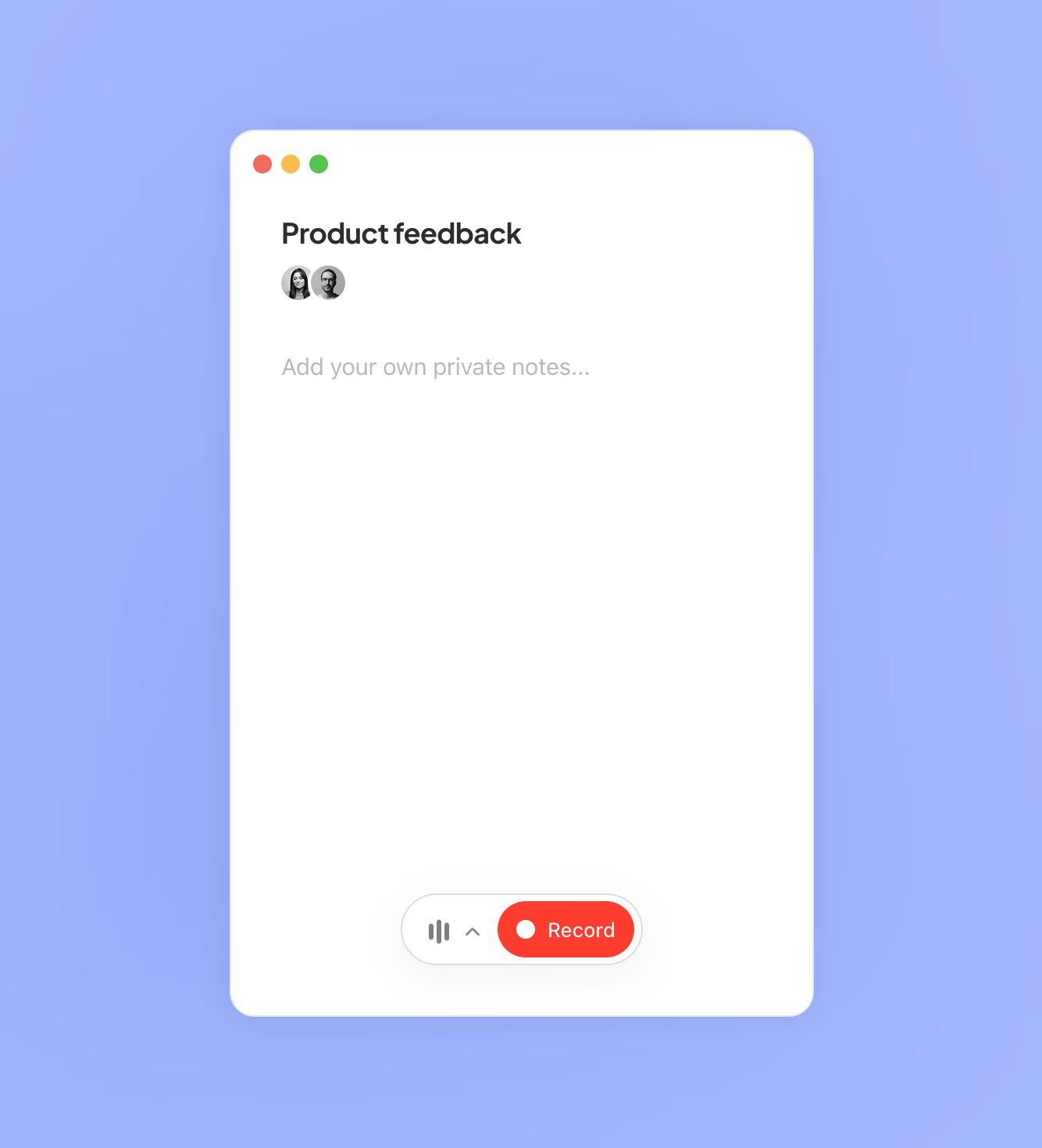
Circleback desktop note window titled Product feedback with space for private notes and a red Record button

The desktop app ready to record a meeting

AI meeting notes, action items and automations for online and in-person meetings, with or without a bot

from$15a month per user, billed yearly

Circleback has a free plan. Prices in US dollars as AdCircleback's pricing page showed them on 11 October 2026.

  • Web
  • Mac
  • Windows
  • iPhone and iPad
  • Android
  • API

What Circleback does

Circleback is an AI meeting note taker that writes notes, action items and searchable transcripts for online and in-person meetings, with a bot or a bot-free desktop app. It suits founders, sales and product teams who want notes pushed into Notion, HubSpot or Slack. A free plan keeps 30 days of history; Pro costs $18 a month per user, or $15 billed annually. Students get 50% off and non-profits 30%.

  • AI meeting notes

    Writes organised notes after each meeting, built around decisions and next steps rather than a raw transcript. You can add your own private notes during the call.

  • Action items

    Captures, assigns and organises action items from every meeting into one filterable list.

  • Bot or bot-free recording

    A bot can join Zoom, Google Meet, Microsoft Teams, Webex, Slack huddles and GoTo calls, or the Mac and Windows desktop app records without one.

  • In-person meetings

    The iPhone, Android and Apple Watch apps record conversations in a room and turn them into the same notes and action items.

  • Automations

    Workflows run after matching meetings, for example generating customer details and sending them to a Slack channel or a CRM such as HubSpot, Salesforce or Attio.

  • Search across meetings

    Ask Circleback answers questions from your whole meeting history and lists the people and companies you have met.

  • Transcripts in 100+ languages

    Speaker-labelled transcripts identify people by name, with support for over 100 languages.

Works with

  • Zoom
  • Google Meet
  • Microsoft Teams
  • Webex
  • Slack
  • GoTo
  • Google Calendar
  • Outlook
  • Gmail
  • Notion
  • Linear
  • HubSpot
  • Salesforce
  • Attio
  • Asana
  • PostHog
  • Ashby
  • Intercom
  • Zoho
  • Monday
  • Zapier
  • Make
  • Webhooks
  • MCP

How much Circleback costs

Billing

Free

Free

30-day meeting and recording history

  • AI meeting notes and action items
  • Ask Circleback across meetings, and view and draft emails
  • Online and in-person meetings, with a bot or the bot-free desktop app
  • Mobile and Apple Watch apps
  • Speaker-labelled transcripts with automatic tagging and sharing
  • Limited automations
  • API, MCP and CLI access
  • 2 teams

Pro

$18a month per user

  • Everything in Free
  • Unlimited meeting history
  • 1 year of recording storage
  • Automations with all integrations, including Notion, HubSpot, Salesforce, Attio and webhooks
  • Custom AI insights
  • Personalised notetaker participant
  • 5 teams

Business

$29a month per user

  • Everything in Pro
  • Admin and member roles
  • Unlimited free viewers
  • Custom data retention
  • Default and enforceable settings
  • 2 years of recording storage
  • Usage dashboard and unlimited teams

Enterprise

$35a month per user, billed yearly

Annual billing only; volume discounts apply automatically

  • Everything in Business
  • Single sign-on (SAML or OIDC) and SCIM provisioning
  • Invoice and PO billing
  • Unlimited recording storage
  • Priority support
  • HIPAA compliance

Prices in US dollars. 50% education discount for students and 30% non-profit discount. Enterprise volume pricing falls to $15 per user a month at 5,000 seats. Prices in US dollars, from AdCircleback's pricing page on 11 October 2026. Circleback may charge VAT on top, and prices can change.

Circleback pros and cons

Pros

  • Free plan includes unlimited meetings, transcripts, AI search and API access
  • Choice of a meeting bot or a bot-free desktop app, plus phone and Apple Watch recording
  • Automations with every integration on Pro, including HubSpot, Salesforce, Attio and webhooks
  • Listed discounts: 50% for students and 30% for non-profits
  • Readers can be added as free viewers rather than paid seats
  • States it does not train AI models on customer data

Cons

  • Free plan keeps only 30 days of meeting and recording history
  • Priced in US dollars and data hosted in the US
  • Enterprise is annual billing only
  • Trustpilot reviewers report missed recordings and canned support replies
  • Few reviews on G2, Capterra or Trustpilot compared with older rivals

Good for

  • Founders, sales and product teams who want notes pushed into a CRM, Notion or Slack automatically
  • People who record a mix of online and in-person meetings
  • Students and non-profits, who get 50% and 30% off
  • Teams where many people read notes but only some hold meetings

Look elsewhere if

  • Anyone who needs noise cancellation on their own microphone
  • UK organisations that need meeting data hosted in the UK or EU
  • Buyers who want a large body of independent reviews before choosing

What reviewers say about Circleback

“Circleback has been an invaluable tool.”

“It'd be useful if it could detect different speakers in the same room by their voices.”

“More and more often, circle back fails to take notes, which you only learn after the meeting.”

What reviewers like

  • Notes that pull out decisions and next steps rather than a wall of transcript
  • Search that answers questions across past meetings
  • CRM and Slack automations that save copying notes by hand
  • Generous free plan for trying it out

What reviewers complain about

  • Occasional missed recordings that only show up after the meeting
  • Support that relies on automated replies
  • Speaker separation in in-person meetings still needs work
  • Some find the interface confusing

What members think

Rating Circleback

Not enough ratings yet. Shopped here? Yours helps the next person.

Circleback: what to know before you pay

Is Circleback worth paying for?

Circleback is worth paying for if you want meeting notes to go somewhere automatically, because the paid plans unlock automations with every integration. If you only need readable notes from a handful of meetings, the free plan already covers notes, action items and transcripts.

The free plan is unusually complete: unlimited meetings, online and in-person recording, speaker-labelled transcripts, AI search across meetings and API, MCP and CLI access. The limits are a 30-day history, limited automations and two teams. Pro removes the history limit, keeps recordings for a year and adds automations with Notion, HubSpot, Salesforce, Attio and webhooks. The few reviews on Product Hunt and Trustpilot praise the notes and search, while critics mention missed recordings and support that relies on canned replies.

How much does Circleback cost in the UK?

Circleback prices in US dollars per user: Pro is $18 a month or $15 a month billed annually, Business is $29 a month or $25 a month billed annually, and Enterprise is $35 a month on annual billing only. Your bank converts the charge to pounds at the day's rate.

  • Free: unlimited meetings with 30 days of history and limited automations
  • Pro: unlimited history, a year of recording storage, all integrations and custom AI insights
  • Business: admin roles, unlimited free viewers, custom data retention and two years of recording storage
  • Enterprise: SSO, SCIM, invoice billing, unlimited storage and HIPAA compliance, with automatic volume discounts that fall to $15 per user at 5,000 seats

Paid plans start with a free trial. Team members who only read shared notes can be added as free viewers.

Circleback vs Granola vs Krisp: which is better?

Circleback is the stronger choice for automations and in-person recording; Granola suits people who like to type their own notes during a call; Krisp suits people whose main problem is noisy audio. All three can record without a bot joining the call.

Circleback lets you choose between a bot and its desktop app, and adds iPhone, Android and Apple Watch apps for meetings in a room. Granola has a free plan with 30 days of history too, and builds its AI notes on top of what you type. Krisp has no free plan, costs $16 a month or $8 billed annually for Core, and pairs its note taker with noise cancellation that Circleback does not offer.

Is Circleback safe for client and company meetings?

Circleback states that it does not train AI models on customer data, and its site lists SOC 2, GDPR, HIPAA and the EU-US Data Privacy Framework. Data is hosted in the United States, so UK organisations rely on the UK Extension to the Data Privacy Framework for the transfer.

The privacy policy says recordings and transcripts are passed to AI model and transcription providers only to provide the service, and that data is kept while your account is open. Deletion is by request to support. Business adds custom data retention and enforceable default settings, and Enterprise adds single sign-on, which matters for firms that need to control who records what.

How do you get Circleback cheaper?

Annual billing is the simplest saving, taking Pro from $18 to $15 a month and Business from $29 to $25. Students and non-profits can pay much less through discounts the maker lists on its pricing page.

  • Students get 50% off by signing up with a school email or sending proof of study to support
  • Non-profits get 30% off by signing up with a non-profit email and contacting support
  • Colleagues who only read notes can join as free viewers rather than paid seats
  • Enterprise discounts apply automatically as seats are added, with no sales call

Alternatives to Circleback

Every meeting notes & calls tool →
  • Free plan

    Granola

    AI notepad that transcribes meetings from your device's audio, with no bot, and turns your rough notes into a full write-up

    Free plan · from $14 a month per user 4.9 on Google Play (3,050)
  • Krisp

    Noise cancellation and bot-free AI meeting notes for Zoom, Teams, Google Meet and other call apps

    7-day free trial · from $8 a month per user 3.0 on Trustpilot (412)

Guides that cover Circleback

Questions about Circleback

Are there any Circleback discount codes?

We don't currently list a confirmed discount code. That doesn't mean the store has no promotions; check its website for current prices.

Is Circleback free?

Yes. The free plan covers unlimited meetings, notes, action items and transcripts, but only keeps 30 days of meeting and recording history and limits automations.

Can I use Circleback without a bot joining my calls?

Yes. Circleback's desktop app for Mac and Windows records meetings without a bot, and it also offers a bot if you prefer one.

Does Circleback work for in-person meetings?

Yes. The iPhone, Android and Apple Watch apps record conversations in a room, and the notes appear alongside your online meetings.

How do I cancel Circleback?

Circleback says you can cancel at any time with a single click from your billing settings. Plan changes are prorated, with any remaining balance credited to future invoices.

Which languages does Circleback support?

Circleback says it supports over 100 languages, including English, Spanish, French, German, Italian, Portuguese, Dutch and Japanese.

Cookie settings

These choices apply to this browser. They do not change your email subscription.

Essential: always on. Used for editor sessions and remembering this choice.