
CleanShot Basic
$35 one-off payment; optional update renewal $19 a year
- Full Mac app, pay once and use forever
- Screenshots and screen recording
- Video editor with smart zooms
- Annotation tools
- One year of updates
- CleanShot Cloud with 1 GB storage
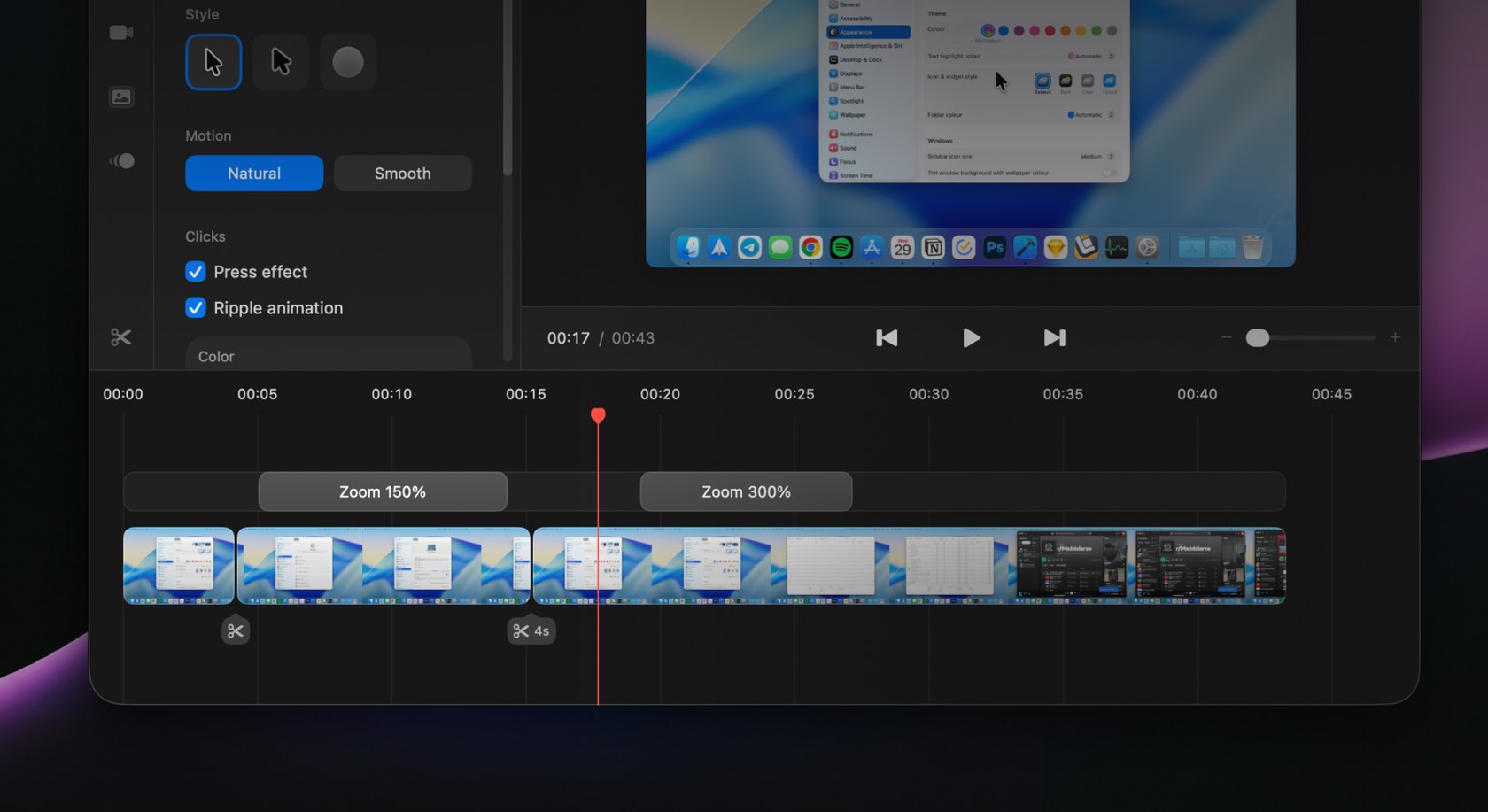
Adding zooms in Studio Mode
Mac app for screenshots and screen recordings with annotation, scrolling capture, OCR, a video editor and cloud sharing
Prices in US dollars as CleanShot X's pricing page showed them on 11 October 2026.
Vouchernaut may earn commission when you sign up through links on this page. It never changes what we say about a product or the order we list them in.
This is CleanShot X, a Mac-only screenshot and screen recording app from a team in Poland. It captures, annotates and shares screenshots and videos, with a built-in editor and optional cloud sharing.
Capture an area, window, full screen or a scrolling window in any app, with a self-timer, crosshair, magnifier and a freeze-screen mode for moving objects.
Arrows, blur and pixelate, spotlight, numbered counters, a smart highlighter, shapes and seven text styles, with editable CleanShot project files and the option to combine several screenshots.
Adds backgrounds, padding, shadows and aspect ratios to screenshots for social posts and docs, with 20 backgrounds included and reusable presets.
Records MP4 or GIF with webcam, microphone and system audio, click highlights and keystrokes, and can switch on Do Not Disturb and hide desktop clutter while recording.
Added in CleanShot 5.0: smart zooms that follow the cursor, cursor smoothing and sizing, backgrounds, motion blur, trimming, and landscape, square or vertical exports.
Copies text from screenshots and images on your Mac and reads QR codes. Capture History restores and reuses earlier screenshots, videos and GIFs.
Uploads a capture in one click and copies a link, with comments, searchable transcripts and captions on videos. Pro adds a custom domain, branding, password protection and link expiry.
Pro includes team management, SSO and SCIM, and the cloud service is certified to ISO 27001 with encryption at rest and in transit.
Works with
$35 one-off payment; optional update renewal $19 a year
$12a month per user
Save 17% on annual billing
Prices in US dollars; taxes may apply at checkout. No trial, but a 30-day money-back guarantee. Students get 30% off, PixelSnap 2 users 20% off. Also available through Setapp. Prices in US dollars, from CleanShot X's pricing page on 11 October 2026. CleanShot X may charge VAT on top, and prices can change.
“This app is worth every penny just for how much time it saves on styling.”
“Only thing that I would like to see is easier access to images I have already used once.”
“Something I would love for CleanShot to add are simple "highlight" tools, especially when editing video.”
CleanShot X replaces the screenshot tools built into macOS. It takes screenshots and screen recordings, with a marked-up result ready to save, copy or drop into any app. CleanShot says it is trusted by hundreds of thousands of users, and it is built natively for the Mac.
Annotation tools let you mark up an image, hide sensitive details, crop and resize, and add backgrounds with padding and shadows. Scrolling capture grabs a full web page, a long chat or a document that runs beyond the screen in one image.
Recordings can include a webcam bubble, highlighted clicks, on-screen keystrokes, and voice and system audio. Studio Mode adds smooth automatic zooms and trimming in a built-in editor, and you can export a video or a GIF.
CleanShot Cloud uploads a capture and gives you a link to share, with comments left on the capture itself. A free Cloud account comes with every licence, though you don't need it to use the app. Paid Cloud plans add custom domains, branding and team controls such as SSO, and CleanShot lists ISO 27001 certification for its Cloud security.
There are two routes. A one-off licence covers the Mac app and a period of updates, with paid renewals if you want more. A Pro subscription is billed per user and adds unlimited Cloud storage and team features. CleanShot also offers student and existing PixelSnap customer discounts, and the app is available through Setapp. Any live code is listed on this page.
It suits anyone who captures their screen often: support teams, product and design people, developers writing bug reports, and remote teams who explain things with annotated images and clips. There is no trial, but CleanShot offers a money-back guarantee. It doesn't run on Windows.
 Free plan
Open source screen recorder for Mac, Windows and Linux with instant share links, a built-in editor and self-hosting

Screen recorder and video editor for Mac, Windows and Chrome, with AI editing, video hosting and viewer analytics
 Free plan
Mac screen recorder that turns recordings into product demo videos with auto zoom, 3D mockups, animated text and AI voiceovers
 Discount
Screen recorder for team video messages on Mac and Windows, with AI auto-editing, chapters, summaries and an MCP server
macOS 27 can record your Mac's sound for free. I'd start there, then pay only if you need scrolling screenshots, a share link or a proper editor.
We don't currently list a confirmed discount code. That doesn't mean the store has no promotions; check its website for current prices.
No. CleanShot doesn't offer a trial, but it has a money-back guarantee if the app isn't right for you. The Setapp version comes with Setapp's own free trial.
No. It is Mac-only and CleanShot says there are no plans for a Windows version. It needs a recent version of macOS.
No. A free Cloud account comes with every licence, but Cloud is only used for uploading and sharing captures. Every other feature works without it.
Yes. Activate the app on the new Mac with your licence key and the old one is deactivated. Extra devices and seats are managed in the License Manager.
Yes. CleanShot offers an educational discount to students who verify with a university-issued email address.
Got a question about CleanShot X?
