Vouchernaut Weekly

The week, sorted.

One email every Thursday at 7am, free. Here's what's in it:

  • New guides
  • Real price drops
  • Fresh codes
  • Sales ahead
Add stories from the magazineOptional
Stories to add

Pause or stop it from any email. I never sell or share your address. See this week's · Privacy

  1. Software
  2. Developer tools
  3. CodeRabbit
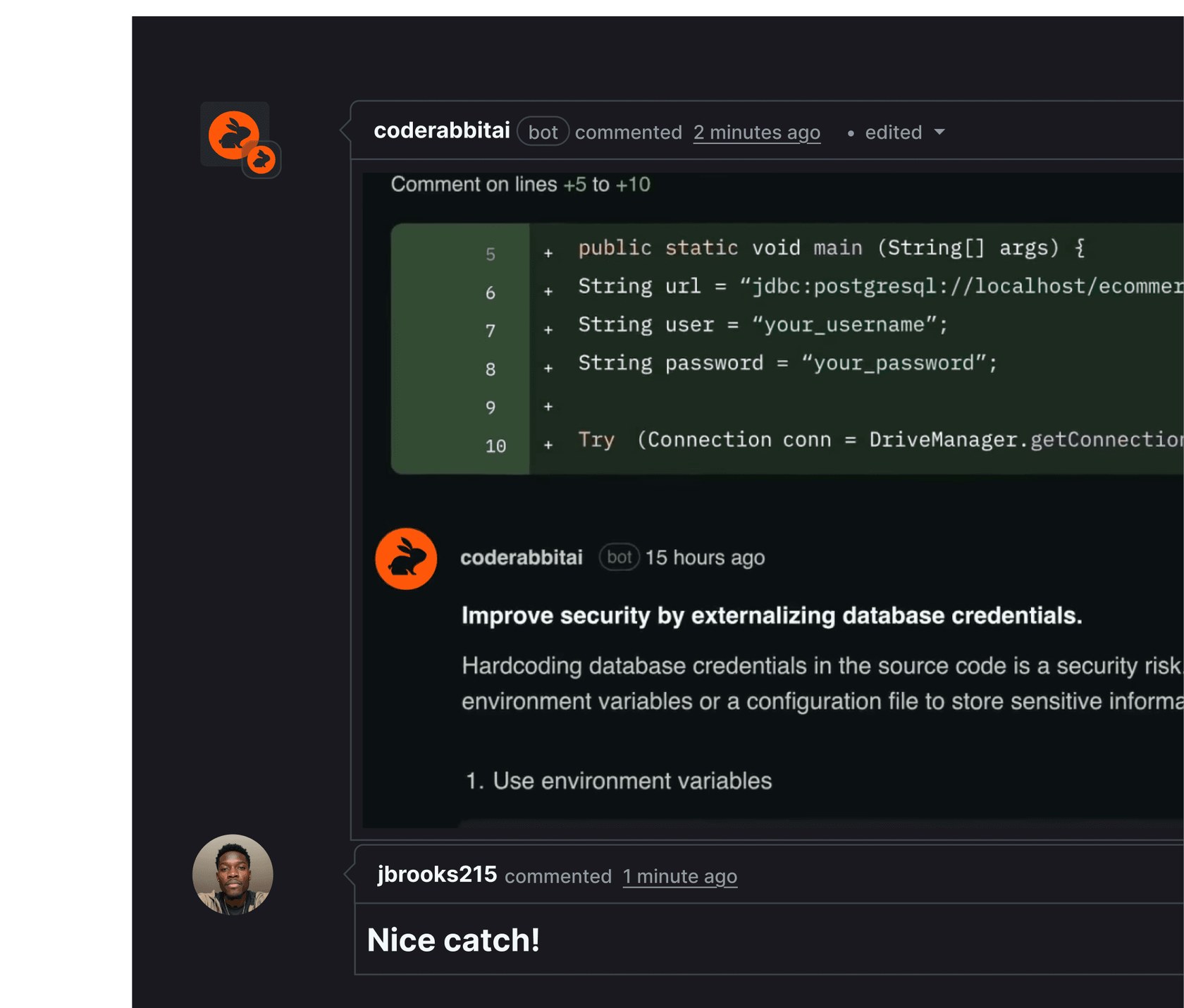
CodeRabbit bot comment on a GitHub pull request flagging hard-coded database credentials and suggesting environment variables

Line-by-line review comments on a pull request

Developer tools

CodeRabbit

AI code reviews on pull requests, in the editor and in the terminal, for GitHub, GitLab, Bitbucket and Azure DevOps

from$24a month per developer, billed yearly

CodeRabbit has a free plan and a 14-day free trial. Prices in US dollars as CodeRabbit's pricing page showed them on 11 October 2026.

  • Web
  • Slack
  • API

What CodeRabbit does

CodeRabbit is an AI code reviewer that comments on pull requests in GitHub, GitLab, Bitbucket and Azure DevOps, and also reviews code in VS Code and the terminal. It suits development teams that want a fast first pass before a human review. A free plan covers PR summaries, public open-source repositories get full reviews free, and paid plans start at $24 per developer a month billed annually, or $30 monthly.

  • Pull request reviews

    Every pull request gets a plain-language summary, a walkthrough of the changes with diagrams and linked issues, and line-by-line comments. Suggested fixes can be applied with one click.

  • Learnings from your team

    Replies and feedback on reviews are saved as learnings, along with context from past PRs and guidelines. The team can view and edit them, and CodeRabbit applies them in later reviews.

  • Reviews before the PR

    An extension for VS Code, Cursor and Windsurf and a command-line tool review uncommitted changes before a pull request exists, including inside coding-agent loops.

  • Pre-merge checks and slop detection

    Quality gates and custom requirements can block a merge until they pass. Slop detection flags low-quality pull requests generated by AI tools.

  • Change Stack

    A review workspace that breaks a large pull request into ordered layers with explanations and dependencies, so reviewers can read a big change in stages. It is marked as a preview.

  • Triage

    On the Team plan and above, open pull requests across repositories are ranked by value, urgency and risk, with suggested next actions and a scheduled digest in Slack.

  • Security monitoring

    The Advanced plan adds continuous security monitoring of every repository and PR, rating findings by severity, exploitability and reachability. Deep Scan, an on-demand scan of a whole codebase, is billed separately.

  • Slack agent

    The CodeRabbit agent can answer questions about a codebase, diagnose incidents and open fixes from Slack. It is billed at $0.40 per agent minute after free minutes.

Works with

  • GitHub
  • GitLab
  • Bitbucket
  • Azure DevOps
  • Jira
  • Linear
  • Slack
  • Discord
  • VS Code
  • Cursor
  • Windsurf

How much CodeRabbit costs

Billing

Free

Free

PR summaries on unlimited public and private repositories

  • Pull request summaries (1 per developer an hour)
  • 3 IDE reviews per developer an hour
  • 3 CLI reviews per developer an hour
  • No credit card required
  • No chat

Essentials

$30a month per developer

5 reviews per developer an hour

  • AI review on pull requests, in the IDE, CLI and coding-agent loops
  • PR summaries and walkthroughs with diagrams
  • Chat with the CodeRabbit agent
  • Learnings from team feedback
  • One-click fixes and slop detection
  • Pre-merge checks
  • Jira and Linear integration
  • 1 linked repository

Team

$60a month per developer

8 reviews per developer an hour

  • Everything in Essentials
  • Unit test generation
  • Finishing touches: resolve conflicts, simplify code, write docstrings
  • Post-merge actions such as changelogs and tickets
  • Prioritised PR queue and review guidance
  • Triage in Slack
  • 10 custom pre-merge checks
  • 5 linked repositories

Advanced

$90a month per developer

10 reviews per developer an hour

  • Everything in Team
  • Continuous security monitoring of every repository and PR
  • Security review on pull requests
  • Blast Radius audit of affected components
  • Architecture impact review
  • Security-informed PR prioritisation
  • 20 custom pre-merge checks
  • 10 linked repositories

Enterprise

Contact sales

Contact sales; 12 reviews per developer an hour

  • Everything in Advanced
  • Multi-organisation admin and enforced policies
  • Custom roles, SSO and audit logs
  • API access and usage metrics
  • Support SLA and dedicated customer success
  • Self-hosting or chosen SaaS regions
  • Purchase through marketplaces
  • 20 linked repositories

Prices in US dollars; the pricing page doesn't mention VAT. Annual billing saves 20%. Public open-source repositories get reviews free. Only developers who open pull requests are charged. Reviews past the hourly allowance cost $0.25 per file if usage billing is on. Prices in US dollars, from CodeRabbit's pricing page on 11 October 2026. CodeRabbit may charge VAT on top, and prices can change.

CodeRabbit pros and cons

Pros

  • Public open-source repositories get reviews free, with Team-level features and no card
  • Only developers who open pull requests are charged, so reviewers and managers don't need seats
  • IDE and CLI reviews catch problems before a pull request is opened, in VS Code, Cursor and Windsurf
  • Works with GitHub, GitLab, Bitbucket and Azure DevOps rather than a single Git host
  • Docs state customer code is never used to train models

Cons

  • Hourly review caps (5 per developer an hour on Essentials), and Trustpilot reviewers complain of being rate limited
  • Reviews past the allowance cost $0.25 per file when usage billing is switched on
  • Security monitoring, Blast Radius and architecture review need the $72 Advanced plan
  • Prices are in US dollars only and the pricing page doesn't mention VAT
  • Trustpilot score is 2.4 from 7 reviews, with complaints about support and cancellations

Good for

  • Small and mid-sized development teams on GitHub or GitLab that want an automatic first review on every pull request
  • Open-source maintainers, who get reviews free on public repositories
  • Teams merging a lot of AI-generated code that need pre-merge checks and slop detection
  • Engineering leads with long PR queues who would use Triage on the Team plan

Look elsewhere if

  • Developers who want full line-by-line reviews on private repositories without paying: the free plan gives summaries only
  • Organisations that need self-hosting or a chosen hosting region but don't want an Enterprise contract
  • Teams that only want security scanning: it sits on the $72 Advanced plan

What reviewers say about CodeRabbit

“It's free for open source, and honestly, the best reviewer I've ever worked with.”

“Surprisingly insightful PR reviews, but the pricing modal is not optimal.”

“Sold as unlimited, rate limited within days to 1/hour (if I am lucky).”

★ · Trustpilot reviewer, United States, Trustpilot, 6 July 2026

What reviewers like

  • Summaries and diagrams double as running documentation of changes
  • Frees senior reviewers to focus on complex changes
  • Free for open-source projects

What reviewers complain about

  • Hourly review limits feel tight for busy developers
  • Support response, cancellations and refunds draw complaints on Trustpilot
  • Auto-reviews occasionally pause and need triggering by hand

What members think

Rating CodeRabbit

Not enough ratings yet. Shopped here? Yours helps the next person.

CodeRabbit: what to know before you pay

Is CodeRabbit worth paying for?

For a team that opens several pull requests a day, the Essentials plan is usually worth it: it gives every change a line-by-line review within minutes, so human reviewers can spend their time on design and logic. For a solo developer on private repositories, the free plan and the IDE extension may be enough.

CodeRabbit reads each pull request, writes a plain-language summary and walkthrough (with diagrams for larger changes), then leaves comments on specific lines with suggested fixes that can be applied in one click. It learns from replies, so a team can tell it to stop flagging a pattern and it remembers. Product Hunt reviewers praise the quality of its reviews.

How much does CodeRabbit cost in the UK?

CodeRabbit prices in US dollars only: Essentials is $24 per developer a month billed annually or $30 monthly, Team is $48 or $60, and Advanced is $72 or $90. Enterprise is priced on request.

The pricing page doesn't mention VAT or pound prices, so a UK card will be charged in dollars and the final sterling amount depends on the exchange rate and any card fees. Seats are counted only for developers who open pull requests, and seats can be moved between people at any time. Each plan includes a set number of reviews per developer per hour (5 on Essentials, 8 on Team, 10 on Advanced); past that, admins can switch on usage billing at $0.25 per reviewed file, with a monthly cap. The cloud coding agent is billed separately at $0.40 per agent minute.

CodeRabbit vs GitHub Copilot code review: which is better?

CodeRabbit is the more specialised choice: it works across GitHub, GitLab, Bitbucket and Azure DevOps, keeps team-specific learnings, and adds pre-merge checks, PR triage and security scanning on higher plans. GitHub's own Copilot code review suits teams that already pay for Copilot and only use GitHub.

Other dedicated reviewers include Greptile and Qodo. TesterArmy tackles a different stage: it tests the running app rather than reading the code, so some teams use both.

Is CodeRabbit safe to use with private code?

CodeRabbit's documentation states that it never uses customer code to train models, and that the model providers it sends code to for reviews (OpenAI and Anthropic) don't train on it either.

It does cache encrypted code and keeps vector representations and team learnings to give reviews context; learnings can be switched off. Teams that need self-hosting, a chosen hosting region, SSO or audit logs need the Enterprise plan. The site links a Trust Center and a data processing agreement for procurement checks.

How do you get CodeRabbit cheaper?

Annual billing takes 20% off every paid plan, which brings Essentials from $30 to $24 per developer a month.

  • Public open-source repositories get reviews free, with Team-level features and no card needed.
  • The free plan gives PR summaries on any repository plus a few IDE and CLI reviews an hour.
  • The 14-day trial runs on the Advanced plan, which helps decide whether the higher tiers earn their price.
  • CodeRabbit runs a startup programme; its terms aren't shown on the pricing page.

No student or non-profit discount is listed.

Alternatives to CodeRabbit

Every developer tools tool →
  • TesterArmy

    AI agents that test web, iOS and Android apps from plain-English steps and report pass or fail with video and screenshots

    from $83 a month

Questions about CodeRabbit

Are there any CodeRabbit discount codes?

We don't currently list a confirmed discount code. That doesn't mean the store has no promotions; check its website for current prices.

What does the CodeRabbit free plan include?

The free plan covers unlimited public and private repositories with pull request summaries only, plus three IDE reviews and three CLI reviews per developer an hour. Chat and full line-by-line PR reviews need a paid plan, unless the repository is public and open source.

Does CodeRabbit charge for every person in the organisation?

No. CodeRabbit only charges for developers who create pull requests, and seats can be reassigned at any time. People who only read or approve code don't need a seat.

How do you cancel a CodeRabbit subscription?

An admin or billing admin opens Subscription and Billing, selects the current plan and chooses to cancel the paid plan. Downgrades take effect at the end of the billing cycle, while deleting the organisation cancels the subscription straight away. The docs don't mention refunds.

Which languages and editors does CodeRabbit support?

CodeRabbit says it works with all programming languages, though results are better for popular ones. Its extension runs in VS Code, Cursor and Windsurf, and there is a command-line tool for reviews in the terminal.

What happens when you hit the CodeRabbit review limit?

Each plan allows a rolling number of reviews per developer per hour. Once that is used, reviews wait for the allowance to refill unless an admin has switched on usage billing, which charges $0.25 per reviewed file up to a monthly cap.

Cookie settings

These choices apply to this browser. They do not change your email subscription.

Essential: always on. Used for editor sessions and remembering this choice.