
Basic
$29a month per seat
Up to 2,500 contacts
- Up to 2,500 contacts
- Pipelines
- Task automation
- Project management
- Contact enrichment
- Gmail and Google Calendar integration
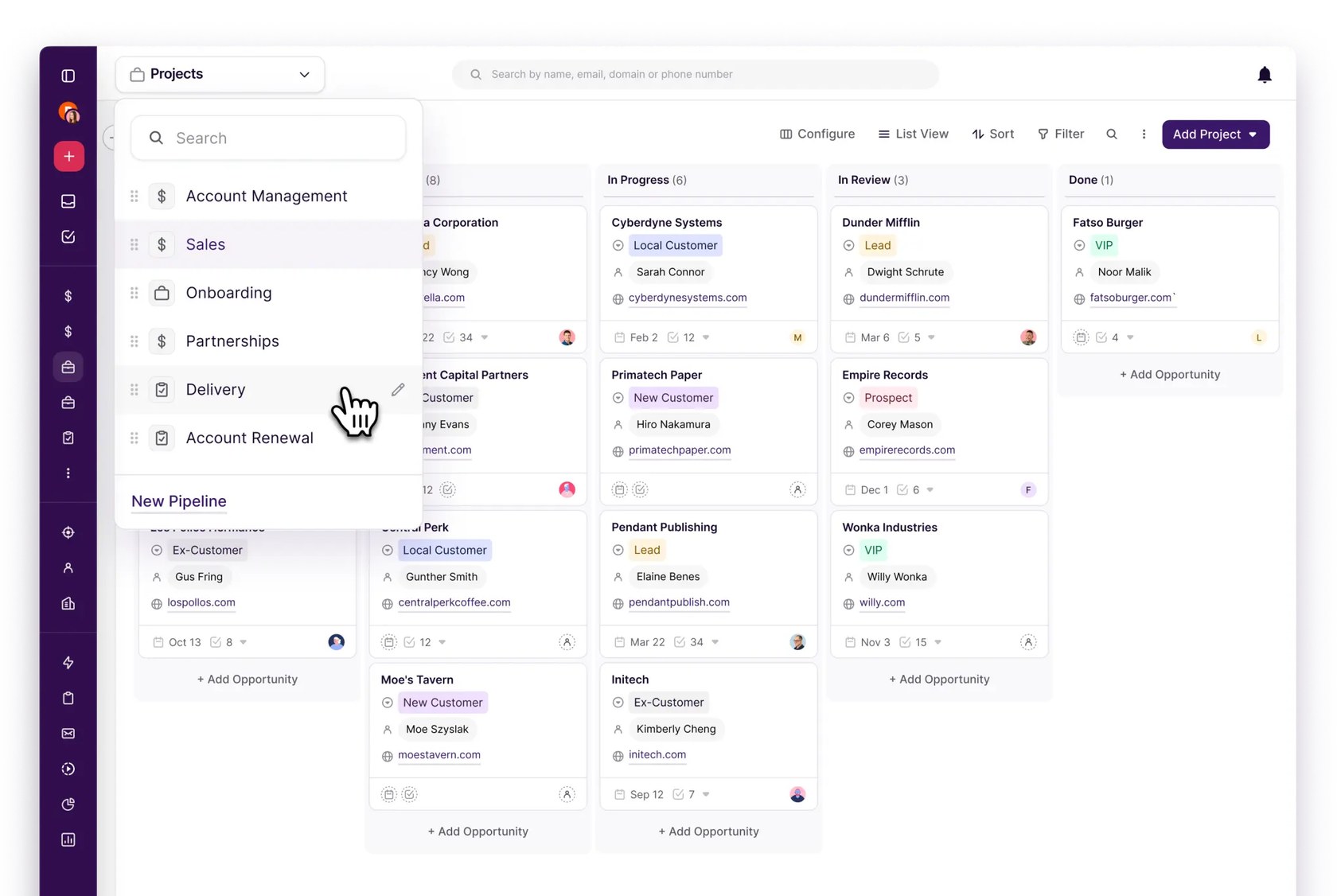
Pipelines for sales, onboarding and delivery

CRM for Google Workspace teams that tracks contacts, deals and projects inside Gmail and Google Calendar
Copper has a 14-day free trial with no card needed. Prices in US dollars as Copper's pricing page showed them on 11 October 2026.
Vouchernaut may earn commission when you sign up through links on this page. It never changes what we say about a product or the order we list them in.
This is Copper, a CRM for agencies, consultants and other relationship-led businesses, built to work inside Gmail, Calendar and Drive. It tracks contacts, deals and projects without leaving your Google tools.
A Chrome extension brings Copper into Gmail and Google Calendar on desktop, so you can add leads, see a contact's history and manage tasks without leaving your inbox. Gmail, Calendar, Contacts and Drive sync automatically.
Drag-and-drop pipelines track deals by stage, with AI flags and alerts on deals that need attention. Moving a deal can trigger emails or reminders.
A won deal can become a project for onboarding or service delivery, with its own pipeline and templates. This suits agencies and consultancies that deliver work after closing.
Templates with merge fields, bulk email, open and click tracking, and on the Business plan automated email series. An AI tool drafts templates and rewrites emails.
Activity and pipeline reports on every plan with reporting, custom reports on Business, and a sync to Google Sheets and Looker Studio for deeper analysis.
iOS and Android apps log calls and texts automatically and include a business card scanner for adding contacts on the go.
Works with
$29a month per seat
Up to 2,500 contacts
$69a month per seat
Up to 15,000 contacts
$134a month per seat
Unlimited contacts
Prices in US dollars and exclude taxes and fees where applicable. Annual billing saves up to 26%. No student or non-profit discount listed. Prices in US dollars, from Copper's pricing page on 11 October 2026. Copper may charge VAT on top, and prices can change.
“Copper just works. Great knowledge base as a resource.”
“Almost everything is default-driven with little to no flexibility.”
“All the PC based stuff is really good but they advertise it as really useful to use on the Android app which I actually find too slow and clunky”
Copper is customer relationship software that lives inside Google Workspace. Contacts, conversations, pipelines and tasks sit alongside your email and calendar, so there is less switching between tabs. It can also turn a closed deal into a project, to carry on with onboarding or delivery.
The company built it for agencies, consultants, account managers and other small teams, rather than large sales organisations with a dedicated admin. Industry pages cover agencies, consulting, media, finance and construction. If your team lives in Gmail, it is designed for you. Copper describes the aim as a CRM your team will actually open, and it describes setup as quick because the tool already sits where your work happens. There is also a demo option if you want a walkthrough first, plus a help centre, webinars and guides for getting started and a developer API for custom connections.
Features include drag-and-drop pipelines, task and workflow automation, email sequences, reporting and a Chrome extension. Mobile apps for iOS and Android log calls and texts and scan business cards, and integrations connect tools such as Slack, QuickBooks and DocuSign.
Copper charges per seat, with plans that step up by contact limits and features. Paying annually costs less per seat than paying monthly. There is a free trial that doesn’t ask for a card, but no permanent free plan.
Start with the trial to check it fits how you work. Any live code is listed on this page: copy it and enter it when you sign up.
Check the renewal date and the refund terms in Copper’s terms of service before committing to an annual plan, so a renewal doesn’t catch you out. If you outgrow a plan, you can move up between tiers as your contact numbers and needs grow.
 Discount
Personal CRM that syncs contacts from LinkedIn, email and messages and reminds you to keep in touch
A CRM keeps every customer, email and deal where the whole team can see them. Pipedrive suits small sales teams, Zoho CRM gives the most for the least, Copper suits Gmail businesses and Capsule is the simple British option. HubSpot's free plan is fine for two, then the price climbs.
We don't currently list a confirmed discount code. That doesn't mean the store has no promotions; check its website for current prices.
No. It offers a free trial that doesn’t need a card, then paid plans per seat on monthly or annual billing.
Copper is built around Google Workspace, so it is designed for Gmail and Google Calendar rather than Outlook.
Yes. There are iOS and Android apps that log calls and texts and scan business cards, plus a Chrome extension for Gmail and Calendar on desktop.
Mainly agencies, consultants and small relationship-driven teams. The company says it was built for people who don’t want a long setup or a dedicated admin.
Check Copper’s terms of service before buying, as annual plans may not be refundable. Note your renewal date so you can change or cancel in time.
Got a question about Copper?
