Vouchernaut Weekly

The week, sorted.

One email every Thursday at 7am, free. Here's what's in it:

  • New guides
  • Real price drops
  • Fresh codes
  • Sales ahead
Add stories from the magazineOptional
Stories to add

Pause or stop it from any email. I never sell or share your address. See this week's · Privacy

  1. Software
  2. Scheduling & forms
  3. Fillout
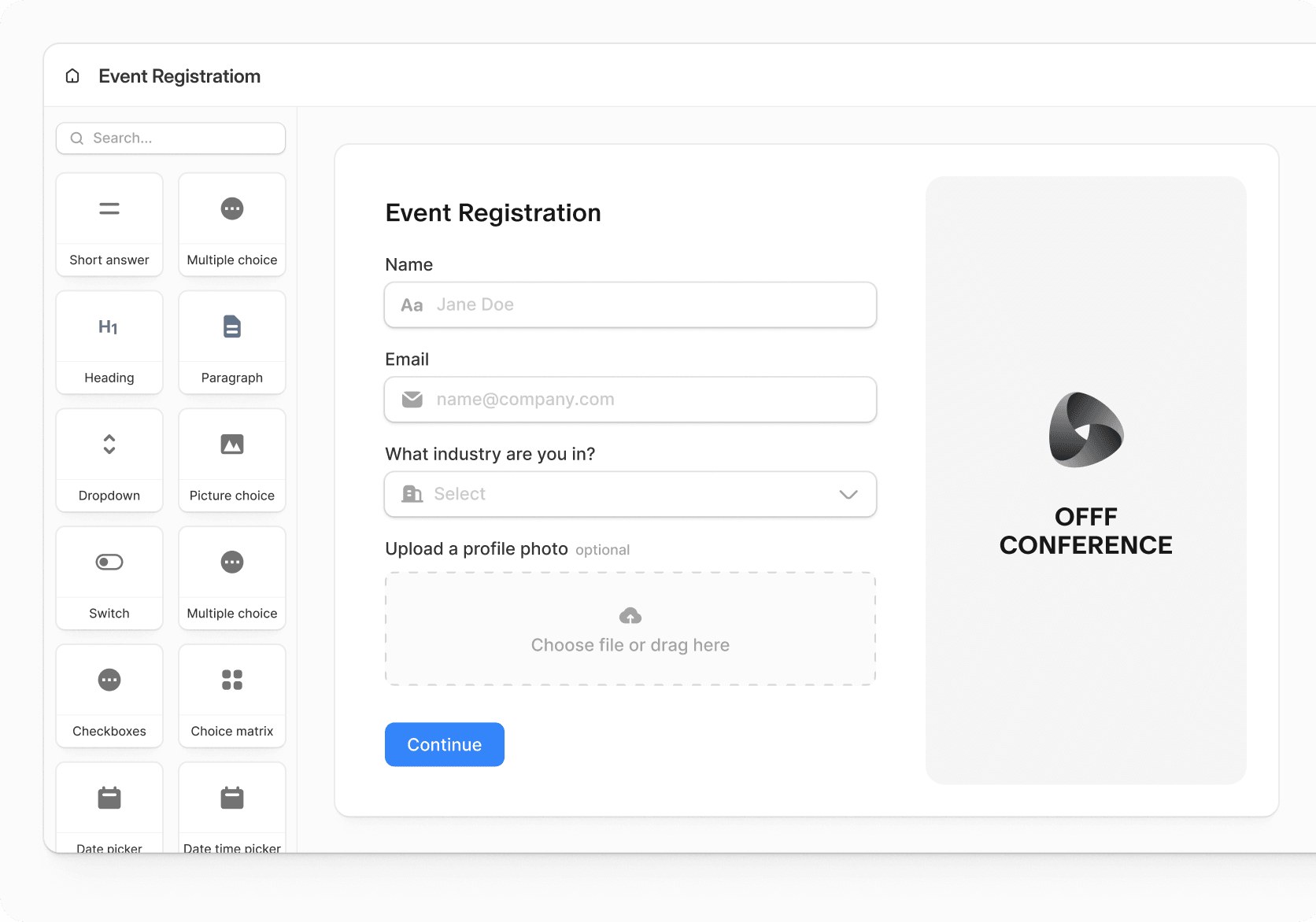
Fillout form editor with a panel of field types on the left and an event registration form with name, email, dropdown and file upload fields

Building a registration form with drag-and-drop fields

Online form builder with payments, scheduling, PDFs, signatures and workflows, and unlimited seats on every plan

from$15a month, billed yearly

Fillout has a free plan. Prices in US dollars as AdFillout's pricing page showed them on 11 October 2026.

  • Web
  • API

What Fillout does

Fillout is an online form builder for surveys, quizzes, order forms, bookings and signatures, with payments through Stripe and links to Airtable, Notion, HubSpot and 50+ other apps. It suits small businesses and teams that want generous free limits: the free plan allows unlimited forms and seats and 1,000 responses a month. Paid plans start at $15 a month billed yearly or $19 monthly, and startups can get 50% off for a year.

  • Drag-and-drop form builder

    Forms, surveys and quizzes are built from 50+ field types, including choice matrices, rankings, signatures and file uploads, with multi-page layouts, conditional logic, calculations and scoring. An AI form builder can draft a form from a prompt or import a Google Form or PDF.

  • Payments

    Forms take one-off payments, subscriptions and pay-what-you-want donations through Stripe, by card, ACH, Affirm or Stripe Link, with discount codes and prices worked out from answers. Fillout advertises 0% added fees.

  • Scheduling

    Booking forms sync with Google Calendar or Outlook, with round robin and collective meetings, buffer times, minimum notice and email and SMS reminders. Fillout says it is free for up to 1,000 meetings a month.

  • PDFs and signatures

    Answers can fill a PDF template, such as a contract or certificate, and forms can collect e-signatures, so an agreement is generated and signed in one step.

  • Fillout Workflows

    A visual workflow editor runs steps after a submission: approvals, AI actions such as qualifying a lead, branches, Slack messages and branded emails to the respondent.

  • Database integrations

    Responses create or update records in Airtable, Notion, Google Sheets, HubSpot, Salesforce and 50+ other apps. Login forms let respondents edit their own submissions, and Business can pre-fetch existing records into a form.

  • Branding and embedding

    Themes, custom fonts, logos and custom CSS match a form to a brand, and forms can be embedded as a popup, slider, side tab or full page, or shared on a custom domain on Business.

  • Results and collaboration

    Responses sit in a shared table with filters and views, a summary page and, on Business, form analytics with drop-off rates. Every plan has unlimited seats.

Works with

  • Airtable
  • HubSpot
  • Notion
  • Stripe
  • Google Sheets
  • Salesforce
  • Slack
  • SmartSuite
  • Monday.com
  • Attio
  • Calendly
  • ClickUp
  • Cal.com
  • Google Calendar
  • Gmail
  • Google Drive
  • OneDrive
  • Dropbox
  • ActiveCampaign
  • Mailchimp
  • Klaviyo
  • Zapier
  • Make
  • Webhook

How much Fillout costs

Billing

Free

Free

Free forever; 1,000 responses a month

  • Unlimited forms and seats
  • 1,000 responses a month
  • Multi-page forms, conditional logic and answer piping
  • Collect payments, scheduling forms and PDF generation
  • Unlimited file uploads up to 20 MB
  • Fillout Workflows
  • Calculations, scoring, pre-fill and hidden fields
  • Fillout badge on forms

Starter

$19a month

2,000 responses a month

  • Everything in Free
  • 2,000 responses a month
  • All question types, CAPTCHA and login forms
  • Custom themes, logo and custom endings
  • Redirect on completion
  • Collect signatures
  • Light Fillout branding

Pro

$49a month

5,000 responses a month

  • Everything in Starter
  • 5,000 responses a month
  • Remove all Fillout branding
  • Custom share links and share previews
  • Custom fonts and favicon
  • Custom CSS
  • White-label emails

Business

$89a month

Unlimited responses

  • Everything in Pro
  • Unlimited responses
  • Custom domain
  • Form analytics, drop-off rates and Meta Pixel
  • View partial submissions
  • Custom code and pre-fetch data
  • Files up to 1 GB+
  • Priority support

Team bundle

$300a month

Fillout Business plus Zite apps and databases; 800+ credits a month

  • Business plan for unlimited users
  • Unlimited workspaces
  • 1,000,000 records
  • 250,000 workflow runs a month
  • Granular permissions and roles
  • Enforce two-factor sign-in
  • Salesforce integration
  • EU hosting for form submissions on request

Enterprise

Contact sales

Custom pricing

  • Everything in Team bundle
  • Single sign-on (SSO)
  • Unlimited workflow runs
  • Audit logs
  • Dedicated support
  • Custom agreements and SLAs

Prices in USD; VAT is not mentioned. Yearly billing saves 20%. Startups can get 50% off for 12 months; non-profits, students and educational institutions can apply for a discount. Prices in US dollars, from AdFillout's pricing page on 11 October 2026. Fillout may charge VAT on top, and prices can change.

Fillout pros and cons

Pros

  • Free plan allows unlimited forms and seats and 1,000 responses a month, with no time limit
  • Payments, scheduling, PDF generation and workflows are all on the free plan
  • Unlimited seats on every plan, so a $40 Pro plan covers a whole team
  • Startups with fewer than 10 staff can get 50% off any paid plan for a year
  • Product Hunt reviewers (5.0 from 13) praise the Airtable and Notion integrations
  • Forms keep collecting responses after the monthly quota is reached

Cons

  • Monthly billing costs about 20% more: Business is $89 instead of $75
  • Seeing partial submissions and a custom domain need the $75-a-month Business plan
  • EU hosting of responses needs the Team bundle at $250 a month billed yearly
  • Prices are in US dollars, with nothing said about VAT for UK buyers
  • Trustpilot (3.5 from 48) includes a UK reviewer whose forms were all blocked by an automated check

Good for

  • Small businesses, clubs and charities that need more than Google Forms without paying
  • Teams running Airtable or Notion who want forms that write straight to their base
  • Businesses taking bookings, deposits or signed agreements through one form
  • Growing teams, since every plan includes unlimited seats

Look elsewhere if

  • UK organisations that must keep responses in Europe but cannot pay for the $250-a-month Team bundle
  • Anyone wanting prices and invoices in pounds, as plans are listed in US dollars
  • Healthcare providers needing HIPAA terms, which Fillout does not publish
  • Teams that need to see abandoned form entries cheaply, as partial submissions need Business

What reviewers say about Fillout

“Fillout is like Typeform, but with a 10x better UX and 100x better Airtable integration. Oh, and it's cheaper too.”

“They blocked all of my forms because their automated system incorrectly flagged them.”

★ · Trustpilot reviewer, United Kingdom, Trustpilot, 16 August 2026

What reviewers like

  • A free plan that includes features rivals charge for
  • Deep Airtable and Notion integrations that update records directly
  • A simple, fast builder with lots of styling control, down to custom CSS
  • Quick, helpful replies from the support team

What reviewers complain about

  • Useful features such as partial submissions held back for the top plan
  • Automated content checks that can block forms without warning
  • Pricing that feels high for a few specific features

What members think

Rating Fillout

Not enough ratings yet. Shopped here? Yours helps the next person.

Fillout: what to know before you pay

How much does Fillout cost in the UK?

Fillout is free to start, then Starter costs $15 a month, Pro $40 and Business $75 when billed yearly, or $19, $49 and $89 billed monthly. Every plan includes unlimited seats, so the price does not rise as a team grows.

Prices are shown in US dollars and the pricing page says nothing about VAT, so UK buyers should check the total at checkout. The plans mainly differ by monthly responses and branding: Starter allows 2,000 responses a month and light Fillout branding, Pro 5,000 with no branding, custom fonts and custom CSS, and Business unlimited responses with a custom domain, form analytics and partial submissions. A Team bundle at $250 a month billed yearly ($300 monthly) adds the Zite apps and databases platform, granular permissions and EU data hosting, and Enterprise is priced on request.

Is Fillout's free plan enough?

For many small businesses, clubs and charities, yes. The free plan has no time limit and allows unlimited forms, unlimited seats and 1,000 responses a month.

It also includes features other form builders often keep for paid plans: multi-page forms, conditional logic, calculations and scoring, file uploads up to 20 MB, payments through Stripe, scheduling, PDF generation and Fillout Workflows. The limits show up elsewhere. Free forms carry a Fillout badge, CAPTCHA and login forms need Starter, signatures are not included, and seeing partly completed forms needs Business. If a form passes its quota, Fillout says it keeps collecting responses, and the account can upgrade or wait for the monthly reset.

Is Fillout worth paying for?

For teams that rely on forms feeding Airtable, Notion or a CRM, reviewers mostly think so. Product Hunt shows 5.0 from 13 reviews.

Reviewers keep praising how much the free plan does, the depth of the Airtable and Notion integrations and quick replies from support. The complaints are sharper on Trustpilot, which shows 3.5 from 48 reviews: one UK reviewer had every form blocked by an automated content check, and another called the pricing misleading because partial submissions sit on the top plan. Pro is the plan most businesses would weigh up, since it removes Fillout branding entirely.

Fillout vs Typeform, Jotform and Tally: which is better?

Fillout suits teams that want generous free limits and database integrations; Typeform suits polished one-question-at-a-time surveys; Jotform suits buyers who want a huge template library; Tally suits people who want the simplest free form builder.

Fillout publishes its own comparison videos against Typeform, Jotform and Formstack. Its main difference from Typeform is pricing: seats are unlimited on every plan and 1,000 monthly responses are free. For booking meetings rather than collecting forms, Cal.com is a closer fit, and Interact is built for marketing quizzes that grow email lists. Fillout's own scheduling covers round robin and collective meetings with Google Calendar or Outlook.

Is Fillout safe for UK customer data?

Fillout states it is SOC 2 Type 2 compliant, encrypts data in transit and at rest, and keeps daily encrypted backups. Form submissions are stored in the United States by default.

UK organisations that need responses held in Europe can ask for EU hosting, but only on the Team or Enterprise plan, by contacting support after upgrading. Fillout's GDPR page says forms, responses or user data are deleted from its servers and backups within 45 days of a request, and that it uses an EU privacy representative. No HIPAA or UK-specific hosting statement was found.

How do you get Fillout cheaper?

Yearly billing is the simplest saving: Fillout says it saves 20%, which takes Pro from $49 to $40 a month.

  • Startups under five years old with fewer than 10 staff can get 50% off any paid plan for 12 months as new customers.
  • Non-profits, students and educational institutions can apply for a discount through Fillout's discount form; the amount is not published.
  • Unlimited seats mean one plan covers a whole team, so there is no need for several accounts.
  • The free plan's 1,000 monthly responses mean paying can wait until volume or branding needs it.

Alternatives to Fillout

Every scheduling & forms tool →
  • Discount

    Cal.com

    Scheduling app with booking links, calendar sync, reminders, payments and team routing, free for individuals

    Free plan · from $12 a month per user 4.7 on Trustpilot (427)20% off your first 12 months of Cal.com
  • Free plan

    Interact

    Quiz builder that turns personality, assessment and product quizzes into segmented email leads

    Free plan · from $27 a month
  • Free plan

    Testimonial

    Collects text and video testimonials, imports reviews from social and review sites, and embeds them on your website

    Free plan · from $25 a month 5.0 on Product Hunt (10)

Guides that cover Fillout

Questions about Fillout

Are there any Fillout discount codes?

We don't currently list a confirmed discount code. That doesn't mean the store has no promotions; check its website for current prices.

Can I cancel Fillout and get a refund?

Plans can be cancelled at any time from Billing & Usage and stay active until the renewal date, then drop to the free plan. New customers can ask for a full refund within the first month if usage was minimal; renewals and upgrades can be refunded within 14 days, after which refunds come as account credit.

What happens if a Fillout form goes over its response limit?

Fillout says forms keep collecting responses. The account can then upgrade, buy extra submissions or wait for the monthly quota to reset.

Does Fillout take a fee on payments?

Fillout advertises 0% added fees on payments, which run through Stripe; Stripe's own processing fees still apply. Forms can take one-off payments, subscriptions and pay-what-you-want donations, with discount codes.

Does Fillout work with Airtable, Notion and Google Sheets?

Yes. Fillout can create and update records in Airtable, Notion and Google Sheets on every plan, including free; pulling existing records into a form (pre-fetch) needs Business. The Salesforce integration needs the Team or Enterprise plan.

Can Fillout book meetings like Calendly?

Yes. Scheduling forms sync with Google Calendar or Outlook, support round robin and collective meetings, and send email and SMS reminders. Fillout says scheduling is free for up to 1,000 meetings a month.

Cookie settings

These choices apply to this browser. They do not change your email subscription.

Essential: always on. Used for editor sessions and remembering this choice.