
Free
Free
Up to 17 free generations
- 3 active projects
- Text and image models
- Full canvas and layer editor
- Run and create Techniques
- FAUNA agent, unlimited and free
- Download and export
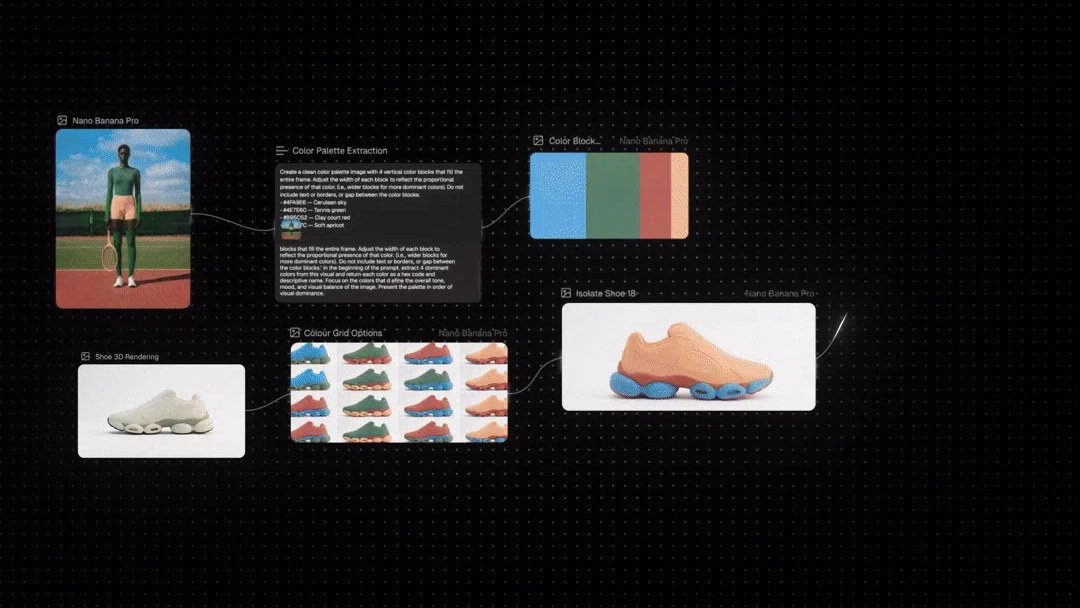
A product colourway workflow on the canvas

Node-based AI canvas that chains text, image, video, audio and 3D models into reusable creative workflows
FLORA has a free plan. Prices in US dollars as FLORA's pricing page showed them on 11 October 2026.
Vouchernaut may earn commission when you sign up through links on this page. It never changes what we say about a product or the order we list them in.
This is FLORA, a creative workspace from a New York team that began at NYU’s ITP programme. You get one canvas for generating, editing and finishing images, video and more with leading AI models.
Text, image, video, audio, document and 3D blocks sit on an infinite canvas and connect so one model's output feeds the next. A layer editor, action nodes for trims, colour grading and background removal, and a timeline editor finish work without leaving the board.
Paid plans can run Nano Banana 2, Veo 3.1, Kling, Seedance, Runway, Luma, Flux, GPT Image and many others at their published rates, with new models added as they are released.
An agent inside the canvas that reads the board, adds nodes, picks models, connects pipelines and runs generations from a conversation. It is free and unmetered on every plan.
Any workflow can be saved as a Technique and rerun on new inputs. A library of ready-made Techniques from FLORA and creators covers jobs such as logo to brand identity and outfit swaps.
Batch nodes and a prompt table generate images in bulk, and the Fashion Studio turns sketches into renders and swaps colours and garments, drawing on the plan's shared usage.
Paid workspaces get real-time cursors, comments, editable project sharing and a pooled usage budget, with per-member caps and usage history by project and member for client billing.
From Starter up, a public API and MCP server let tools such as Claude Code and Cursor run FLORA workflows, and a Shopify app publishes finished visuals straight to a store.
Works with
Free
Up to 17 free generations
$18a month per seat
Includes $18 of model usage per seat each month
$50a month per seat
Includes $50 of model usage per seat each month
$200a month per seat
Includes $200 of model usage per seat each month
Contact sales
For teams of 9 or more
Prices in US dollars; VAT not mentioned. Quarterly billing saves 10% and annual 20%. Students get 3 months of Pro free and educators 3 months of Max via flora.ai/edu. Usage beyond the monthly budget is billed at published model rates. Prices in US dollars, from FLORA's pricing page on 11 October 2026. FLORA may charge VAT on top, and prices can change.
“It makes image generation feel incredibly fast and intuitive.”
“Very intuitive and powerful platform. Will take some time to learn it properly”
“A built-in photo enhancement / upscaler would make the workflow much better”
FLORA is an infinite canvas for creative work with AI. Text, image and video models sit in one place, so you can explore ideas, refine them and produce finished assets without switching tabs. It is aimed at creative professionals who want control as well as speed.
FLORA says its founders are creatives who wanted more control than most AI tools give. The company grew out of an art and technology graduate programme at NYU called ITP, and founder and CEO Weber Wong describes the aim as letting people speak their ideas into existence with a high degree of creative control.
The canvas includes a layered image editor, annotations and labels, and an AI assistant called FAUNA. Techniques are reusable workflows built by FLORA and top creators, such as sketch to render or logo to brand identity. Fashion Studio covers garment try-ons and campaign work. Paid plans add API and MCP access, and FLORA says it works with Claude, ChatGPT and Grok.
There is a free plan to try the canvas, then per-seat plans for individuals and teams, plus a custom enterprise tier. Each seat adds to a shared pool of usage that is metered at the published rates of the underlying models, so you can see the cost of every generation. Paying quarterly or annually costs less than monthly. See the pricing page for current plans.
Designers, art directors, brand teams, agencies and filmmakers who generate lots of visual assets and want consistent, repeatable output. It also suits teams who need shared projects, real-time collaboration and usage reporting.
You can cancel at any time through the billing portal and keep access until the end of the period. Payments are non-refundable unless FLORA approves an exception.

AI platform that turns product photos and brand assets into on-brand photoshoots, ads and videos for ecommerce
 Free plan
Browser-based 3D design tool for interactive web and app scenes, with a 2D canvas and an AI agent
 Free plan
Lottie animation platform: a free and premium animation library, the Lottie Creator web editor and plugins for Figma and After Effects
We don't currently list a confirmed discount code. That doesn't mean the store has no promotions; check its website for current prices.
An AI creative workspace where you generate, edit and finish images, video and other assets on one canvas using many models, with reusable workflows called Techniques.
There is a free plan to explore the canvas, with limits on seats, projects and free generations. Video models, API access and unlimited projects need a paid plan.
Paid plans share a pool of usage across the team, and each generation is metered at the published rate of the model used.
Yes, at any time through the billing portal, and you keep access until the end of the billing period. Payments are non-refundable unless FLORA approves an exception.
FAUNA is FLORA’s AI agent, which works inside the canvas to help with creative tasks. It is included free on every plan.
Got a question about FLORA?