Vouchernaut Weekly

The week, sorted.

One email every Thursday at 7am, free. Here's what's in it:

  • New guides
  • Real price drops
  • Fresh codes
  • Sales ahead
Add stories from the magazineOptional
Stories to add

Pause or stop it from any email. I never sell or share your address. See this week's · Privacy

  1. Software
  2. Website & app builders
  3. Framer
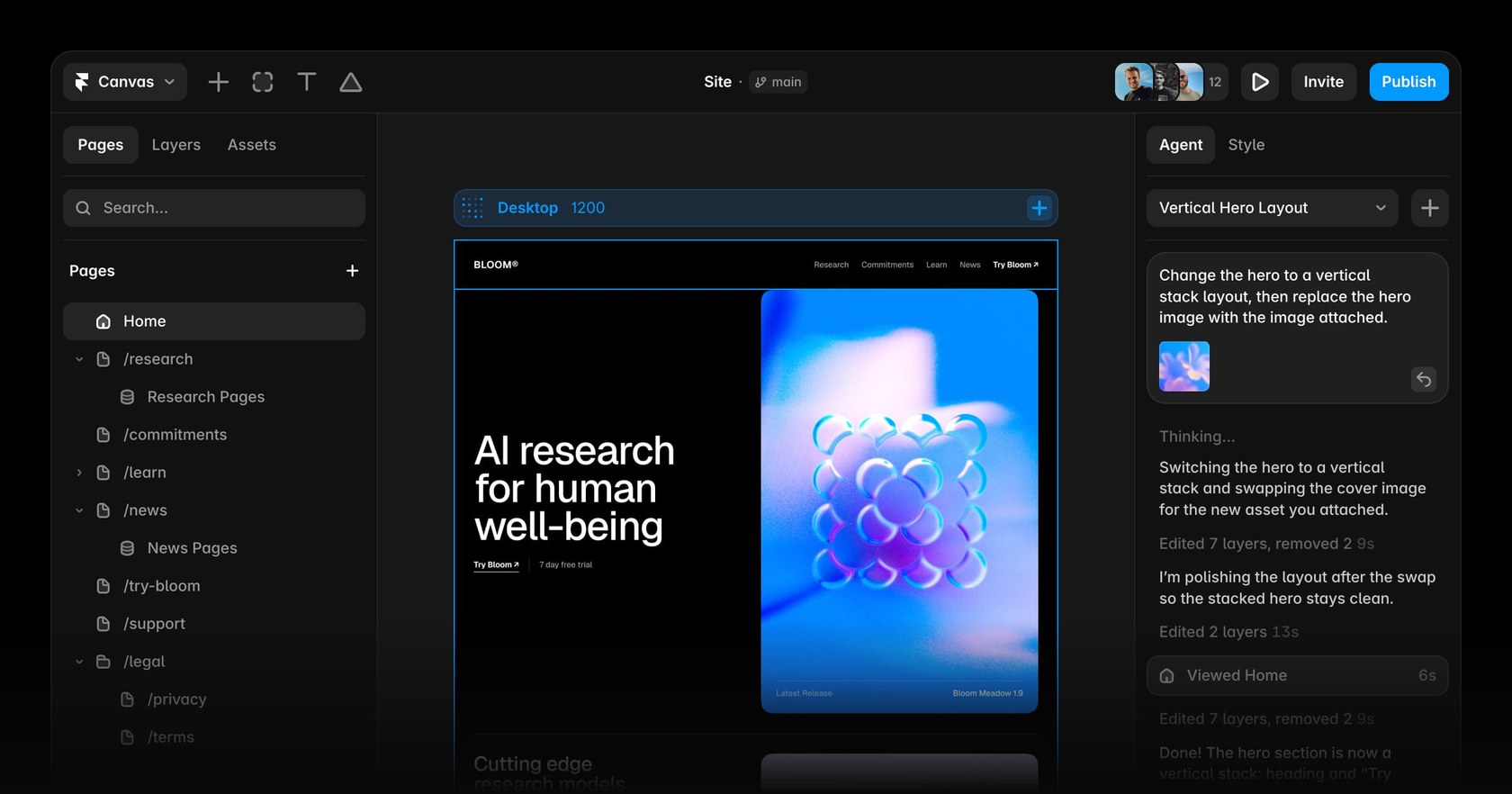
Framer editor with the page list on the left, a website on the canvas and the Agent panel changing the hero layout on the right

The AI agent editing a page on the canvas

Visual website builder with an AI design agent, CMS, hosting, analytics and A/B testing in one workspace

from$10a month per site, billed yearly

Framer has a free plan. Prices in US dollars as AdFramer's pricing page showed them on 11 October 2026.

  • Web
  • Mac
  • Windows

What Framer does

Framer is a visual website builder with an AI design agent, built-in CMS, hosting and analytics, aimed at designers, freelancers, startups and marketing teams. A free plan publishes to a Framer subdomain with a Made in Framer badge. Paid plans start at $10 a month per site for Basic and $30 for Pro on yearly billing, or $15 and $45 monthly. Students can apply for Basic free for a year.

  • AI design agent

    An agent on the canvas creates and edits pages, layouts, copy, components and responsive breakpoints from a prompt. Every change stays editable, and Skills let teams teach it their design system.

  • Freeform design canvas

    A Figma-like canvas for layout, animation, hover and scroll effects and interactive components, published straight to a live site without code.

  • Built-in CMS

    Collections for blogs, case studies and other repeating content, with one page template per item. A CMS agent can set up and fill collections, and plugins sync content from Notion, Google Sheets and Airtable.

  • Hosting, SEO and performance

    Sites are hosted on Framer's global network, with page titles, descriptions, social images and redirects set in the editor. Framer states 99.99% uptime.

  • AI translation

    The localisation add-on translates a site into up to 20 languages with AI, at $20 per locale, and keeps each version editable.

  • Analytics and A/B testing

    Built-in analytics show visitors, pageviews and events. The Convert add-on adds A/B tests, funnels and triggers, billed at $50 per 500,000 events.

  • Collaboration and branching

    Teams edit together in real time, leave comments and, on Pro, work on branches with shareable previews and a staging environment before publishing.

  • Templates and marketplace

    A marketplace of free and paid templates, components, vectors and plugins from independent creators, which open as a copy in your own workspace.

Works with

  • Figma
  • Notion
  • Google Sheets
  • Airtable
  • HubSpot
  • Unsplash
  • WordPress import
  • Webflow import
  • Claude Code
  • Cursor
  • OpenAI Codex
  • ChatGPT
  • Slack
  • GitHub

How much Framer costs

Billing

Free

Free

For non-commercial use and trying Framer

  • Free Framer subdomain with a Made in Framer badge
  • No custom domain
  • 1 GB bandwidth
  • 500 AI credits to try the agents
  • Up to 3 editors in a workspace with no subscription
  • 5 MB file uploads

Basic

$15a month per site

Creative personal sites; 1,000 AI credits a month

  • Custom domain, with a free domain on yearly billing
  • 30 pages
  • 2 CMS collections and 1,000 CMS items
  • 50 GB bandwidth
  • Hosting from 20 locations
  • 30 days of analytics history
  • Built-in SEO
  • Localisation as an add-on

Pro

$45a month per site

Growing professional sites; 3,000 AI credits a month

  • Custom domain, with a free domain on yearly billing
  • 150 pages, up to 700 with add-ons
  • 10 CMS collections and 2,500 CMS items
  • 100 GB bandwidth, up to 2 TB with add-ons
  • Hosting from 300+ locations
  • 90 days of analytics history
  • Site redirects, staging and branching with previews
  • A/B testing and advanced hosting as add-ons

Enterprise

Contact sales

Mission-critical sites, annual billing

  • Custom limits
  • Credits with volume discounts
  • Unlimited editors
  • SSO and SCIM
  • Uptime guarantee
  • Enterprise-grade security and dedicated support

Prices show in local currency by location; sales tax such as VAT is added at checkout. Extra editors $20 a month, content editors $10, viewers free. Students can get Basic free for a year; eligible startups a year of Pro free. Prices in US dollars, from AdFramer's pricing page on 11 October 2026. Framer may charge VAT on top, and prices can change.

Framer pros and cons

Pros

  • Free plan has no time limit, so a site can be designed and tested before paying
  • Basic costs $10 a month per site on yearly billing and includes a custom domain
  • Students can get Basic free for a year and eligible startups a year of Pro free
  • Product Hunt reviewers (4.8 from 263) praise the animation tools and Figma-like canvas
  • Hosting, SEO settings and analytics are built in, so no separate host is needed
  • Thousands of free community templates, with paid ones from about $29

Cons

  • Monthly billing costs 50% more than yearly: Basic is $15 instead of $10
  • Basic caps a site at 30 pages, 2 CMS collections and 1,000 CMS items
  • Each extra editor adds $20 a month on top of the site plan
  • Trustpilot reviewers (1.5 from 146) complain that AI edits burn through credits
  • Refunds only within 7 days worldwide and never for unused subscription time
  • Free sites carry a Made in Framer badge and cannot use a custom domain

Good for

  • Designers and freelancers who want an animated portfolio or client site without code
  • Startups and marketing teams running landing pages and marketing sites
  • Agencies building and handing over client sites
  • Students, who can apply for Basic free for a year

Look elsewhere if

  • Shops that need built-in ecommerce: Framer's plans list no store or checkout
  • Content-heavy sites with tens of thousands of posts, given the CMS item caps
  • Anyone wanting fixed, predictable AI costs, since agent work uses credits
  • Building a full web app with user accounts and a database

What reviewers say about Framer

“Framer makes it incredibly fast to design, prototype, and publish professional websites without writing code.”

“Still some things that are pretty standard and you would think are straightforward are missing.”

“To get the AI agent to make the most basic changes (remove an image, and add a table for example) will cost you hundreds of credits.”

★ · Trustpilot reviewer, United Kingdom, Trustpilot, 6 October 2026

What reviewers like

  • Design freedom and animation tools that make sites look polished
  • A canvas that feels familiar to anyone coming from Figma
  • Publishing a fast, responsive site without writing code
  • Templates that give a quick starting point for landing pages and portfolios

What reviewers complain about

  • Costs that climb with extra editors, add-ons and more sites
  • AI agent edits that use up credits quickly
  • Slow or automated customer support
  • A CMS that feels limited for large, content-heavy sites
  • A learning curve for people who aren't designers

What members think

Rating Framer

Not enough ratings yet. Shopped here? Yours helps the next person.

Framer: what to know before you pay

How much does Framer cost in the UK?

Framer has a free plan, then Basic at $10 a month and Pro at $30 a month per site when billed yearly, or $15 and $45 billed monthly. Enterprise is priced on request.

The pricing page shows prices in the visitor's local currency, so UK buyers may see pounds at checkout, and any sales tax such as VAT is added at checkout based on location. The headline plan is only part of the bill. Each extra editor costs $20 a month and each content editor $10, while viewers who only comment are free. Pro limits can be raised with paid top-ups: $20 per 100 extra pages, $40 per 10 CMS collections, $20 per 10,000 CMS items and $40 per 100 GB of bandwidth. Translating a site costs $20 per locale, and the Convert add-on for A/B tests and funnels is $50 per 500,000 events.

Is Framer's free plan enough?

For learning, designing and testing a template, yes. For a business site, usually not, because the free plan cannot use a custom domain.

Free sites publish on a Framer subdomain and show a Made in Framer badge, which disappears only after upgrading or connecting your own domain and republishing. The plan includes 1 GB of bandwidth and 500 AI credits to try the agents, and Framer describes it as ideal for non-commercial use. A workspace with no subscription can still have up to three editors, so a small group can design together before anyone pays.

Are Framer templates free?

Many are. The Framer Marketplace lists thousands of free community templates alongside paid ones sold by independent creators, with paid prices on the first page ranging from $29 to $149.

Templates cover portfolios, SaaS and startup sites, agencies, restaurants, events, blogs and more, and open as a copy in your own workspace. Two details matter before buying. A paid template is licensed for one project under Framer's community terms, so using it on a second client site needs a second licence. Refunds are handled by the creator, not Framer. A template is free to use, but publishing it on your own domain still needs a Basic or Pro plan.

Is Framer worth paying for?

For designers, freelancers and marketing teams who want a polished, animated site without writing code, reviewers largely think so. For anyone who wants predictable costs or deep content tools, the case is weaker.

On Product Hunt, Framer scores 4.8 from 263 reviews, with praise for the Figma-like canvas, animation tools and fast publishing. Capterra and GetApp both show 4.3 from 32 reviews. Trustpilot tells a different story at 1.5 from 146 reviews, where complaints centre on AI credit costs, billing surprises and slow support. Basic suits a portfolio or small business site within 30 pages and 2 CMS collections. Pro adds staging, branching, redirects and 150 pages for growing marketing sites.

Framer vs Durable and Anything: which is better?

Framer suits people who want design control; Durable suits small service businesses that want a site written for them; Anything suits founders building an app rather than a website.

Durable builds a site from a few answers about your business and bundles bookings, invoices and a simple CRM, from $22 a month billed yearly. Anything builds web and mobile apps with sign-in, a database and payments from a chat description, from $19 a month billed yearly. Framer is cheaper to start, at $10 a month, and gives far more freedom over layout and motion, but it expects you to make design decisions yourself. Webflow is the other common comparison: both are visual builders aimed at designers, and Framer's own site publishes a comparison page.

How do you get Framer cheaper?

Yearly billing is the main saving: it cuts Basic from $15 to $10 a month and Pro from $45 to $30, and includes a free custom domain.

  • Students on a recognised course can apply for Basic free for a year, worth $120, and reapply every 11 months while studying.
  • Eligible startups can apply for a first year of Pro free, worth $360, through Framer's startup programme.
  • Content editors at $10 a month cost half as much as full editors when someone only updates text and CMS items.
  • The free plan costs nothing while a site is being designed, so paying can wait until launch day.
  • Free plan

    Durable

    AI website builder for small service businesses, with bookings, a CRM, invoices and local search tools in one account

    Free plan · from $22 a month 4.8 on Trustpilot (330)
  • Anything

    AI agent that builds web apps and iOS and Android apps from a chat, with database, sign-in, payments and hosting included

    from $19 a month 2.4 on Trustpilot (18)
  • Free plan

    Replo

    AI agent that builds, publishes and reports on ecommerce landing pages and funnels from chat, with Shopify checkout

    Free plan · from $99 a month 3.9 on Trustpilot (9)
  • Free plan

    whacka

    AI app builder that turns a chat description into a hosted app with logins, a database and payments

    Free plan · from $6.67 a month
  • Free plan

    Spline

    Browser-based 3D design tool for interactive web and app scenes, with a 2D canvas and an AI agent

    Free plan · from $12 a month per seat 4.6 on Product Hunt (31)

Guides that cover Framer

Questions about Framer

Are there any Framer discount codes?

We don't currently list a confirmed discount code. That doesn't mean the store has no promotions; check its website for current prices.

Can I cancel Framer and get a refund?

Framer's refund policy allows a refund within 7 days of the first purchase worldwide, or 14 days in the EU and Turkey; the UK isn't named separately. Refunds aren't given for unused time left in a subscription term, and paid plans and add-ons stay active until the end of the billing period.

What are Framer AI credits?

Credits power Framer's agents, AI translation and other AI features, and are shared across the whole workspace. Basic includes 1,000 a month and Pro 3,000, with larger credit tiers available at a higher price; the free plan gives 500 to try.

Does Framer have a desktop app?

Yes. Framer runs in the browser and also has a desktop app for Mac (Apple silicon and Intel) and Windows. There is no Linux app.

Is Framer GDPR compliant for UK businesses?

Framer B.V. is based in Amsterdam, so it operates under EU data protection law, and it publishes a trust and security centre. UK businesses collecting visitor data through forms or analytics still need their own privacy notice and cookie consent.

Can I use Framer for client websites?

Yes. Agencies and freelancers build client sites on Framer, and members of the Pro Experts programme get free editor access on client projects and 50% off agent credits. Each published site needs its own plan.

What happens if a Framer site goes over its limits?

Framer lets a site exceed its bandwidth for one month and sends an email so you can upgrade. Other limits, such as pages and CMS items, need an upgrade or a paid add-on before you can add more.

Cookie settings

These choices apply to this browser. They do not change your email subscription.

Essential: always on. Used for editor sessions and remembering this choice.