Vouchernaut Weekly

The week, sorted.

One email every Thursday at 7am, free. Here's what's in it:

  • New guides
  • Real price drops
  • Fresh codes
  • Sales ahead
Add stories from the magazineOptional
Stories to add

Pause or stop it from any email. I never sell or share your address. See this week's · Privacy

  1. Software
  2. Meeting notes & calls
  3. Granola
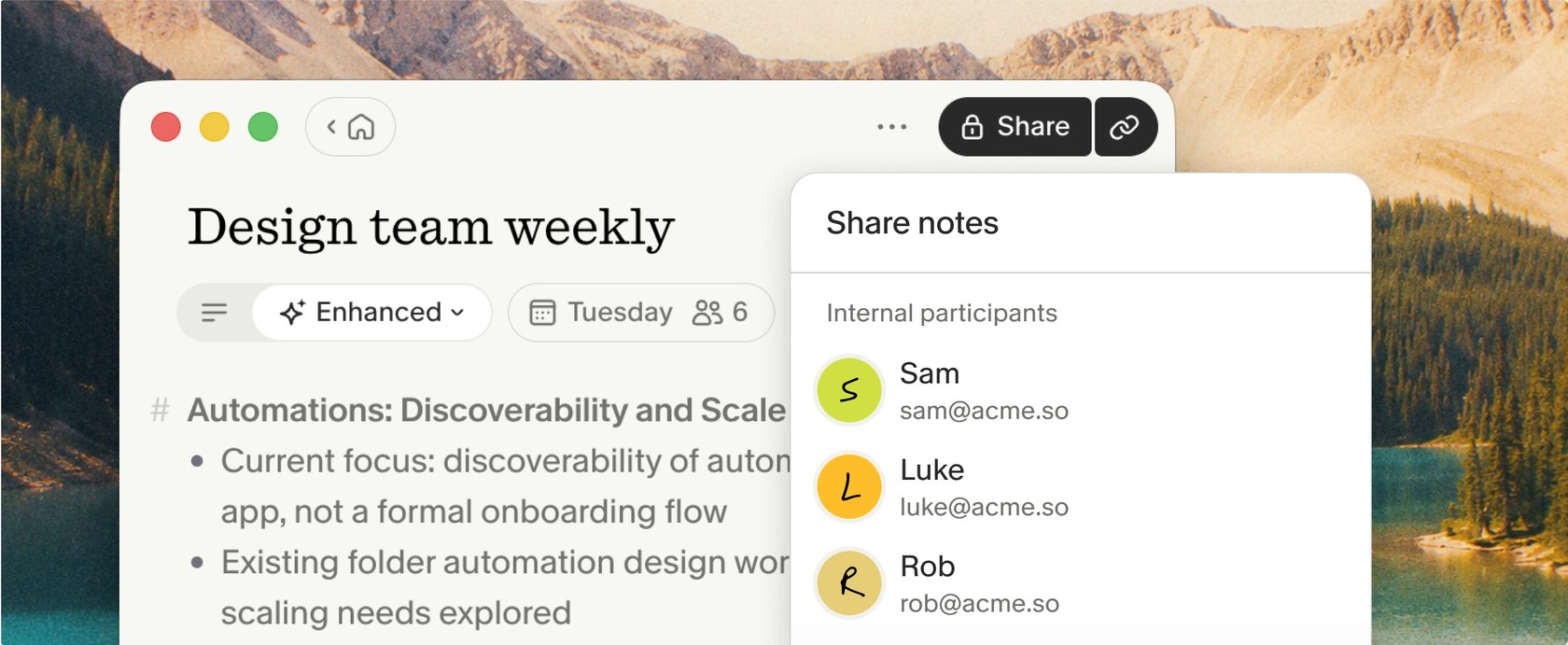
Granola desktop note titled Design team weekly in Enhanced view, with the Share notes panel open listing internal participants

Enhanced notes are private by default and shared with chosen participants

AI notepad that transcribes meetings from your device's audio, with no bot, and turns your rough notes into a full write-up

from$14a month per user

Granola has a free plan. Prices in US dollars as Granola's pricing page showed them on 11 October 2026.

  • Mac
  • Windows
  • iPhone and iPad
  • Android
  • Web
  • Slack
  • API

What Granola does

Granola is an AI notepad for Mac, Windows, iPhone and Android that transcribes meetings from your device's audio, without a bot joining the call, and turns your rough notes into a full write-up. It suits people in back-to-back calls. The Basic plan is free but only shows the last 30 days of notes, and Business costs $14 per user a month. UK students and early-stage startups can apply for a year of Business free.

  • Transcription without a meeting bot

    On Mac and Windows, Granola transcribes your computer's system audio and microphone in real time, so it works with Zoom, Google Meet, Microsoft Teams and Slack huddles without joining the call. It only starts when you open a note for the meeting, and the audio is deleted once transcribed.

  • Your notes, filled in by AI

    You type rough notes during the meeting and Granola expands them afterwards with detail from the transcript, keeping your own lines as the structure. Custom templates set the layout for different meeting types.

  • Chat and Recipes across meetings

    Granola Chat answers questions about one meeting or many, such as open to-dos or what a client said last month. Recipes are saved prompts, written by you or shared by others, for jobs like weekly recaps or follow-up emails.

  • Briefs before, emails after

    On paid plans Granola prepares a short brief before external meetings, with attendees, past discussions and open threads, and drafts a follow-up email afterwards using the transcript, calendar and past Gmail threads.

  • Phone, in-person and Apple Watch notes

    The iPhone and Android apps capture in-person conversations and sync with desktop, and the iPhone app can also record phone calls. Notes can be started from an Apple Watch.

  • Sharing, folders and CRM sync

    Notes are private by default and can be shared by link, to Slack or into Spaces and folders for a team. Business plans can push notes to Notion, HubSpot, Attio and Affinity, or anywhere else through Zapier.

  • MCP and API access

    Granola's MCP connector lets AI apps such as Claude, ChatGPT and Cursor read your meeting notes, and Business plans can create API keys for notes, transcripts and summaries.

  • Consent and retention controls

    Granola can post an automatic chat message in Zoom, Teams and Google Meet, or add a watermark to your camera, to tell others it is running. Transcripts can auto-delete after a day, a week, a month or up to a year.

Works with

  • Zoom
  • Google Meet
  • Microsoft Teams
  • Slack
  • Google Calendar
  • Outlook
  • Gmail
  • Notion
  • HubSpot
  • Attio
  • Affinity
  • Salesforce
  • Zapier
  • Asana
  • Linear
  • Jira
  • ChatGPT
  • Claude
  • Gemini
  • Microsoft 365 Copilot
  • Cursor
  • Figma
  • Lovable
  • Replit

How much Granola costs

Basic

Free

Unlimited meetings, but only the last 30 days of notes are visible

  • AI meeting notes from device audio, no bot
  • Meeting history limited to 30 days
  • AI chat within and across meetings (automatic model only)
  • Shared folders and custom note templates
  • Slack integration
  • Multi-language transcription
  • Opt out of model training at any time

Business

$14a month per user

Billed monthly; no annual option

  • Everything in Basic
  • Unlimited meeting notes and history
  • Choice of advanced AI models in chat
  • Pre-meeting briefs and follow-up emails
  • Workspace-wide dictionary
  • Notion, HubSpot, Attio, Affinity and Zapier integrations
  • MCP integration and API access
  • Central billing and user management

Enterprise

$35a month per user

From $35; annual contracts through sales

  • Everything in Business
  • Single sign-on and SCIM provisioning
  • HIPAA-compliant workspaces and audit API
  • Org-wide transcript auto-deletion and sharing settings
  • Model training off for the whole workspace
  • Advanced integrations such as Salesforce
  • Admin-enforced notice that Granola is in use
  • Dedicated support and usage analytics

Prices in US dollars, excluding VAT, which is added by billing address (a valid VAT number removes it from future invoices). Students in the UK, US and Canada and seed-stage startups can apply for 12 months of Business free; registered non-profits for 50% off Business. Prices in US dollars, from Granola's pricing page on 11 October 2026. Granola may charge VAT on top, and prices can change.

Granola pros and cons

Pros

  • No bot joins the call: it transcribes device audio on Mac and Windows, and the audio is deleted after transcription
  • Free Basic plan has no cap on meetings or transcription time; the limit is 30 days of visible history
  • Business at $14 per user a month undercuts Circleback Pro ($15) and Krisp Core ($16) on monthly billing
  • UK students can apply for 12 months of Business free, and registered non-profits for 50% off
  • Transcribes 31 languages on desktop and can switch language mid-meeting
  • Rated 4.9 from 2,244 ratings on the UK App Store and 4.9 on Google Play

Cons

  • Notes and transcripts are stored only on AWS in the US; no UK or EU data residency
  • Free plan hides notes older than 30 days and leaves out Notion, HubSpot and Zapier integrations
  • Priced in US dollars with no annual discount on Business
  • Reviewers report speaker attribution is unreliable on calls with several people
  • Uses anonymised data for its own model training unless you opt out (Enterprise is opted out by default)
  • The web version can only view and edit notes; transcribing needs the desktop or mobile app

Good for

  • People in back-to-back video calls who like typing their own rough notes
  • Founders, sales and product people who need searchable meeting history and follow-ups
  • Teams on Zoom, Google Meet or Microsoft Teams who don't want a bot appearing in calls
  • UK university students and seed-stage startups, who can apply for a year of Business free

Look elsewhere if

  • Organisations that need UK or EU data residency
  • Teams that want meeting audio or video recordings kept for later
  • Anyone who needs dependable speaker labels on calls with several people
  • Linux users, as there is no Linux app

What reviewers say about Granola

“Granola doesn’t just transcribe conversations, it organises notes intelligently, and you can easily search them or ask questions.”

★★★★ · App Store reviewer, UK, App Store, 3 September 2026

“Speaker attribution on a four person call is still a coin flip, and who committed to something is half of why I'm reading the notes.”

★★★★ · Product Hunt reviewer, Product Hunt, 2 September 2026

“The Summary gets lots of things wrong (other apps do a better job) and you can't change the names of the speakers in the transcript”

★★★ · App Store reviewer, UK, App Store, 18 September 2026

What reviewers like

  • No bot in the call, which reviewers say makes other participants more comfortable
  • Their own typed notes stay at the heart of the AI write-up instead of being buried
  • Searching and asking questions across months of past meetings
  • Mobile, Apple Watch and phone call capture for meetings away from the desk
  • A simple, calm interface that sits in the background

What reviewers complain about

  • Speaker attribution that mixes people up on larger calls
  • Summaries that occasionally get details wrong, sending people back to the transcript
  • Limited ways to organise notes, with requests for deeper folders and PDF export
  • The 30-day history limit on the free plan pushing users to pay
  • Search that matches words better than meaning

What members think

Rating Granola

Not enough ratings yet. Shopped here? Yours helps the next person.

Granola: what to know before you pay

How much does Granola cost in the UK?

Granola has a free Basic plan, and its paid Business plan costs $14 per user a month. Prices are shown only in US dollars, so the amount on a UK card statement moves with the exchange rate, and VAT is added according to your billing address.

Basic and Business are billed monthly only: Granola's help centre says annual billing is available only on Enterprise contracts. Enterprise is listed at $35 per user a month and adds single sign-on (for teams of 50 or more), SCIM provisioning, org-wide retention and model-training controls, HIPAA-compliant workspaces and dedicated support. VAT-registered businesses can add their VAT number in the Stripe billing portal so future invoices leave VAT off, though Granola won't refund VAT already charged.

Is Granola worth paying for?

For anyone who needs to look back at meetings older than a month, yes, because that is the main thing the free plan holds back. Basic records unlimited meetings with no daily transcription limit, but only notes from the last 30 days are visible; older ones are kept and reappear after an upgrade.

Business also adds:

  • Unlimited note history and a choice of AI model in chat
  • Pre-meeting briefs and drafted follow-up emails
  • Integrations with Notion, HubSpot, Attio, Affinity and Zapier
  • API access, and MCP access to personal and shared workspace notes

App store reviewers rate it highly (4.9 from 2,244 ratings on the UK App Store and 4.9 on Google Play), mostly because no bot joins calls and past meetings are easy to search and question. The recurring complaint on Product Hunt and the App Store is speaker attribution: on calls with several people the notes can credit the wrong person, which matters if you rely on them for who agreed to what.

Is Granola safe to use for work meetings?

Granola is SOC 2 Type 2 certified and says it doesn't keep meeting audio, but notes and transcripts are stored in the US, with no UK or EU hosting option. Its security FAQ states that all data sits on AWS servers in the United States and that regional data residency isn't offered at present.

Audio is cached only for transcription and then deleted from Granola's systems and its providers'. Transcription runs through third parties such as Deepgram and AssemblyAI, and summaries through models from OpenAI and Anthropic, which Granola says are not allowed to train on your data. Granola itself trains on anonymised data unless you switch this off in Settings; Enterprise workspaces are opted out by default.

It has a UK company, Granola Labs Ltd, states that it complies with UK GDPR and offers a data processing agreement with UK and EU standard contractual clauses. Transcripts can be set to delete themselves after anything from a day to a year. Granola's terms make the user responsible for getting participants' consent, and it can post an automatic chat message in Zoom, Teams and Google Meet, or add a watermark to your camera feed, to tell people it's running.

Granola vs Circleback vs Krisp: which is better?

Granola suits people who want to type their own notes and let AI fill the gaps; Circleback suits teams that want recordings kept, and Krisp suits people who also want noise cancellation on calls.

Circleback has a free plan and a Pro plan at $15 per user a month, and can join meetings as a bot or record through its desktop app. Unlike Granola, it stores recordings: a year on Pro and two years on its $25 Business plan. Krisp's meeting assistant costs $16 per user a month billed monthly or $8 billed annually, with a seven-day free trial rather than a free plan, and comes with its noise cancellation. On monthly billing Granola's $14 Business plan is the cheapest of the three, but Krisp works out cheaper if you pay for a year up front. Granola keeps no audio at all, which some organisations prefer and others see as a gap.

How do you get Granola cheaper?

The cheapest routes are the programmes Granola runs itself. Students at accredited universities in the UK, US and Canada can apply for 12 months of Business free, and startups with fewer than 30 staff that have raised a pre-seed or seed round can apply for a year free. Registered non-profits, verified through Goodstack, can apply for 50% off Business.

There is no annual discount on Business. Billing is per active seat, so pending invitations aren't charged, and removing members reduces the bill on a pro-rata basis.

  • Free plan

    Circleback

    AI meeting notes, action items and automations for online and in-person meetings, with or without a bot

    Free plan · from $15 a month per user 4.7 on App Store (38)
  • Krisp

    Noise cancellation and bot-free AI meeting notes for Zoom, Teams, Google Meet and other call apps

    7-day free trial · from $8 a month per user 3.0 on Trustpilot (412)
  • Discount

    Fyxer

    AI assistant inside Gmail and Outlook that labels email, drafts replies in your tone, takes meeting notes and tracks follow-ups

    Free plan · from $37 a month per person 4.0 on Trustpilot (744)20% off your first two months of Fyxer

Guides that cover Granola

Questions about Granola

Are there any Granola discount codes?

We don't currently list a confirmed discount code. That doesn't mean the store has no promotions; check its website for current prices.

What does Granola's free plan include?

Basic has no limit on the number of meetings or on transcription, and includes AI chat, note templates, shared folders and the Slack integration. Notes older than 30 days are hidden until you upgrade, and pre-meeting briefs, follow-up emails, the Notion, HubSpot and Zapier integrations and API access need Business.

Does Granola join my calls as a bot?

No. On Mac and Windows it transcribes the computer's system audio and microphone, so it works with Zoom, Google Meet, Microsoft Teams and Slack huddles without anyone being added to the call. It only starts transcribing once you open a note for the meeting.

Which devices does Granola work on?

There are desktop apps for macOS and Windows, mobile apps for iPhone and Android, and an Apple Watch app. The web version at notes.granola.ai can view and edit notes but can't transcribe, and recording phone calls works on iPhone only.

How do you cancel Granola, and are refunds given?

Subscriptions are cancelled in Settings, under Billing and Manage subscription, which opens Stripe's billing portal. The plan runs to the end of the paid month and then drops to the free Basic plan. Granola's help pages don't describe a refund policy, so refund requests go to [email protected].

Does Granola work in languages other than English?

Yes. It transcribes 31 languages on desktop and 17 on mobile, and the desktop app can switch between languages within one meeting. The app's menus and settings are in English only.

Can I delete my Granola notes and data?

Individual notes can be deleted at any time, and the whole account can be deleted from Settings, under Profile, which removes its data. Notes and transcripts are otherwise kept indefinitely unless you or an admin set an auto-deletion period for transcripts.

Cookie settings

These choices apply to this browser. They do not change your email subscription.

Essential: always on. Used for editor sessions and remembering this choice.