
Free
Free
Exports are watermarked
- All major features available
- Unlimited exports, watermarked
- 1,000 sample AI voiceover characters
- Shareable links, watermarked
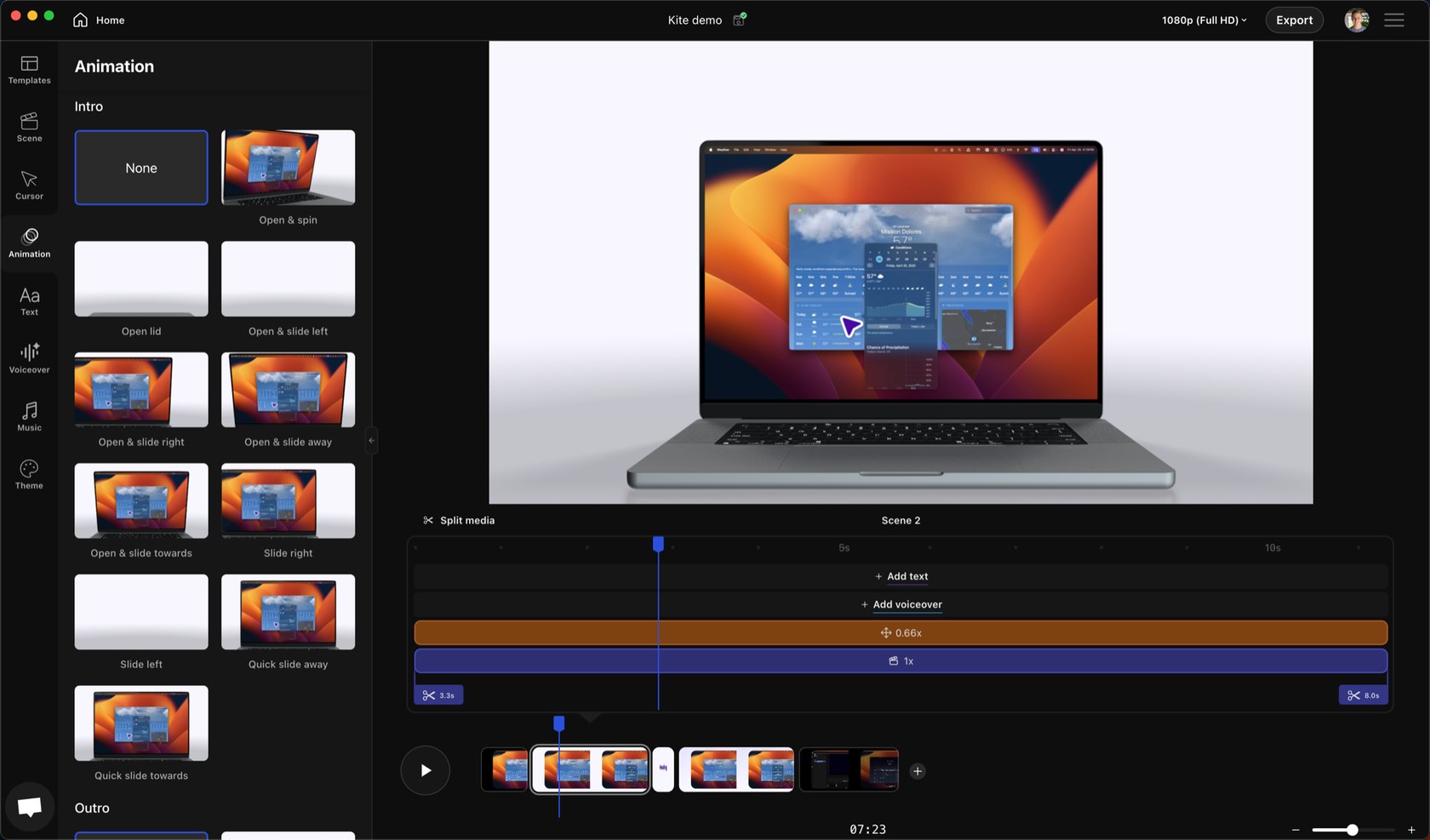
Choosing animations in the Kite editor
Mac screen recorder that turns recordings into product demo videos with auto zoom, 3D mockups, animated text and AI voiceovers
Kite has a free plan. Prices in US dollars as Kite's pricing page showed them on 11 October 2026.
Vouchernaut may earn commission when you sign up through links on this page. It never changes what we say about a product or the order we list them in.
This is Kite, a Mac screen recorder and editor from a San Francisco company, built for product launch and demo videos. It adds automatic zooms, device mockups and AI voiceovers so founders and teams can make polished videos without an editor.
Kite's recorder tracks your cursor and clicks, then zooms and pans to follow the action. Zooms can also be added or adjusted by hand on the timeline, and the cursor can be smoothed and restyled.
Combine as many screen recordings, imported videos and images as you like in one project, then split, trim and speed up clips.
Place recordings in 3D MacBook, iPhone and other device frames, with one-click cinematic 3D animations, intro and outro animations, 3D shader backgrounds and effects such as depth of field and bloom.
Add animated title and ending scenes, text beside or over recordings, animated 3D callouts, and blur areas to hide sensitive information.
Write a script and choose from thousands of ElevenLabs and OpenAI voices, prompted for tone, speed and accent, or connect your own ElevenLabs key for cloned voices. A royalty-free music library is included.
Save project templates and a Brand Kit of colours, fonts and logos. On the Team plan, projects, templates and brand kits are shared through the cloud.
Export up to 4K as MP4 or WebM, including transparent backgrounds, or create a share link. Captions and subtitles are supported.
Recordings stay on your computer unless you share them or use an AI feature that uploads media, and analytics and all cloud and AI features can be switched off.
Works with
Free
Exports are watermarked
$59a month
$480 billed yearly
$79a month per seat
Minimum 3 seats; $660 a seat billed yearly
Contact sales
Custom pricing
Prices in US dollars; VAT not mentioned. Yearly billing saves 30% or more. UK and EU customers can cancel an annual plan within 14 days if no watermark-free export has been made. Prices in US dollars, from Kite's pricing page on 11 October 2026. Kite may charge VAT on top, and prices can change.
“With no prior video editing experience, I was able to download Kite and have the launch video ready for PH in about an hour.”
“I was able to spin up a product mockup video for my landing page using a simple screen capture in ~15 minutes.”
“Kite helped get a nice intro video with minimal effort!”
Kite was founded in 2023 by Derek Feehrer and Todd Ashley, and was part of Y Combinator's Summer 2023 batch. The company is based in San Francisco. It set out to make a product video something a founder can do in an afternoon, with no video editor in the team.
You record your screen, and Kite follows your cursor and clicks so it can zoom and pan on its own. Then you edit in the app: combine recordings, imported clips and images, trim and speed up clips, drop footage into MacBook and iPhone mockups, and add animated titles and text. A blur tool hides sensitive parts of the screen, and a Brand Kit holds your colours, fonts and logos.
AI voiceovers draw on ElevenLabs and OpenAI voices, and you can connect your own ElevenLabs key to use custom or cloned voices. There is also a royalty-free music library. Exports are available as MP4 or WebM, including transparent backgrounds.
Kite has a free plan with the major features, but exports carry a watermark. Paid plans for individuals and teams remove it, and an enterprise tier adds single sign-on and custom integrations. Prices are quoted in US dollars, so a UK card is charged in dollars at your bank's rate. Check the pricing page for the current figures.
Kite is for launch videos, feature announcements and product demos, not everyday talking-head messages. It is built for macOS, with a Windows version in beta. The company describes it as local-first, so recordings stay on your Mac unless you share them or use a cloud feature.
Kite says subscriptions are generally non-refundable because the free plan lets you test first. If you upgrade by mistake and haven't exported a watermark-free video, it can reverse the charge if you get in touch quickly.

Screen recorder and video editor for Mac, Windows and Chrome, with AI editing, video hosting and viewer analytics
 Free plan
Open source screen recorder for Mac, Windows and Linux with instant share links, a built-in editor and self-hosting

Mac app for screenshots and screen recordings with annotation, scrolling capture, OCR, a video editor and cloud sharing
 Discount
Screen recorder for team video messages on Mac and Windows, with AI auto-editing, chapters, summaries and an MCP server
macOS 27 can record your Mac's sound for free. I'd start there, then pay only if you need scrolling screenshots, a share link or a proper editor.
We don't currently list a confirmed discount code. That doesn't mean the store has no promotions; check its website for current prices.
Read the retailer's current policy before buying. Eligibility can depend on the product, its condition and whether it has been used or activated. Kite refund policy
Yes. The free plan includes the major features, but every export carries a watermark. A paid plan removes it.
Yes, in beta. Kite is built for macOS and offers a Windows beta from its download page.
Kite says subscriptions are generally non-refundable because you can test on the free plan. If you upgraded by mistake and haven't exported a watermark-free video, contact it quickly and it can reverse the charge.
You can connect your own ElevenLabs key to use your custom and cloned voices in voiceovers.
Kite describes itself as local-first, so files stay on your Mac unless you share a link, use a team feature or an AI feature that uploads media.
Got a question about Kite?
