Vouchernaut Weekly

The week, sorted.

One email every Thursday at 7am, free. Here's what's in it:

  • New guides
  • Real price drops
  • Fresh codes
  • Sales ahead
Add stories from the magazineOptional
Stories to add

Pause or stop it from any email. I never sell or share your address. See this week's · Privacy

  1. Software
  2. Developer tools
  3. Knock
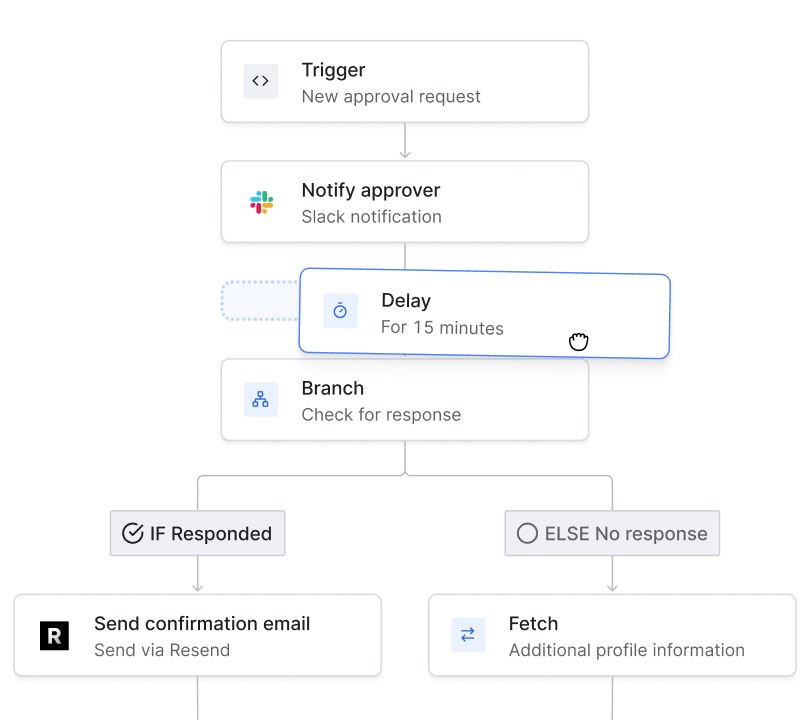
Knock workflow builder with a trigger, a Slack notification to an approver, a delay being dragged into place and a branch that sends an email via Resend or fetches profile data

Building a notification workflow

Notification and messaging infrastructure: one API and dashboard for email, in-app, push, SMS and Slack messages from your product

from$250a month

Knock has a free plan. Prices in US dollars as Knock's pricing page showed them on 11 October 2026.

  • Web
  • API
  • Slack

What Knock does

Knock is messaging infrastructure for software products: one API and dashboard for sending notifications and lifecycle messages by email, in-app feed, push, SMS and chat apps such as Slack. It suits engineering and product teams that would otherwise build their own notification system. The Developer plan is free for 10,000 messages a month, and the Starter plan costs $250 a month with 50,000 messages included.

  • Workflows

    A visual workflow builder decides who is notified, on which channel and when, with steps for delays, batching and digests, branches, fetching data over HTTP, throttling and waiting for events. Workflows are triggered by API calls, usage events or audience changes.

  • In-app feeds and inboxes

    Pre-built components add a real-time notification feed, inbox or toasts to a web or mobile app, or teams can build their own on the feed API. Each recipient can have as many in-app channels as needed.

  • Guides

    In-app messages such as banners, paywalls, dialogs and nudges, rendered with a product's own components. Non-engineers can edit the copy and targeting from Knock, and guides can be ordered and throttled.

  • Cross-channel delivery

    One workflow can send through email providers such as SendGrid, Postmark and Resend, SMS providers such as Twilio, Apple and Firebase push, and chat apps including Slack, Microsoft Teams, Discord and WhatsApp.

  • User preferences and send windows

    Recipients can choose which notifications they get and on which channels, and send windows hold messages until set hours in the recipient's time zone.

  • Templates and AI agent

    Templates, layouts, partials and translations are managed in one place with version control. A built-in agent can draft emails and workflows from a prompt in the team's existing layout and branding.

  • Data sources and audiences

    Knock takes in events from CDPs such as Segment and Rudderstack, reverse ETL tools such as Hightouch and Census, and apps like Stripe, Supabase, Clerk and PostHog, then builds audiences from attributes and events.

  • Developer tooling and logs

    SDKs cover eight server languages, and the Knock CLI and MCP server let developers manage workflows from code, CI/CD and AI coding tools. Every API request, workflow run and message is logged for debugging.

Works with

  • SendGrid
  • Postmark
  • Resend
  • Mailgun
  • Amazon SES
  • Twilio
  • Vonage
  • Apple Push (APNs)
  • Firebase FCM
  • Expo
  • OneSignal
  • Slack
  • Microsoft Teams
  • Discord
  • WhatsApp
  • Segment
  • Rudderstack
  • Hightouch
  • Census
  • Stripe
  • Supabase
  • Clerk
  • PostHog
  • Datadog

How much Knock costs

Developer

Free

10,000 messages a month

  • 10,000 messages a month
  • 500 guide active users
  • 500 AI agent credits, then $0.01 per credit
  • Unlimited workflows, broadcasts and channels
  • Unlimited team members
  • Batch and delay notifications
  • Built-in multi-tenancy
  • Google SSO

Starter

$250a month

50,000 messages included, then $0.005 per message

  • Everything in Developer
  • 50,000 messages a month, then $0.005 each
  • 2,500 guide active users, then $0.05 each
  • 2,000 AI agent credits, then $0.01 per credit
  • Remove Knock branding
  • Email client previews
  • 30-day log retention and 99.9% uptime SLA

Enterprise

Contact sales

Contact sales; volume or monthly notified user pricing

  • Everything in Starter
  • Volume and annual commit discounts
  • Custom roles and permissions
  • Per-customer branding and preferences
  • Translations (i18n)
  • Data warehouse and Datadog streaming
  • SAML SSO and directory sync (SCIM)
  • HIPAA BAA, enterprise SLAs and shared Slack support

Prices in US dollars; the pricing page doesn't mention VAT or GBP. Only delivered messages are billed (one per person per channel); delivery providers such as Postmark or Twilio bill separately. Volume discounts are Enterprise only. Prices in US dollars, from Knock's pricing page on 11 October 2026. Knock may charge VAT on top, and prices can change.

Knock pros and cons

Pros

  • Free plan includes 10,000 messages a month with unlimited workflows, channels and team members
  • Only delivered messages are billed: ones skipped by preferences, bounced or failed aren't charged
  • Pre-built in-app feed, inbox and guide components save building them from scratch
  • No hard cap on the free plan: Knock asks for billing details rather than stopping messages
  • SDKs for eight server languages, plus a CLI and MCP server for working from code

Cons

  • The jump from free to paid is steep: Starter costs $250 a month
  • Delivery providers such as Postmark and Twilio are paid for separately on top of Knock
  • Translations, per-customer branding, SAML SSO and HIPAA agreements need the Enterprise plan
  • Prices in US dollars only, and data is processed and stored in the US
  • Log retention is 30 days below Enterprise

Good for

  • Software teams adding notifications across email, in-app, push and Slack without building the plumbing themselves
  • B2B SaaS products that need per-user preferences, digests and a real-time in-app inbox
  • Early-stage products that fit within 10,000 messages a month on the free plan
  • Product and growth teams that want to edit in-app messages and copy without an engineering release

Look elsewhere if

  • Small businesses looking for a point-and-click email newsletter tool: Knock needs developer set-up
  • High-volume senders on a tight budget: every delivered message on every channel is billed above the allowance
  • Teams that must self-host or keep data in a UK or EU region: Knock stores data in the US

What reviewers say about Knock

“It has pretty much every feature an engineer might need”

“Knock is a very easy-to-use API that makes adding all sorts of user notifications to your application a breeze.”

What members think

Rating Knock

Not enough ratings yet. Shopped here? Yours helps the next person.

Knock: what to know before you pay

Is Knock worth paying for?

Knock is worth paying for when a product sends notifications on several channels and the team would otherwise build batching, preferences, in-app feeds and logging itself. For a product that only sends a handful of transactional emails, an email provider on its own is usually enough.

Knock sits between an app and the services that deliver messages. The app calls Knock's API when something happens, and a workflow decides who hears about it, on which channel, after what delay and whether to bundle it into a digest. Knock then hands each message to a provider such as SendGrid, Postmark, Twilio or Apple Push, or shows it in Knock's own in-app feed. Product Hunt reviewers describe the API as easy to use.

How much does Knock cost in the UK?

Knock prices in US dollars only. The Developer plan is free with 10,000 messages, 500 guide users and 500 AI agent credits a month; Starter is $250 a month with 50,000 messages, then $0.005 per extra message; Enterprise is priced on request.

A message is one delivery to one person on one channel, so a single alert sent by email and in-app counts as two. Messages skipped because of a user's preferences, and messages that bounce or fail, aren't charged. Guides (in-app banners and modals) are billed separately by active users: 2,500 are included on Starter, then $0.05 each. The pricing page doesn't mention VAT or pound prices, so a UK card is charged in dollars. Knock's price also doesn't cover the delivery services underneath it: Postmark, Twilio and similar providers bill separately.

Knock vs Courier, Novu and Customer.io: which is better?

Knock, Courier and Novu all do the same core job: one API that routes product notifications to many channels. Customer.io and Braze are marketing automation platforms built around campaigns and segments rather than in-app notifications.

Knock's strengths are its in-app feed and guide components for React and mobile, batching and digests, per-user preferences and detailed logs. Novu has an open-source core that can be self-hosted, which Knock doesn't offer. Teams whose main need is marketing email to large lists may find a newsletter or email marketing tool cheaper, since Knock bills every message.

Is Knock safe to use with UK customer data?

Knock states that it is SOC 2 Type 2 compliant, GDPR certified, CCPA compliant and HIPAA compliant, and that all data is encrypted at rest.

The company is based in New York and its privacy policy says personal information is processed and stored in the US. It certifies to the UK Extension of the EU-U.S. Data Privacy Framework, which covers transfers of UK personal data, and names a UK representative. No UK or EU hosting region is mentioned on its site. A HIPAA business associate agreement, SAML SSO, directory sync and custom roles are only on the Enterprise plan.

How do you get Knock cheaper?

The Developer plan covers 10,000 messages a month free, which is enough for many early-stage products.

  • Sandbox mode renders test messages without sending them, so testing doesn't count towards usage.
  • Preferences and conditions that skip a channel step avoid a billable message.
  • Batching and digests merge several events into one message.
  • Enterprise customers can choose volume discounts, annual commit discounts or pricing by monthly notified users.

The pricing page doesn't list a student, start-up or non-profit discount, and volume discounts are only offered on Enterprise.

Questions about Knock

Are there any Knock discount codes?

We don't currently list a confirmed discount code. That doesn't mean the store has no promotions; check its website for current prices.

What happens if you go over Knock's free plan limit?

Knock doesn't cut off notifications when a free account passes 10,000 messages. Its pricing page says it will get in touch about adding a billing method for the following month.

How does Knock bill paid plans?

There are no set-up fees. The Starter platform fee is invoiced on the day of upgrade, which becomes the monthly billing date, and usage over the included volume is billed in arrears on the next invoice.

Does Knock charge for team members or recipients?

No. Every plan includes unlimited team members, recipients, workflows, channels and environments. Billing is based on messages sent, guide active users and AI agent credits.

Which languages and platforms does Knock support?

Knock has server SDKs for Node, Python, Ruby, Go, Java, .NET, Elixir and PHP, client components for in-app feeds and guides, and push through Apple, Firebase, Expo and OneSignal. A CLI and an MCP server let developers manage it from the terminal or AI coding tools.

How long does Knock keep logs?

Logs are kept for 30 days on the Developer and Starter plans and 90 days on Enterprise. Messages in in-app feeds have no retention limit by default.

Cookie settings

These choices apply to this browser. They do not change your email subscription.

Essential: always on. Used for editor sessions and remembering this choice.