Vouchernaut Weekly

The week, sorted.

One email every Thursday at 7am, free. Here's what's in it:

  • New guides
  • Real price drops
  • Fresh codes
  • Sales ahead
Add stories from the magazineOptional
Stories to add

Pause or stop it from any email. I never sell or share your address. See this week's · Privacy

  1. Software
  2. AI assistants & agents
  3. Lindy
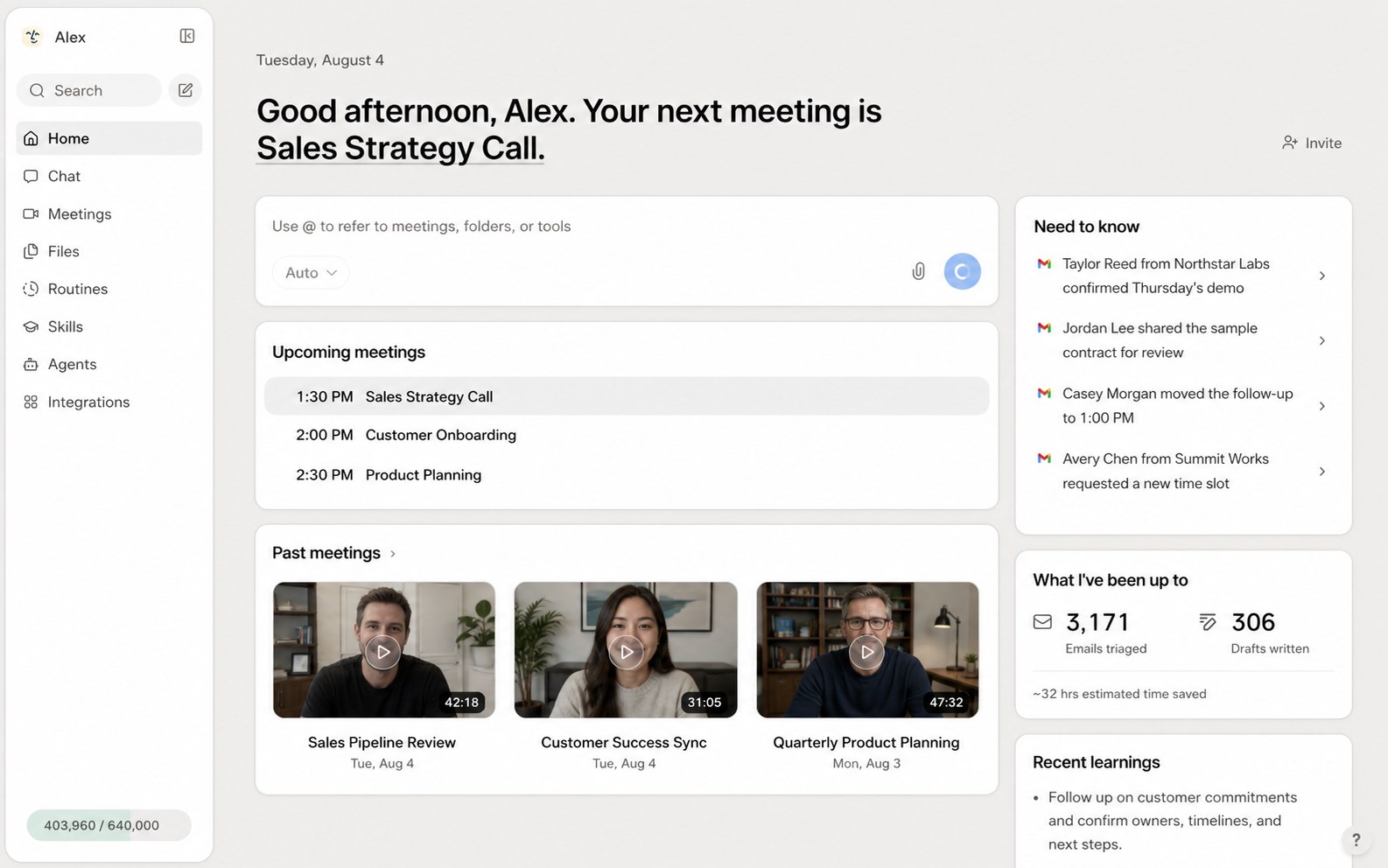
Lindy web app home page with upcoming meetings, past meeting recordings, a Need to know list and hours saved

The Lindy home page

An AI assistant in Slack, Gmail and iMessage that records meetings, sends daily briefs, drafts replies and runs scheduled tasks

from$29.99a month per active user

Lindy has a 7-day free trial with no card needed. Prices in US dollars as Lindy's pricing page showed them on 11 October 2026.

  • Web
  • Slack
  • Chrome extension

What Lindy does

Lindy is an AI assistant for teams that works mainly through Slack, plus Gmail, iMessage and a web app: it records meetings, sends daily briefs, drafts email replies and runs scheduled jobs across 1,500+ tools. It suits busy managers and small teams. New users get $50 of credits for seven days with no card; after that every active user pays from $29.99 a month for 3,000 credits.

  • Slack teammate

    You mention Lindy in a Slack channel or message it directly, and it replies in the thread with answers, summaries, reports and files, using context from your connected tools.

  • Meeting assistant

    Lindy joins and records calls, writes notes, keeps a shared meeting library in folders, prepares you before meetings and schedules follow-ups.

  • Inbox management

    It triages Gmail, applies labels, drafts replies in your voice and nudges people who haven't replied. A Chrome extension puts these inside Gmail.

  • Routines

    Recurring jobs such as a daily brief by 8am, weekly reports and follow-up nudges run on a schedule, and a new routine can be set up in a sentence.

  • Skills and memory

    More than 40 built-in skills cover research, data analysis, decks and dashboards, a workflow can be saved as a skill for the whole team, and memory is kept in plain files you can read and edit.

  • iMessage and SMS

    You can text your assistant to schedule meetings, check your day or send a voice memo, without opening an app.

  • Approvals and spend caps

    Actions that write or send can wait for your approval, and admins can cap how many credits each teammate uses.

Works with

  • Slack
  • Gmail
  • Google Calendar
  • Google Drive
  • Google Sheets
  • Google Slides
  • Google Ads
  • Microsoft Teams
  • Zoom
  • Notion
  • GitHub
  • Linear
  • HubSpot
  • Stripe
  • Meta
  • Zendesk
  • Intercom
  • PostHog
  • Figma
  • Zapier
  • Datadog

How much Lindy costs

Free

Free

$50 of credits that last 7 days, no card needed

  • Everything needed to get started
  • Setup in about two minutes

Team

$29.99a month per active user

3,000 credits a month per user, pooled across the team

  • Slack teammate in threads and mentions
  • Meeting recording, notes and a shared meeting library
  • Daily briefs and scheduled routines
  • Inbox management and replies drafted in your voice
  • iMessage with your assistant
  • Top-ups at $10 per 1,000 credits
  • Choice of AI model for each task
  • 1,500+ integrations and MCP support

Enterprise

Contact sales

Custom credits and billing

  • HIPAA compliance and signed BAA
  • SSO and SCIM
  • Audit logs
  • Shared usage and bonus credits
  • Dedicated support
  • Onboarding and enablement

Prices in US dollars; VAT not mentioned. Larger Team credit tiers run from $39.99 to $9,999.50 a month. No annual, student or non-profit pricing listed. Purchases are non-refundable under Lindy's terms. Prices in US dollars, from Lindy's pricing page on 11 October 2026. Lindy may charge VAT on top, and prices can change.

Lindy pros and cons

Pros

  • $50 of free credits for a week with no card needed
  • Rated 4.9 out of 5 on G2 from 171 reviews, with ease of setup praised most
  • Covers meetings, email, Slack and iMessage in one assistant
  • Pauses when credits run out rather than adding surprise charges, and admins can cap spend per person
  • SOC 2 Type II audit and a no-training policy for customer data

Cons

  • Scores 1.7 out of 5 on Trustpilot from 40 reviews, mostly over credits, support and billing
  • Each active user is billed, and anyone who mentions Lindy in Slack takes a seat after a week
  • 3,000 monthly credits per seat can go after a few large tasks, and unused credits don't roll over
  • Purchases are non-refundable, and some reviewers report trouble cancelling
  • Plan names in Lindy's docs (Plus, Pro, Max) don't match the pricing page

Good for

  • Managers who want meeting notes, daily briefs and email drafts handled in one place
  • Small teams that already work in Slack and Gmail
  • People who like texting an assistant from their phone

Look elsewhere if

  • Heavy users on a tight budget, since credits can run out quickly
  • Teams that want flat workspace pricing rather than paying per active user
  • Organisations that need confirmed UK or EU data hosting before signing up

What reviewers say about Lindy

“I use Lindy every day and so do my clients and it saves us hours every week.”

“The built-in AI that builds or fixes workflows for you sometimes doesn’t hit the mark.”

“There is a supposed monthly rate but actually this is only for a number of credits which get used up for any action.”

What reviewers like

  • Quick to set up, with ready-made agents and routines
  • Daily schedules and meeting reminders that arrive with context
  • Acts across several tools rather than only writing text
  • Connects well with Gmail, Outlook and Slack

What reviewers complain about

  • Credits run out much faster than expected
  • Agents drift from instructions and need correcting, which costs more credits
  • Support that is slow or handled by an AI
  • Difficulty cancelling and charges after a trial

What members think

Rating Lindy

Not enough ratings yet. Shopped here? Yours helps the next person.

Lindy: what to know before you pay

How much does Lindy cost in the UK?

Lindy's Team plan costs $29.99 a month for each active user, which includes 3,000 credits per person added to a shared team pool. Prices are shown in US dollars only, so a UK card is charged in dollars and your bank may add a foreign transaction fee.

Larger credit allowances are listed in steps, from 4,000 credits for $39.99 up to 1.75 million credits for $9,999.50 a month. Extra credits can be bought at any time at $10 per 1,000. Enterprise adds HIPAA compliance with a signed BAA, SSO, SCIM, audit logs and dedicated support at a custom price. No annual discount is shown on the pricing page.

How far do Lindy's credits go?

Lindy's pricing page puts everyday asks such as summaries and drafted replies at 2 to 250 credits, deeper work such as a research report at 250 to 1,000, and big builds such as dashboards or internal tools at 1,000 to 2,500. On those figures, the 3,000 credits in a seat can run out after a handful of larger jobs.

Monthly credits reset each billing cycle and don't roll over, while bought top-ups last until used. When the pool runs dry, Lindy pauses rather than billing you more, and admins can set spending caps per person. Several Trustpilot reviewers say they used a month of credits in a day or two, and one blamed a change of default AI model for a jump in usage, so it pays to check the model setting and the usage page early.

Is Lindy worth paying for?

Reviews split sharply. Lindy averages 4.9 out of 5 on G2 from 171 reviews and 4.6 on Product Hunt, where users praise how quickly agents can be set up and the time saved on meeting prep, email and reminders.

On Trustpilot it scores 1.7 from 40 reviews, and the complaints are consistent: credits used up far faster than expected, agents that drift from instructions, slow or automated support, and trouble cancelling. Anyone considering it should start with the free week, watch credit use closely, and treat it as a monthly commitment rather than paying for a large tier up front.

Lindy vs Viktor: which is better?

Both are AI agents you message in Slack, but they price differently. Lindy charges per active user, while Viktor charges per workspace from $50 a month with credits shared by the whole team and gives $100 of credits that never expire to start.

Lindy has more personal assistant features, including meeting recording, a Gmail extension that drafts replies and texting your assistant over iMessage. Viktor leans towards analysis, reports and building tools for the business. Marblism, Chipp and Runable are other options: Marblism sells ready-made AI employees for small businesses, Chipp builds custom chatbots and agents, and Runable is a general agent for documents, slides and websites.

Is Lindy safe to use with work email and meetings?

Lindy states it holds a SOC 2 Type II audit, encrypts data in transit and at rest, and that neither Lindy nor its AI providers train models on your data. Its security page also lists GDPR and PIPEDA compliance, and actions that write or send can be set to wait for your approval.

The security page does not say where data is hosted, so UK firms with data residency rules should ask before connecting company inboxes. HIPAA terms and a BAA are only on Enterprise. The company behind it is Crivello Corp, trading as Lindy and registered in Oregon.

How do you get Lindy cheaper?

The main saving is control rather than a discount. Lindy lists no annual, student or non-profit pricing. Keeping only regular users on paid seats, since anyone who mentions Lindy in Slack takes a seat after a seven-day trial, and setting spend caps per person keeps the bill predictable. Admins can remove seats at any time, though access runs to the end of the paid month with no part refund.

  • Viktor

    An AI agent you message in Slack or Microsoft Teams that runs reports, updates tools and builds apps across 3,200+ integrations

    from $50 a month per workspace 4.8 on G2 (63)
  • Marblism

    Seven AI agents for small businesses that handle email, social posts, leads, SEO articles, phone calls, websites and contracts

    from $24 a month 4.8 on Trustpilot (1,161)
  • Chipp

    AI agents for websites, Slack, Teams, messaging and phone, plus an AI software factory that writes and ships code for you

    from $299 a month
  • Free plan

    Runable

    A general AI agent that builds websites, apps, slide decks, videos, carousels and research reports from a plain-English prompt

    Free plan · from $15 a month 3.8 on App Store (62)
  • Free plan

    Littlebird

    An AI assistant that remembers what is on your screen, takes meeting notes and answers questions about your past work

    Free plan · from $17 a month 5.0 on Product Hunt (10)

Questions about Lindy

Are there any Lindy discount codes?

We don't currently list a confirmed discount code. That doesn't mean the store has no promotions; check its website for current prices.

Does Lindy have a free plan?

Not a permanent one. New users get $50 of credits with no card, which last seven days, and then a paid seat is needed to keep using it.

Does Lindy give refunds?

Lindy's terms say all purchases are non-refundable. You can cancel at any time and the cancellation takes effect at the end of the current billing period.

Who needs a paid Lindy seat?

Anyone who signs up directly, joins the workspace, or mentions Lindy in your Slack for the first time. People who join through Slack get a one-time seven-day trial before their seat is billed.

Where can you use Lindy?

In Slack threads and direct messages, in Gmail through its Chrome extension, by text over iMessage or SMS, and in the web app at lindy.ai.

Do unused Lindy credits roll over?

No. Monthly plan credits reset each billing cycle. Credits bought as top-ups stay available until used.

Does Lindy train AI on your data?

Lindy states that neither it nor its model providers use your data to train AI models.

Cookie settings

These choices apply to this browser. They do not change your email subscription.

Essential: always on. Used for editor sessions and remembering this choice.