
Basic
Free
Free
- Context from your screen, apps and meetings
- Daily usage credits for chats and routines
- Limited meeting notes in 10+ languages
- Web search
- Chat on mobile apps
- Calendar, email and other connections
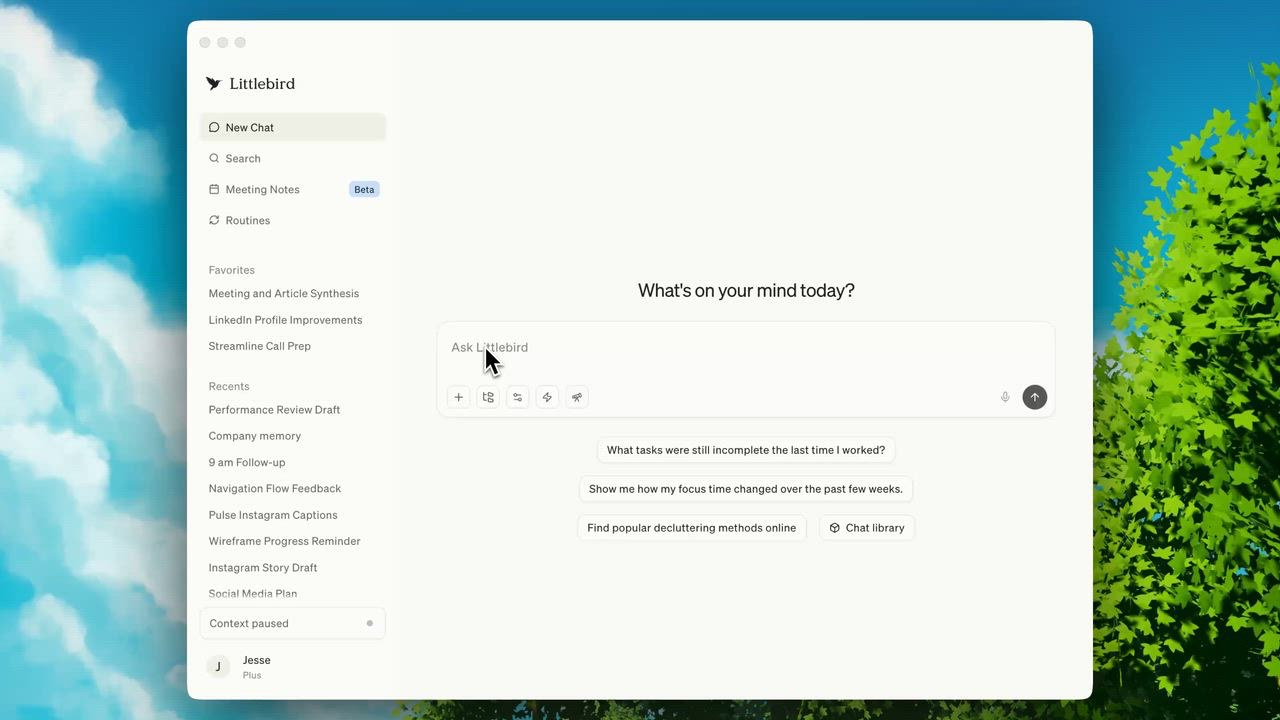
The Littlebird desktop app

An AI assistant that remembers what is on your screen, takes meeting notes and answers questions about your past work
Littlebird has a free plan and a 14-day free trial. Prices in US dollars as Littlebird's pricing page showed them on 11 October 2026.
Vouchernaut may earn commission when you sign up through links on this page. It never changes what we say about a product or the order we list them in.
This is Littlebird, a US software company behind an AI assistant that remembers your work. It reads the window you have open, takes meeting notes without a bot and answers questions about what you have been doing.
Littlebird reads the text in your active window and keeps it as memory, so you can ask about a document, email or page you saw last week without pasting anything in.
It listens during calls, transcribes and summarises them in more than 10 languages, and prepares notes before meetings you haven't had yet.
Scheduled briefs such as a morning plan, a weekly activity summary or competitor monitoring arrive at the time you set, built from what you have been working on.
A small chat box appears in any app with one tap, so you can ask about the page or document in front of you without switching windows.
Because it knows your projects, Littlebird drafts emails, documents and updates that draw on what you have actually done.
On paid plans, an MCP server lets other AI tools such as Claude and Cursor ask about your meetings, decisions and past work.
Passwords, card details and banking sites are blocked by default, you can exclude any app or site, and you can pause or delete the last hour, day or all data.
Works with
Free
Free
$20a month
$204 a year billed yearly; 14-day free trial
$50a month
$510 a year billed yearly
$100a month
5x Plus credits; 12x for $200 a month
From $17 a month per seat
Contact sales
Priced on request
Prices in US dollars; VAT not mentioned. Students get Plus for $15 a month after two free months, with a .edu email and student ID. Purchases are non-refundable under the terms. Prices in US dollars, from Littlebird's pricing page on 11 October 2026. Littlebird may charge VAT on top, and prices can change.
“I genuinely have managed to avoid hiring an EA after using LittleBird for just over a week - it is unbelievably smart.”
“I love the AI and what it does. But their mobile app leaves a lot to be desired.”
“I wonder if they changed the models behind it, it was soooo good before and accurate.”
Littlebird is built around memory. Instead of making you paste in background every time, it pays attention to the active window on your screen, such as the document you're writing or the page you're browsing, and during meetings it listens along. You then chat with it about your work, and it already knows the context.
It preps you for calls, takes notes without a meeting bot and drafts the recap for everyone. It can set up daily or weekly routines such as a morning briefing or a project update, and it drafts emails, documents and updates in your voice. It connects to email, calendar and many other tools, though its site says these are optional because it works from what is on your screen. It also has a connector, Littlebird MCP, that links its memory to other AI tools.
Because it sees your screen, privacy is central. Passwords, credit cards and banking sites are blocked by default, you can add any app or site to skip, and you can pause at any time. You can delete the last hour, the last day or everything. Littlebird says it doesn't sell your data or train on it, that its AI providers keep nothing, and that it is SOC 2 Type II certified.
There's a free Basic plan with daily usage credits and limited meeting notes. Paid individual plans add more capable AI, enhanced memory, unlimited meeting notes and bigger usage allowances. There are team seats and an enterprise tier as well. The site lists prices and plan details, and you can try the paid features before committing.
The desktop app is built for Mac first, and the site links to companion apps and a web version. Check the download page for what's supported on your device.
It suits busy professionals and people who lose track across many apps, such as someone who spends the day moving between documents, calls and email and wants an assistant that has seen it all.
 Free plan
AI notepad that transcribes meetings from your device's audio, with no bot, and turns your rough notes into a full write-up
 Discount
AI workspace and cloud drive for notes, files, meetings and bookmarks, with search by meaning and scheduled AI agents

An AI assistant in Slack, Gmail and iMessage that records meetings, sends daily briefs, drafts replies and runs scheduled tasks
 Free plan
AI meeting notes, action items and automations for online and in-person meetings, with or without a bot

Noise cancellation and bot-free AI meeting notes for Zoom, Teams, Google Meet and other call apps
We don't currently list a confirmed discount code. That doesn't mean the store has no promotions; check its website for current prices.
It builds a memory of your work from the active window on your screen and from meetings, then lets you ask about it in chat. It also takes meeting notes and drafts emails and documents in your voice.
Yes. The Basic plan is free, with daily usage credits and limited meeting notes. Paid plans add more capable AI, enhanced memory and unlimited meeting notes.
It reads the active window rather than recording everything. Passwords, credit cards and banking sites are blocked by default, and you can add apps or sites to skip and pause it at any time.
It says no. It doesn't sell your data or train on it, and it has zero-retention agreements with its AI providers.
No. It takes notes without a meeting bot, listening along on your device and then drafting the recap for everyone.
Got a question about Littlebird?