Vouchernaut Weekly

The week, sorted.

One email every Thursday at 7am, free. Here's what's in it:

  • New guides
  • Real price drops
  • Fresh codes
  • Sales ahead
Add stories from the magazineOptional
Stories to add

Pause or stop it from any email. I never sell or share your address. See this week's · Privacy

  1. Software
  2. Design & creative AI
  3. LottieFiles
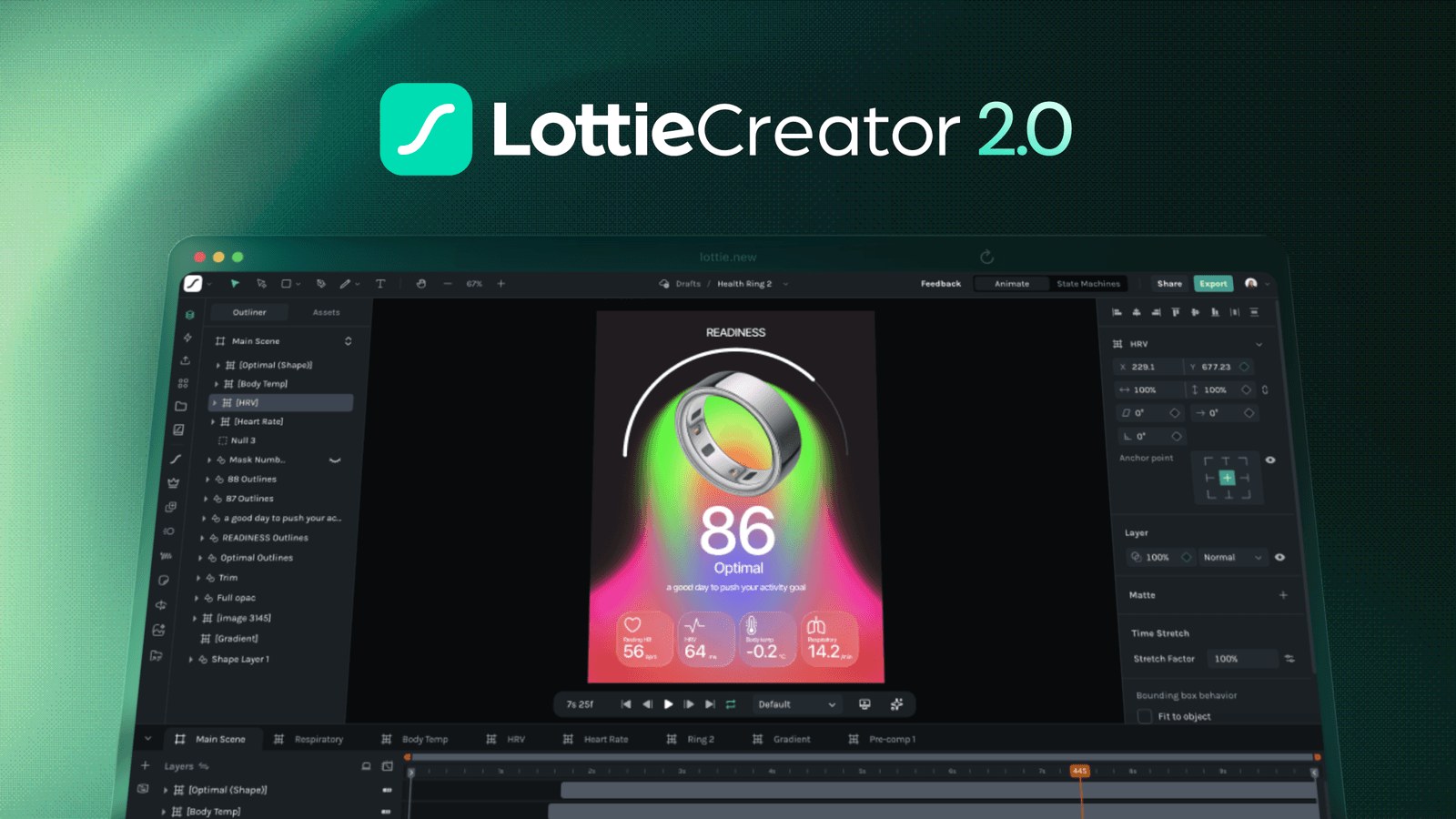
Lottie Creator 2.0 editor with a layer list, a phone-sized animation canvas, a properties panel and a keyframe timeline

Lottie Creator, the browser-based animation editor

What LottieFiles does

LottieFiles is a platform for making, finding and shipping Lottie animations, the small vector animation files used in apps and websites. It suits product designers, motion designers and developers who want lightweight motion. The free plan includes Lottie Creator and the free library, with tight download limits; paid plans start at $19.99 a month per user, billed annually. Students and educators in the UK can apply for a free annual Education Plan.

  • Lottie Creator

    A web-based animation editor for creating Lottie and dotLottie files without After Effects. It has a keyframe timeline, graph editor, masks, parenting, motion paths and SVG import, and exports to Lottie JSON, dotLottie, MP4, WebM, MOV and GIF.

  • Motion Copilot and AI tools

    Motion Copilot turns a written prompt into an editable animation with keyframes and shapes. Prompt to Vector makes vector graphics from text, and Raster to Vector converts images in the Figma plugin; paid plans include monthly AI credits.

  • State machines and motion tokens

    Lottie Creator can link animations with transitions triggered by clicks, hovers, data or events. Motion tokens expose text, colours and positions as variables, so one dotLottie file can change at runtime without separate versions.

  • Animation library

    LottieFiles says it hosts over 800,000 free and premium ready-to-use animations. Paid plans include the premium library of more than 600,000 animations, and free animations can be recoloured and edited.

  • Design tool plugins

    Plugins for Figma and Adobe After Effects create Lottie animations and save them to a LottieFiles workspace. Apps for Canva, Webflow and Framer let teams add their animations inside those tools.

  • Developer handoff and hosting

    Animations can be optimised to smaller dotLottie files, hosted on the LottieFiles CDN and embedded with asset links. Open-source dotLottie players cover the web, iOS, Android and Flutter.

  • Team workspace and asset management

    Team plans add shared files, version history, frame-by-frame comments, review statuses and roles. The asset manager previews Lottie, dotLottie, After Effects, Illustrator, Photoshop and common image files.

Works with

  • Adobe After Effects
  • Figma
  • Canva
  • Webflow
  • Framer
  • Adobe Premiere Pro
  • Adobe Animate
  • Sketch
  • ProtoPie
  • Origami Studio
  • WordPress
  • Elementor
  • Bubble
  • Wix
  • Notion
  • Medium
  • Ghost
  • Google Workspace
  • Microsoft Office
  • VS Code
  • React
  • iOS
  • Android
  • Flutter

How much LottieFiles costs

Free

Free

Free workspace with download and upload limits

  • Unlimited Lottie Creator files
  • Up to 5 public animation downloads per workspace
  • Up to 5 private file uploads, counted over time
  • Unlimited publishing to the public animation library
  • Unlimited previewing, testing and sharing
  • Basic edits to free animations

Individual

$19.99a month per user, billed yearly

Billed annually; for solo designers and freelancers, 1 editor

  • Unlimited file uploads
  • Lottie Creator
  • 600,000+ premium animation library
  • Optimised dotLottie and JSON formats
  • Lottie hosting with 10 GB of CDN
  • 2 GB of asset storage
  • 300 AI credits a month
  • Workspace access from After Effects, Figma, Webflow and Canva

Team

$24.99a month per user, billed yearly

Billed annually; 2 or more editors, unlimited viewers

  • Everything in Individual
  • Unlimited team files
  • Version history
  • Team comments and feedback
  • Custom brand palette
  • Team roles and permissions
  • 50 GB of CDN and 5 GB of asset storage
  • 600 AI credits a month

Team+

Contact sales

Priced by seats and usage; for teams of 5 to 50 editors and developers

  • Everything in Team
  • Motion System and motion templates
  • 50 GB of asset storage and 500 GB of CDN
  • 1,500 AI credits a month
  • Onboarding, training and priority support
  • SSO (SAML and SCIM) as an add-on

Enterprise

Contact sales

Book a call

  • Dedicated customer success manager
  • Invoicing and net terms
  • SSO (SAML and SCIM) included
  • Audit logs and API
  • Security, compliance and legal review
  • Priority support with an SLA

Prices are in US dollars per user a month, billed annually; no monthly billing or VAT is shown. A free annual Education Plan is open to students and educators in the UK and 15 other countries, for non-commercial use only. Prices in US dollars, from LottieFiles's pricing page on 11 October 2026. LottieFiles may charge VAT on top, and prices can change.

LottieFiles pros and cons

Pros

  • Lottie Creator files are unlimited on the free plan and don't count towards the 5 private file limit
  • The Individual plan at $19.99 a month (billed annually) includes Lottie Creator, the premium library of 600,000+ animations and 300 AI credits a month
  • Plugins for Figma, After Effects, Canva, Webflow and Framer keep animation work inside familiar tools
  • Optimised dotLottie files are up to 80% smaller by the maker's figures, with open-source players for web, iOS and Android
  • A free annual Education Plan covers students and educators in the UK for non-commercial work
  • Trustpilot reviewers repeatedly mention quick replies from customer support

Cons

  • Paid plans are billed annually only, so the Individual plan costs about $240 up front
  • The free plan allows only 5 public animation downloads and 5 private uploads per workspace, and deleting files doesn't restore the quota
  • Fees are non-refundable except where the law requires, with no prorated refund on cancelling, according to the Terms of Sale
  • Prices are in US dollars only, and the pricing page doesn't say how VAT is handled
  • The Android app scores 3.2 out of 5 on Google Play, well below the iPhone app
  • Team pricing starts at two editors at $24.99 each a month, billed annually

Good for

  • Product and UI designers adding small animations to apps and websites
  • Motion designers who build in After Effects or Figma and hand files to developers
  • Developers who need lightweight animations with players for web, iOS and Android
  • Students and educators in the UK who qualify for the free Education Plan

Look elsewhere if

  • Anyone who wants to pay month to month, as paid plans are billed annually
  • People who only want to download lots of free animation files, given the free plan's 5-download limit
  • Teams making interactive 3D scenes, which suit Spline better

What reviewers say about LottieFiles

“My #1 choice any time I need an animation for personal or professional use. The UI can be a bit confusing at times when trying to editing/modifying animations”

★★★★ · A UX/UI designer, looking for new tools, Product Hunt, 16 January 2024

“Lottie Files is definitely the best platform for (Web)Animations out there.”

★★★★★ · Trustpilot reviewer, Germany, Trustpilot, 13 November 2025

“Terrible pricing transparency, they advertise a monthly option but its actually billed yearly”

★ · Trustpilot reviewer, US, Trustpilot, 17 February 2026

What reviewers like

  • A very large library of ready-made animations that can be recoloured and reused
  • Moving animations from Figma or After Effects into a product with little friction
  • Small, scalable animation files that load quickly in apps and websites
  • Customer support that replies quickly and sorts out billing mistakes
  • Regular new features, such as Lottie Creator 2.0 and Motion Copilot

What reviewers complain about

  • Prices shown per month but charged for a full year up front
  • A cancellation flow some reviewers describe as designed to keep them subscribed
  • Free plan download limits that surprise people expecting free files
  • Bugs and a confusing interface when editing animations
  • Marketing emails after signing up

What members think

Rating LottieFiles

Not enough ratings yet. Shopped here? Yours helps the next person.

LottieFiles: what to know before you pay

What is LottieFiles and who is it for?

LottieFiles is a home for Lottie animations: a library of ready-made animations, a browser editor called Lottie Creator, plugins for design tools and a private workspace for teams. It is aimed at product designers, motion designers and the developers who put animation into apps and websites.

A Lottie file is a vector animation stored as JSON, and dotLottie is a compressed version of it. LottieFiles says its optimised dotLottie and JSON files can be up to 80% smaller, and it publishes open-source players for the web, iOS, Android and Flutter. The company says more than 16 million designers and developers use it.

How much does LottieFiles cost in the UK?

The free plan costs nothing, and the paid plans are priced in US dollars per user a month, billed annually. There is no pound price and the pricing page doesn't mention VAT.

  • Individual: $19.99 a month per user, one editor, 300 AI credits a month, 10 GB of CDN hosting and 2 GB of storage
  • Team: $24.99 a month per user, two or more editors, unlimited viewers, 600 AI credits and 50 GB of CDN hosting
  • Team+: priced by seats and usage after a call with sales, for 5 to 50 editors and developers
  • Enterprise: priced on request, with SSO, audit logs, invoicing and a dedicated success manager

Because every plan is billed for a year up front, an Individual plan costs about $240 at checkout rather than $19.99. Several Trustpilot reviewers say they expected a monthly charge and were billed for the year.

Is the LottieFiles free plan enough?

For trying Lottie Creator and testing animations, yes; for regular downloading, probably not. The help centre says a free workspace can download up to 5 public animations and upload up to 5 private files, and those limits count every upload over time, so deleting files doesn't free up space.

Files made in Lottie Creator don't count towards the private file limit, so the editor itself can be used without a cap. Free users can also publish unlimited animations to the public library through the After Effects and Figma plugins. Previewing, testing and sharing animations stay free.

LottieFiles vs Spline and Rive: which is better?

LottieFiles is the better choice when the job is 2D vector motion for apps and websites, especially if animations start in After Effects or Figma. Spline is built for interactive 3D scenes, and Rive uses its own file format and runtime for interactive 2D graphics with state machines.

LottieFiles has added its own state machines, motion tokens and multi-animation dotLottie files in Lottie Creator, so it now covers some of the interactive work Rive is known for. Teams building whole marketing sites may prefer Framer, which can play Lottie files through the LottieFiles integration.

Is LottieFiles worth paying for?

It is worth paying for when a team ships animation regularly and wants the premium library, CDN hosting, version history and comments in one place. A solo designer who only needs the occasional free animation may manage on the free plan.

Reviewers on Product Hunt most often praise the size of the animation library and how quickly animations move from Figma or After Effects into a product. The complaints on Trustpilot are mostly about billing: annual-only plans, the cancellation flow and download limits that surprise people expecting free files. Several Trustpilot reviewers also say support answered quickly and sorted out accidental charges.

How do you get LottieFiles cheaper?

The main way to pay less is the free Education Plan, if you qualify. LottieFiles offers it to students and educators over 13 at educational institutions in the UK and 15 other countries, and it upgrades one workspace for a year.

The Education Plan leaves out premium animations and the file optimiser, and it is for personal and educational use only, so client and company work need a paid plan. Outside that, the cheapest route is to stay on the free plan and build animations in Lottie Creator, which has no file limit, and to choose Individual rather than Team when only one person edits.

Alternatives to LottieFiles

Every design & creative ai tool →
  • Free plan

    Spline

    Browser-based 3D design tool for interactive web and app scenes, with a 2D canvas and an AI agent

    Free plan · from $12 a month per seat 4.6 on Product Hunt (31)
  • Free plan

    Framer

    Visual website builder with an AI design agent, CMS, hosting, analytics and A/B testing in one workspace

    Free plan · from $10 a month per site 4.8 on Product Hunt (263)
  • Free plan

    FLORA

    Node-based AI canvas that chains text, image, video, audio and 3D models into reusable creative workflows

    Free plan · from $14.40 a month per seat

Questions about LottieFiles

Are there any LottieFiles discount codes?

We don't currently list a confirmed discount code. That doesn't mean the store has no promotions; check its website for current prices.

Can I pay for LottieFiles monthly?

The pricing page shows every paid plan as a price per user a month, billed annually, and doesn't offer a monthly billing option. The Terms of Sale describe an annual membership that renews automatically.

Can I cancel LottieFiles and get a refund?

You can cancel from your account or by emailing [email protected], and the plan stays active until the end of the term. The Terms of Sale say fees are non-refundable except where the law requires, with no prorated refund for cancelling early.

Does LottieFiles add VAT for UK customers?

The pricing page lists prices in US dollars and doesn't mention VAT. The Terms of Sale say fees are payable together with any applicable taxes, so the checkout total can be higher than the headline price.

Which devices does LottieFiles work on?

LottieFiles and Lottie Creator run in a web browser, and there are LottieFiles apps for iPhone, iPad and Android plus a desktop app for previewing files. Plugins add it to Figma, After Effects, Canva, Webflow and Framer.

Do Lottie Creator files count towards the free plan limit?

No. The help centre says files created and saved in Lottie Creator don't count towards the 5 private file limit, so free users can save as many as they like.

Can I use the Education Plan for client work?

No. LottieFiles says the Education Plan is strictly for personal and educational use, and commercial work such as adverts, paid client projects and corporate communications needs a Team or Enterprise plan.

Cookie settings

These choices apply to this browser. They do not change your email subscription.

Essential: always on. Used for editor sessions and remembering this choice.