Vouchernaut Weekly

The week, sorted.

One email every Thursday at 7am, free. Here's what's in it:

  • New guides
  • Real price drops
  • Fresh codes
  • Sales ahead
Add stories from the magazineOptional
Stories to add

Pause or stop it from any email. I never sell or share your address. See this week's · Privacy

  1. Software
  2. Screen recording & video
  3. Medal
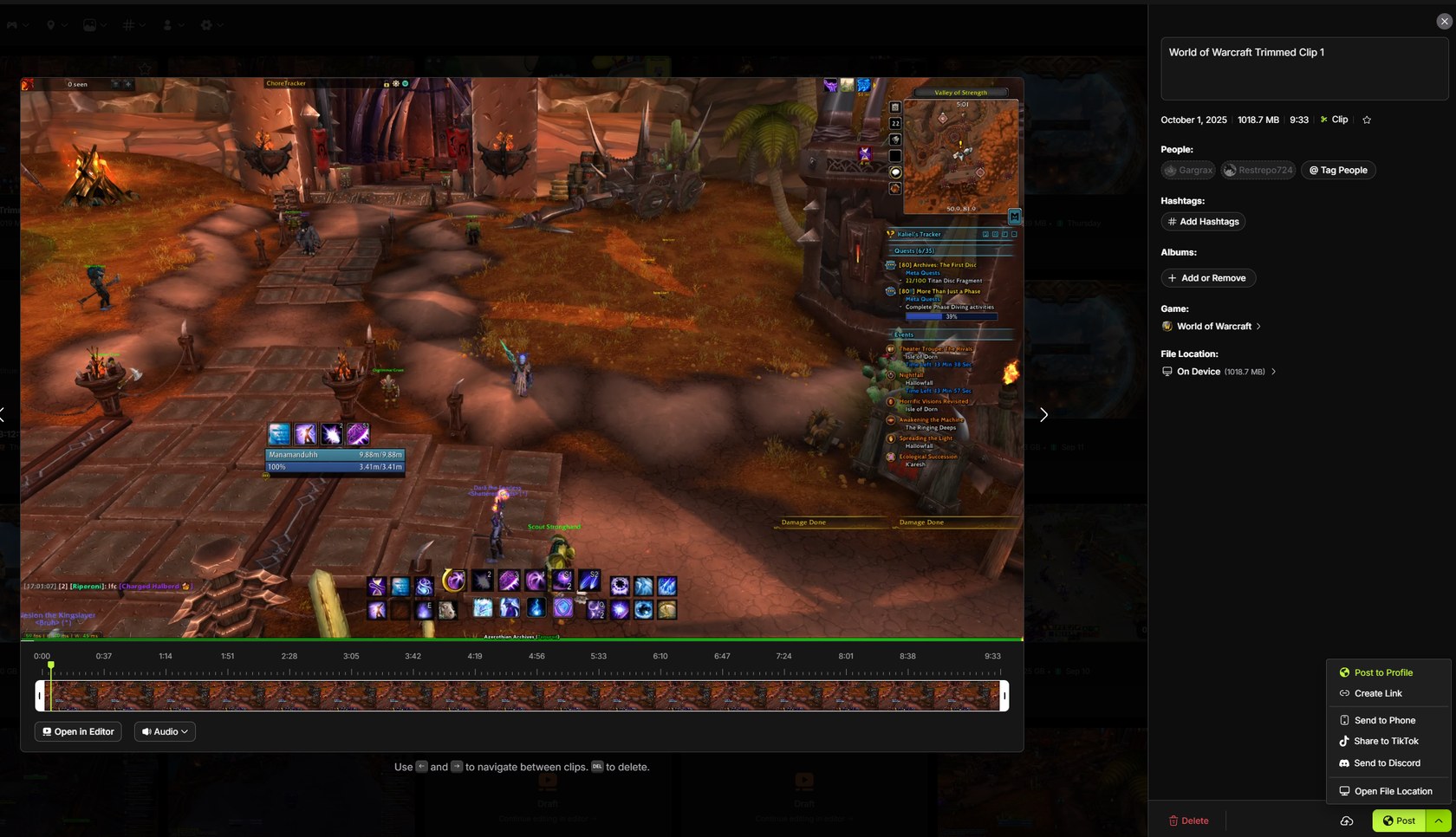
Medal desktop editor trimming a World of Warcraft clip, with a timeline under the video and sharing options on the right

Trimming a clip in the Windows app

Free game clipping app that saves your best PC gameplay moments with a hotkey and turns them into shareable links

from£6.42a month, billed yearly

Medal has a free plan and a 14-day free trial (card needed). Prices in pounds as Medal's pricing page showed them on 11 October 2026.

  • Windows
  • iPhone and iPad
  • Android

What Medal does

Medal is a free game clipping app for Windows PCs, with iPhone and Android apps for watching and sharing clips. It records in the background and saves the last few seconds or minutes of play when you press a hotkey, ready to share as a link. The free plan covers clipping, editing and sharing. Premium removes ads and watermarks and lifts upload limits for £7.99 a month or £76.99 a year.

  • Background clipping

    Medal keeps recording while you play and saves the last 15 seconds, a minute, 10 minutes or the whole session when you press a hotkey. It says it supports any PC game.

  • Automatic clips

    In supported games such as Valorant, League of Legends, Fortnite and Counter-Strike, Medal detects events like kills and clips them without a key press.

  • Quality settings

    Records up to 4K at 144fps, with 60fps by default, using H.264, H.265 or AV1 on Nvidia, AMD or Intel graphics, or the processor.

  • Multi-track audio

    Game sound, your microphone and Discord voice are recorded separately, so you can balance or mute each one afterwards.

  • Editor and instant links

    Trim clips, add stickers and build montages in the Medal editor, then share a link straight away or post to your Medal profile.

  • Phone apps

    The iPhone and Android apps show your PC clips, friends' posts and trending clips, and let you post or send clips from your phone. The Android app can also record mobile games.

  • Discord bot and SDK

    A Medal Discord bot shares clips into servers, and a game developer SDK lets studios add clipping to their games.

Works with

  • Discord
  • Roblox
  • TikTok
  • Instagram
  • X (Twitter)
  • YouTube

How much Medal costs

Billing

Free

Free

Clip, edit, upload and share with ads

  • Background recording of any PC game
  • Uploads up to 20 minutes long
  • Uploads up to 1080p at 60fps
  • Built-in editor and share links
  • Watermarks and outros on downloads
  • No Medal Cloud sync

Premium

£7.99a month

£76.99 a year on the UK App Store, where it's called Medal Gold

  • No ads
  • Unlimited upload length
  • Original quality uploads up to 4K and 144fps
  • Unlimited Medal Cloud storage and sync
  • Share links that don't expire
  • Removable watermarks
  • Auto-generated subtitles in the editor
  • GIF avatars, banners and custom hotkey sounds

Prices from the UK App Store, VAT included; Medal's own Premium page shows no price. The store also lists a second price point of £6.99 a month and £69.99 a year. Prices in pounds, from Medal's pricing page on 11 October 2026. Medal may charge VAT on top, and prices can change.

Medal pros and cons

Pros

  • The free plan covers clipping, editing, uploading and sharing, with uploads up to 20 minutes
  • Works with Nvidia, AMD and Intel graphics, unlike ShadowPlay
  • Records game, microphone and Discord audio on separate tracks
  • Rated 4.7 on the UK App Store and 4.8 on Google Play
  • Premium is cheaper on annual billing: £76.99 a year against £95.88 paid monthly

Cons

  • Free uploads are capped at 1080p and 60fps, and downloads carry a watermark
  • Cloud sync and links that don't expire need Premium
  • No Mac app
  • Trustpilot reviewers report missing clips, overlay crashes and an app that is hard to uninstall
  • Premium's price isn't shown on Medal's own website

Good for

  • PC gamers who want to save and share highlights without recording whole sessions
  • Players on AMD or Intel graphics who can't use Nvidia's ShadowPlay
  • Friends who share clips in Discord and want instant links
  • Roblox and Fortnite players who want a social feed of clips from friends

Look elsewhere if

  • Mac users, as the desktop app is Windows only
  • Streamers who need full broadcast software such as OBS
  • Anyone who wants a recorder with no social network or account attached

What reviewers say about Medal

“Medal is a great platform because it's simple and effective to use.”

★★★★ · Trustpilot reviewer, Ireland, Trustpilot, 11 October 2026

“It's pretty good. Only wish it didnt lock my fps.”

★★★★ · Trustpilot reviewer, United States, Trustpilot, 26 September 2026

“no changes can make it somewhat decent nor usable.”

★ · Trustpilot reviewer, Italy, Trustpilot, 25 September 2026

What reviewers like

  • Clipping and sharing a moment takes a single key press
  • Quick, helpful replies from Medal's support team
  • Automatic clips catch moments players would have missed
  • Being able to post long clips without paying

What reviewers complain about

  • Clips that go missing or fail to save
  • Overlay updates that crash or slow games
  • Free uploads locked to 1080p and 60fps
  • An app that launches with Windows and is hard to remove

What members think

Rating Medal

Not enough ratings yet. Shopped here? Yours helps the next person.

Medal: what to know before you pay

What is Medal and how does it work?

Medal is a game clipping app: it records your PC gameplay in the background and saves a clip when you press a hotkey, so you only keep the moments worth sharing.

You choose how far back a clip reaches, from the last 15 seconds to a whole session. Medal says it works with any PC game and with Nvidia, AMD and Intel graphics cards, records up to 4K at 144fps (60fps by default), and uses 100 to 400MB of memory while it runs. In supported games such as Valorant, League of Legends, Fortnite and Counter-Strike it can clip automatically when something happens, such as a multi-kill. Each clip gets a link you can paste into Discord or a group chat, and the phone apps let you watch, trim and post clips you made on your PC.

Is Medal free?

Yes. Medal's own Premium page says all free users can download, clip, edit, upload, share and watch posted clips from any device.

The free plan has limits, set out in Medal's Cloud FAQ:

  • Uploads up to 20 minutes long, at up to 1080p and 60fps
  • No Medal Cloud sync for backing up your library
  • Watermarks and outros that can't be removed from downloads
  • Adverts in the app

Private share links on the free plan expire after 14 days, according to Medal's help pages, while Premium links stay up as long as the clip stays in the cloud.

How much does Medal Premium cost in the UK?

Medal doesn't print a price on its Premium page, but the UK App Store lists the subscription (called Medal Gold there) at £7.99 a month or £76.99 a year, which works out at about £6.42 a month.

The store also lists a second price of £6.99 a month and £69.99 a year, so the price you're offered may vary. Premium is billed monthly or yearly and starts with a 14-day free trial, one per account. On the desktop app Medal takes a small test charge to check your card and refunds it. Prices on the desktop checkout may differ from the App Store, so it's worth comparing before you subscribe.

Is Medal Premium worth paying for?

Premium is worth it if you upload long clips or want to keep your library in the cloud; for occasional clipping and sharing with friends the free plan is enough.

Premium adds unlimited upload length, uploads up to 4K and 144fps in original quality, unlimited Medal Cloud storage, links that don't expire, removable watermarks, auto-generated subtitles in the editor and no ads. The rest of the perks are profile cosmetics: GIF avatars and banners, custom hotkey sounds, an animated background and a premium badge. If you mainly clip for Discord and never download clips for YouTube or TikTok, the watermark and quality limits matter less.

Medal vs Nvidia ShadowPlay and Outplayed: which is better?

Medal suits players who want clipping, editing and sharing in one free app on any graphics card; ShadowPlay suits Nvidia owners who only want a lightweight instant replay.

ShadowPlay, part of Nvidia's own software, only works with Nvidia graphics cards and saves clips to your PC with no sharing network around them. Outplayed, which runs inside the Overwolf platform, focuses on automatically recording highlights. Medal's extra pull is its social side: a feed of friends' clips, instant links, a Discord bot and phone apps. Trustpilot reviewers who left Medal mention missed or vanished clips and overlay crashes, so if reliability in one particular game matters most, it's worth comparing the apps on your own PC.

Is Medal safe to install?

Medal is made by Medal B.V., a Dutch company, and is listed on the App Store and Google Play; the most common complaint about the desktop app is how hard it is to get rid of.

Some Trustpilot reviewers say the desktop app is hard to uninstall and keeps starting with Windows, so it's worth checking its startup settings after installing. Clips you post publicly can be seen by anyone, so check a clip's privacy setting before sharing.

  • Free plan

    Cap

    Open source screen recorder for Mac, Windows and Linux with instant share links, a built-in editor and self-hosting
    Free plan · from $2.42 a month per user 3.9 on Product Hunt (8)
  • CleanShot X

    Mac app for screenshots and screen recordings with annotation, scrolling capture, OCR, a video editor and cloud sharing

    from $10 a month per user 4.9 on Product Hunt (55)
  • Tella

    Screen recorder and video editor for Mac, Windows and Chrome, with AI editing, video hosting and viewer analytics

    7-day free trial · from $13 a month per user 4.8 on Chrome Web Store (67)

Questions about Medal

Are there any Medal discount codes?

We don't currently list a confirmed discount code. That doesn't mean the store has no promotions; check its website for current prices.

Does Medal work on Mac or PlayStation?

Medal's desktop app is for Windows PCs; it doesn't offer a Mac app. It can't capture consoles directly, but you can import console captures into Medal to edit and share them.

How do I cancel Medal Premium?

On desktop, go to Settings, then Subscription Billing, then Manage Subscription and Cancel plan. If you subscribed through Google Play or the App Store, cancel there. Cancelling within the 14-day trial means you aren't charged.

Can I get a refund on Medal Premium?

Medal's help centre says Android refunds go through a support ticket with your Google Play order number, and iPhone refunds go through Apple's own refund process.

Does Medal slow down games?

Medal says it uses 100 to 400MB of memory and can record with your graphics card's encoder (Nvidia, AMD or Intel) to keep the load low. Some reviewers still report a frame rate hit or overlay crashes in particular games.

Do Medal share links expire?

Private share links on the free plan expire after 14 days. With Premium, links don't expire as long as the clip stays in Medal Cloud.

Cookie settings

These choices apply to this browser. They do not change your email subscription.

Essential: always on. Used for editor sessions and remembering this choice.