Vouchernaut Weekly

The week, sorted.

One email every Thursday at 7am, free. Here's what's in it:

  • New guides
  • Real price drops
  • Fresh codes
  • Sales ahead
Add stories from the magazineOptional
Stories to add

Pause or stop it from any email. I never sell or share your address. See this week's · Privacy

  1. Software
  2. Design & creative AI
  3. Spline
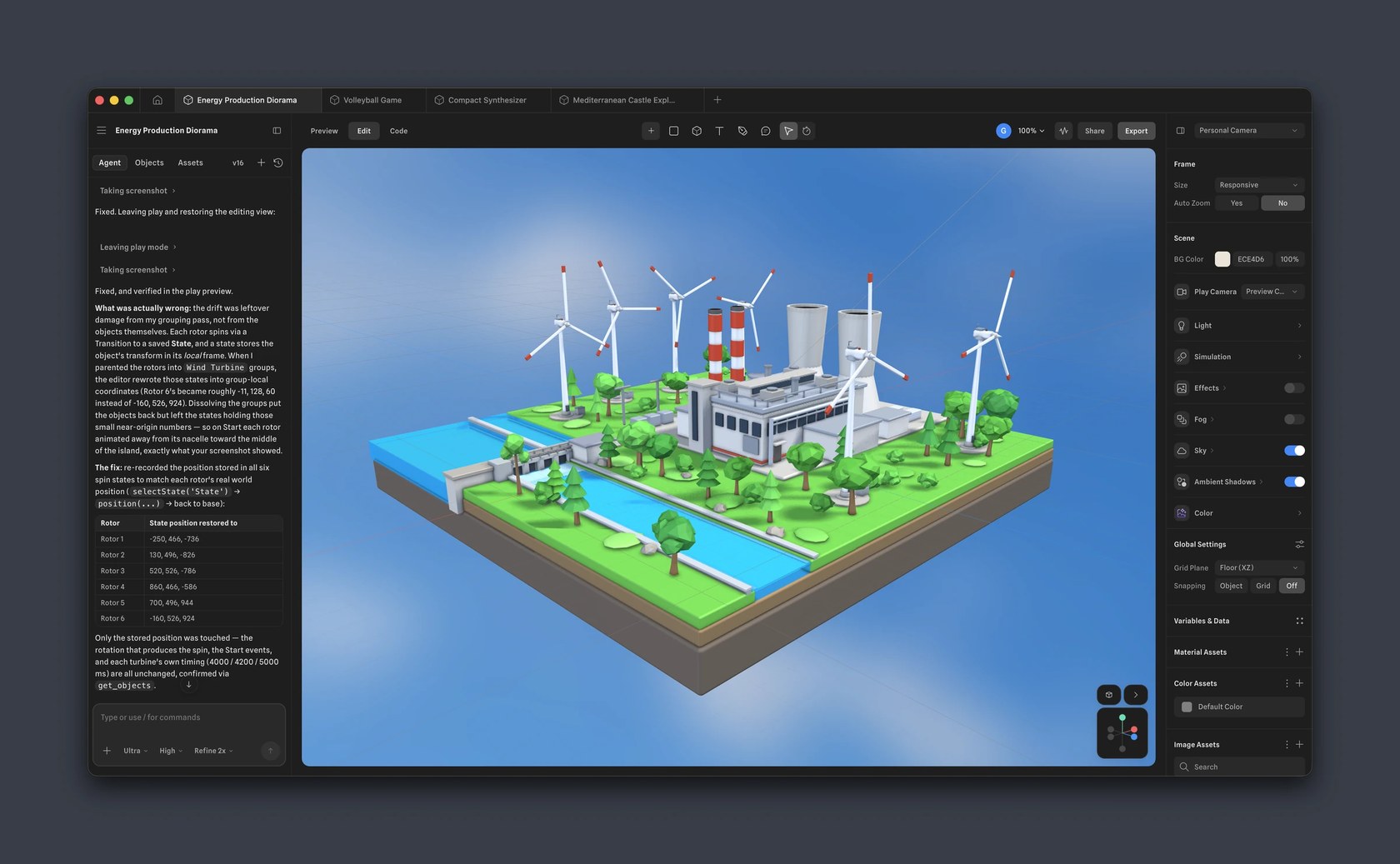
Spline 3D editor with the AI agent chat on the left, a low-poly power station scene in the middle and scene settings on the right

The 3D editor with the AI agent panel

Browser-based 3D design tool for interactive web and app scenes, with a 2D canvas and an AI agent

from$12a month per seat, billed yearly

Spline has a free plan. Prices in US dollars as Spline's pricing page showed them on 11 October 2026.

  • Web
  • Mac
  • Windows

What Spline does

Spline is a browser-based 3D design tool for making interactive scenes, animations and 3D models for websites and apps, with a 2D canvas called Hana and an AI agent built in. It suits web and product designers more than film or game artists. A free plan exists, and paid plans start at $15 a month per seat, or $12 a month billed yearly. Students and educators can apply for an education discount.

  • 3D modelling in the browser

    Parametric objects, polygonal editing, booleans, sculpting and 3D vector editing, with real-time rendering on WebGPU and a WebGL fallback. Components support reusable 3D design systems.

  • Layer-based materials

    Materials are built by stacking layers such as glass, fresnel and displace instead of writing shaders, with a ready-made material library, PBR and HDRi lighting, video textures and post-processing like bloom and depth of field.

  • Interactivity, animation and physics

    States and events make objects respond to clicks, scrolling, keys and collisions. Timeline animation, conditional actions, drag and drop, physics, particles and first- or third-person game controls work without code.

  • Variables, APIs and webhooks

    Scenes can pull in real-time data through variables, API requests and webhooks, so what a scene shows can change with live information. Pro removes the limits on these.

  • AI agent and AI 3D generation

    An AI agent builds and edits scenes and writes code from a description, and AI generation makes 3D models from a text prompt or an image. A Spline MCP server lets Claude, Cursor and Codex drive the editor through the desktop app.

  • Hana 2D canvas

    A collaborative canvas for interfaces and motion with frames, auto layout, vector networks and booleans, effects such as shadows, blurs, noise and glass, and states and transitions for interactive prototypes.

  • Exports and embeds

    Scenes publish to a public URL or embed in Webflow, Framer, Wix Studio, React and Next.js, and export for Apple and Android apps. Files export as JPG or PNG, MP4 or GIF, GLTF or USDZ, plus code export for React.

  • Real-time collaboration

    Several people can edit the same file at once, with permissions, comments, team libraries, and teams, projects and folders to organise work.

Works with

  • Webflow
  • Framer
  • Wix Studio
  • React
  • Next.js
  • Swift (Apple)
  • Kotlin (Android)
  • Figma (copy and paste into Hana)
  • Claude
  • Cursor
  • Codex
  • Apple Vision Pro (Spline Mirror)

How much Spline costs

Billing

Free

Free

  • Limited personal files
  • Unlimited file viewers
  • Web exports with a Spline watermark
  • Spline library and templates
  • Publish scenes with a Spline logo

Hobby

$15a month per seat

2,000 AI credits a month

  • Everything in Free
  • Unlimited 3D and 2D files
  • Web exports without a watermark
  • Video upload
  • Higher-resolution image exports
  • Material and audio libraries

Pro

$30a month per seat

3,000 AI credits a month

  • Everything in Hobby
  • Unlimited folders, projects and scenes per file
  • Video export
  • Apple and Android exports
  • Audio upload
  • Unlimited variables, APIs and webhooks
  • No watermark on 2D web embeds

Max

$70a month per seat

10,000 AI credits a month

  • Everything in Pro
  • 5x more media generation a week
  • 100MB maximum video size
  • Higher MCP tool call limits
  • Priority support

Enterprise

Contact sales

Custom pricing, billed yearly

  • Everything in Max
  • Centralised licensing and billing
  • Multiple teams with team privacy
  • SAML single sign-on
  • Code and self-hosted exports
  • File version history
  • Team library
  • Custom onboarding and training

Prices in US dollars per seat; VAT is not mentioned. Yearly billing saves up to 20%. Extra AI credits cost $5 a month per 1,000. Students and educators can apply for an education discount. Prices in US dollars, from Spline's pricing page on 11 October 2026. Spline may charge VAT on top, and prices can change.

Spline pros and cons

Pros

  • Free plan includes unlimited file viewers, templates and the community library
  • Runs in the browser with desktop apps for Mac and Windows, so nothing needs installing to start
  • Short embed snippets for Webflow, Framer, Wix Studio, React and Next.js
  • Interactivity, physics and timeline animation without writing code
  • Yearly billing cuts every plan by up to 20%, so Hobby drops from $15 to $12 a month
  • Every paid plan includes AI credits: 2,000 a month on Hobby, 3,000 on Pro and 10,000 on Max

Cons

  • Prices are in US dollars only and the pricing page gives no VAT information
  • Free plan web exports carry a Spline watermark and personal files are limited
  • Apple and Android exports and video export need Pro at $25 to $30 a month per seat
  • No prorated refunds after a new billing cycle starts, and several Trustpilot reviewers complain of unrefunded renewals
  • AI credits reset each billing cycle and unused ones are lost
  • Reviewers report a learning curve for people new to 3D and slowdowns on complex scenes

Good for

  • Web and product designers adding interactive 3D to sites built in Webflow, Framer or React
  • Designers new to 3D who want a browser tool with a familiar design-app layout
  • Small teams that want to work on the same 3D file together in real time
  • Brand and marketing teams making 3D icons, mockups and animated hero scenes

Look elsewhere if

  • Film, VFX or game studios that need a full production 3D pipeline
  • Projects with very heavy, detailed models, which reviewers say slow the editor down
  • Anyone who wants a refund option after a renewal: payments are not prorated once a new cycle starts

What reviewers say about Spline

“Best 3D design tool for beginners. Very easy to learn and can also create simple games with no coding required.”

“Still a drastic learning curve for non 3D folk.”

“Nonexistent and frustrating customer service”

What reviewers like

  • Quick to pick up for designers with no 3D background
  • Works in the browser with real-time collaboration
  • Animation and interactivity without writing code
  • Straightforward way to get 3D onto a website

What reviewers complain about

  • Renewal charges and a strict no-refund policy
  • Slow or unhelpful customer service replies
  • Still a learning curve for people new to 3D
  • Slowdowns and inconsistent rendering on complex scenes
  • Less depth than desktop 3D software for professional work

What members think

Rating Spline

Not enough ratings yet. Shopped here? Yours helps the next person.

Spline: what to know before you pay

What is Spline 3D used for?

Spline is used to design interactive 3D scenes, 3D icons, product mockups and animated characters that run in a web browser or an app. It is a design tool first, made for people who build websites and digital products rather than film or games.

Everything happens in the browser, or in Spline's desktop apps for Mac and Windows. Scenes start from primitives and are shaped with booleans, sculpting and 3D vector editing, then given layered materials, lighting and animation. States and events make objects react to clicks, scrolling, keys and collisions, while physics, particles and game controls cover simple playable experiences. A finished scene publishes to a public link or embeds in Webflow, Framer, Wix Studio, React or Next.js with a short snippet. Spline also includes Hana, a 2D canvas for interface and motion design, and an AI agent that builds and edits scenes from a written description.

How much does Spline cost in the UK?

Spline has a free plan, and paid plans cost $12 to $60 a month per seat billed yearly, or $15 to $70 billed monthly. Prices are shown in US dollars only and the pricing page says nothing about VAT, so the amount on a UK card statement depends on the exchange rate.

  • Free: limited personal files, unlimited viewers, web exports with a Spline watermark
  • Hobby, $15 a month or $12 billed yearly: unlimited 3D and 2D files, no watermark on web exports, 2,000 AI credits a month
  • Pro, $30 a month or $25 billed yearly: unlimited projects and scenes, video export, Apple and Android exports, unlimited variables, APIs and webhooks, 3,000 AI credits
  • Max, $70 a month or $60 billed yearly: 10,000 AI credits, more media generation each week and priority support
  • Enterprise: custom pricing billed yearly, with SAML single sign-on, code and self-hosted exports and version history

Is Spline worth paying for?

For a designer who needs to put 3D on a live website, Hobby is the plan that matters, because it removes the watermark from web exports. Pro earns its higher price only for Apple and Android exports, video export or scenes that pull in live data.

On Product Hunt, Spline holds 4.6 out of 5 from 31 reviews, and reviewers there praise how quickly beginners get going and how easily 3D reaches the web. Some still describe a steep learning curve for people with no 3D background, and other reviewers mention slow performance on complex models and inconsistent rendering. Its Trustpilot page is small, with six reviews, and those focus on renewal charges and refunds rather than the editor itself.

Spline vs Blender: which should you use?

Spline suits interactive 3D for websites and apps, while Blender suits detailed modelling, rendering and animation for film, games and print. Blender is free and open source but runs as a desktop program with a much steeper learning curve, and its output needs extra work before it runs interactively in a browser.

Among other design tools, LottieFiles is the closer match for lightweight 2D animations on websites and apps, and FLORA for AI image and video generation on a canvas. Framer builds whole websites and is one of the site builders Spline scenes embed into, so the two are often used together rather than instead of each other.

What should you check before subscribing to Spline?

The main thing to know is that Spline does not give prorated refunds once a new billing cycle has started. Cancelling from account settings keeps the plan running until the end of the period already paid for.

Several Trustpilot reviewers say they were charged for a renewal they had forgotten about and could not get the money back, so the renewal date is worth noting, especially on a yearly plan. AI credits reset every billing cycle and do not roll over, and extra credits cost $5 a month for each 1,000.

How do you get Spline cheaper?

Yearly billing is the main saving: it cuts each plan by up to 20%, for example $144 a year for Hobby instead of $180 paid month by month. Students and educators can apply for an education discount using an education email and proof of status, and Spline approves the application before the upgrade; the page does not state the size of the discount.

The free plan also goes a long way for learning, with templates, the community library and unlimited viewers. Spline lists no free trial of its paid plans, apart from a trial of Enterprise on request.

  • Free plan

    LottieFiles

    Lottie animation platform: a free and premium animation library, the Lottie Creator web editor and plugins for Figma and After Effects

    Free plan · from $19.99 a month per user 3.2 on Google Play (446)
  • Free plan

    FLORA

    Node-based AI canvas that chains text, image, video, audio and 3D models into reusable creative workflows

    Free plan · from $14.40 a month per seat
  • Free plan

    Framer

    Visual website builder with an AI design agent, CMS, hosting, analytics and A/B testing in one workspace

    Free plan · from $10 a month per site 4.8 on Product Hunt (263)

Questions about Spline

Are there any Spline discount codes?

We don't currently list a confirmed discount code. That doesn't mean the store has no promotions; check its website for current prices.

What are the limits of Spline's free plan?

The free plan allows a limited number of personal files, and web exports and published scenes carry a Spline watermark or logo. It includes unlimited file viewers and access to the Spline library and templates.

Can you get a refund from Spline?

Spline's pricing page says it does not give prorated refunds if you cancel after a new billing cycle has started. Cancelling from account settings keeps your plan benefits until the end of the current billing period.

Does Spline work on Mac and Windows?

Yes. Spline runs in a web browser and also has desktop apps for Mac and Windows. Spline Mirror, a separate app, shows Spline designs on Apple Vision Pro.

What are Spline AI credits used for?

AI credits pay for features such as the AI agent, AI 3D generation, texture and image generation, background removal and image upscaling. Hobby includes 2,000 a month, Pro 3,000 and Max 10,000, and unused credits do not roll over.

Which file formats can Spline export?

Spline exports images as JPG or PNG, video as MP4 or GIF, and 3D files as GLTF or USDZ, with USDZ and STL export on Pro. Scenes can also be published as a public link or embedded in a website.

Does Spline charge VAT in the UK?

The pricing page lists prices in US dollars and does not mention VAT or other taxes. The final charge on a UK card depends on the exchange rate and any non-sterling fee from your card provider.

Cookie settings

These choices apply to this browser. They do not change your email subscription.

Essential: always on. Used for editor sessions and remembering this choice.