
10%off
10% off your first 12 months of Supercut
Deal
Terms and conditions
New Supercut customers who sign up through our link get 10% off for their first 12 months. It's applied at checkout for anyone arriving through the link: no code needed.
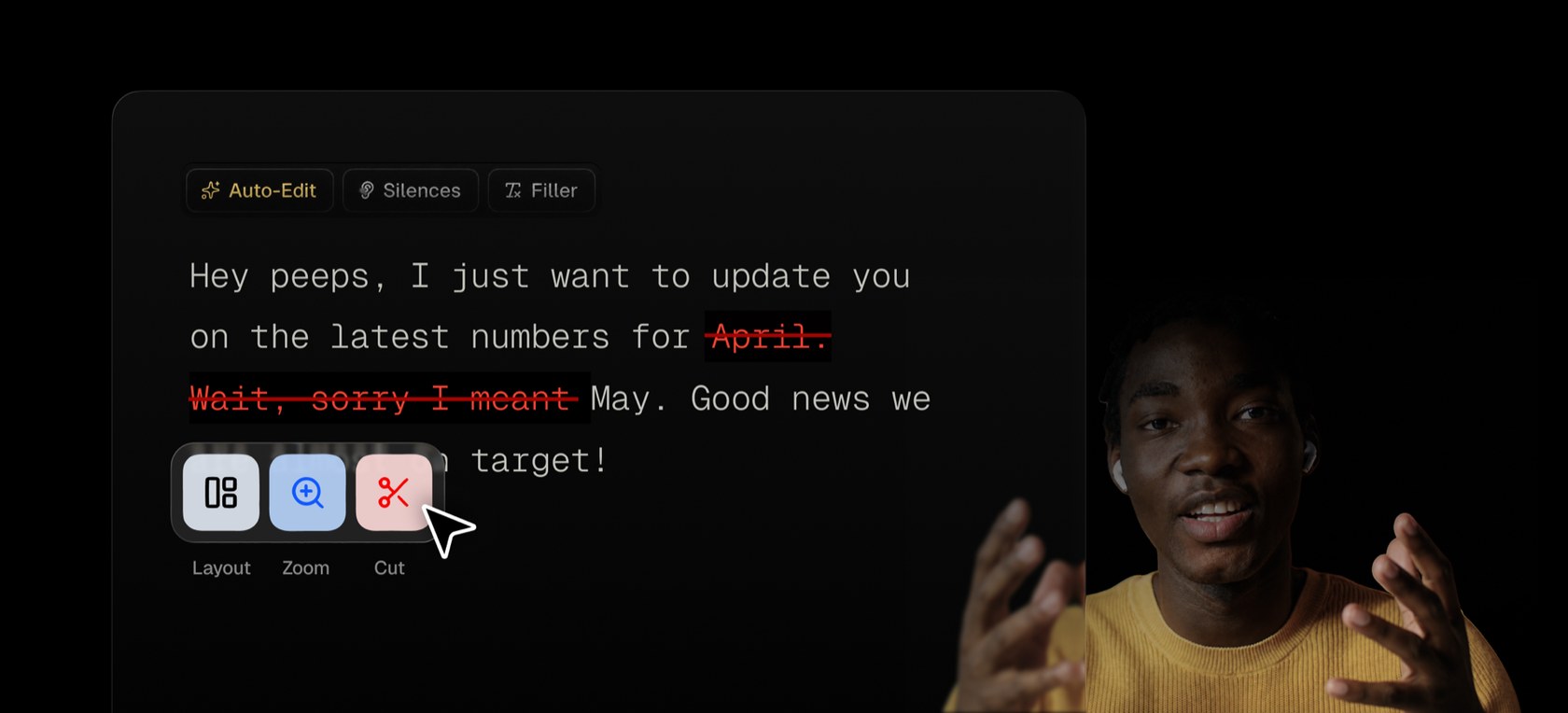
Auto-Edit cutting mistakes, silences and filler words

Screen recorder for team video messages on Mac and Windows, with AI auto-editing, chapters, summaries and an MCP server
Supercut has a 14-day free trial with no card needed. Prices in US dollars as Supercut's pricing page showed them on 11 October 2026.
Vouchernaut may earn commission when you sign up through links on this page. It never changes what we say about a product or the order we list them in.
10%off
Deal
New Supercut customers who sign up through our link get 10% off for their first 12 months. It's applied at checkout for anyone arriving through the link: no code needed.
This is Supercut, a screen recorder for team video messages, made by Float Labs. You record your screen and camera, get an edited, shareable link, and it comes with AI chapters and summaries.
Apps for macOS 14+ and Windows 10+ record screen, window or area, camera and system sound in up to 4K, with an annotation tool and keyboard shortcuts. A Chrome extension records screen and microphone at up to 1080p.
Screen and camera are recorded separately, so you can switch between Bubble, Cutout, Split, camera-only and screen-only at any point, with virtual backgrounds and background removal.
Removes mistakes, silences and filler words automatically, alongside trimming, zooms, redaction, background noise removal and volume balancing.
Every recording gets a transcript, captions, an AI title, summary and chapters the moment you stop. Viewers can ask the AI assistant questions about the video without a paid seat.
Share by link, email or embed with your logo, colours, fonts and custom domain, plus calls to action, forms, comments and reactions, password protection and expiry dates.
Supercut's MCP server gives AI agents such as Claude, Cursor and Codex access to recordings, transcripts and frames, so a recorded bug can become a Linear ticket or a walkthrough a Notion page.
Paste a Loom video or folder link and the videos arrive in Supercut with their titles, transcripts, summaries and chapters, though imported videos can't use the editor.
SOC 2 Type II and ISO 27001 on every plan, GDPR and UK GDPR, EU storage on AWS in Ireland by default, and no AI training on customer content.
Works with
$18a month per seat
$180 a seat billed yearly; viewers are free
Contact sales
Custom pricing, annual billing only
Prices shown in US dollars; VAT not mentioned. Teams switching from Loom get Supercut Pro free until their Loom term ends. Fees are non-refundable unless stated otherwise. Prices in US dollars, from Supercut's pricing page on 11 October 2026. Supercut may charge VAT on top, and prices can change.
“I love how I can just record and send, and the AI takes care of titles and descriptions etc.”
“would love to see a mode similar to screen studio, with zooms on typing and cursor movement.”
“The easiest and fastest recording product I've ever used”
Supercut is a screen and camera recorder for business communication: product updates, bug reports, sales follow-ups, demos and how-tos. You record with the native Mac or Windows app, up to 4K, and share the result by link, email or embed as soon as you stop. A Chrome extension covers computers where you can't install the app.
It tidies videos for you. Auto-Edit removes mistakes, silences and filler words, and each recording gets an AI title, summary, chapters and transcript. You can then add zooms, your logo, calls to action and forms, or leave it as it is.
Supercut is paid per seat, with a Pro plan and an Enterprise plan for larger organisations that need things like SSO. Pro includes the recording, editing, AI and sharing features. There is no permanent free plan, but a free trial lets you try the full product without a card. Viewers don't need a seat, only the people recording. See the pricing page for the current plans.
It is built for product, sales and support teams who send plenty of async video and want it to look polished. Companies that need extra security controls can use the Enterprise plan, and the company says it holds SOC 2 and ISO 27001 certification. Supercut positions itself as an alternative to Loom, aimed at teams who want videos that look professional and AI features on every plan, and it has offered teams moving over from Loom free use until their Loom plan ends. Check the Loom offer page for the current terms.
Start with the free trial: it covers the full product, so you can see whether it fits your team before paying anything. If you subscribe, any live code is listed on this page for you to use at checkout. Teams moving from Loom should also look at Supercut's switching offer, which is set out on its own page.

Screen recorder and video editor for Mac, Windows and Chrome, with AI editing, video hosting and viewer analytics
 Free plan
Open source screen recorder for Mac, Windows and Linux with instant share links, a built-in editor and self-hosting
Mac app for screenshots and screen recordings with annotation, scrolling capture, OCR, a video editor and cloud sharing
 Free plan
Mac screen recorder that turns recordings into product demo videos with auto zoom, 3D mockups, animated text and AI voiceovers
macOS 27 can record your Mac's sound for free. I'd start there, then pay only if you need scrolling screenshots, a share link or a proper editor.
We don't currently list a confirmed discount code. That doesn't mean the store has no promotions; check its website for current prices.
Yes. Supercut presents itself as an alternative to Loom, with native recording, automatic editing and AI summaries. It has also run an offer for teams switching over.
No permanent free plan, but there is a free trial of the full product and it doesn't ask for a card.
Yes. It has native apps for both, and a Chrome extension for other computers with more limited recording.
No. Viewers are free, so only the people who record and publish need a seat.
Yes. Auto-Edit removes mistakes, silences and filler words, and each video gets an AI title, summary, chapters and transcript.
Got a question about Supercut?
