
40%off
40% off your first 6 months of Superwhisper
Deal
Terms and conditions
New Superwhisper customers who sign up through our link get 40% off for their first 6 months. It's applied at checkout for anyone arriving through the link: no code needed.
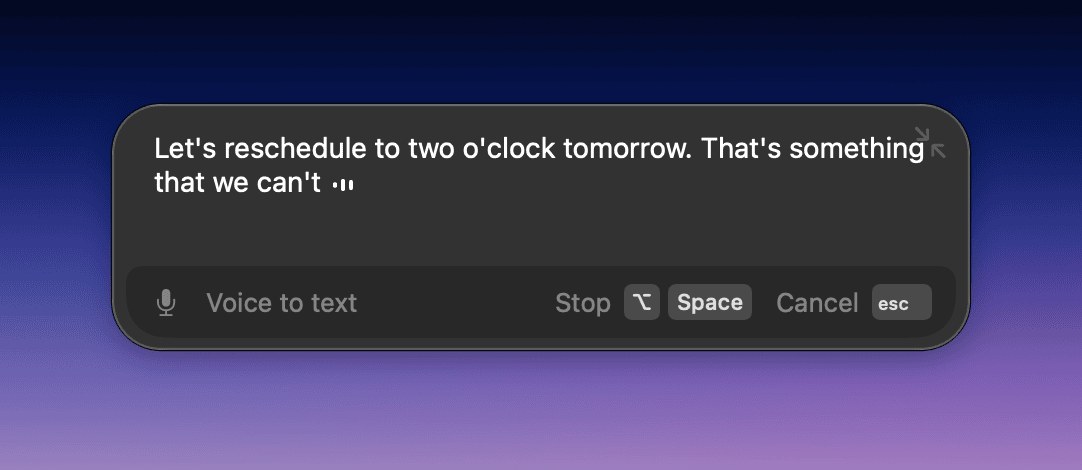
The recording window with realtime transcription
Voice dictation that types formatted text into any app on Mac, Windows, iPhone and Android, with offline models
Superwhisper has a free plan. Prices in US dollars as Superwhisper's pricing page showed them on 11 October 2026.
Vouchernaut may earn commission when you sign up through links on this page. It never changes what we say about a product or the order we list them in.
40%off
Deal
New Superwhisper customers who sign up through our link get 40% off for their first 6 months. It's applied at checkout for anyone arriving through the link: no code needed.
This is Superwhisper, a voice dictation app for Mac, Windows, iPhone and Android that turns speech into polished text in any app. It can run offline with local models, so your words can stay on your device.
Press a shortcut, speak, and the edited text is pasted into whatever app is active, from Slack and Gmail to Notion and code editors.
Local voice models such as Whisper, Parakeet and Cohere Transcribe transcribe on your device without Wi-Fi. With a local language model too, nothing leaves your machine.
Built-in modes for messages, email, notes and meetings adjust tone and formatting. Custom modes run your own instructions with a model you choose from GPT, Claude, Llama, Grok, Gemini or Mistral.
Super Mode uses the selected text, the active app and the clipboard as context, so the output fits what is on screen.
Teach it names, abbreviations and specialist terms, and set automatic replacements for words it gets wrong.
Records and summarises meetings, separates speakers on Pro, and transcribes uploaded audio and video files.
Works with Claude Code, Codex, Cursor, OpenCode and Amp, answering agent questions by voice. A macOS CLI can run as an MCP server over your dictation history.
Dictates in over 100 languages and dialects, and Pro can translate any language into English.
Works with
Free
Unlimited dictation with local Whisper models
$8.49a month
$84.99 a year, or $249.99 once for a lifetime licence
Contact sales
Contact sales
Prices in US dollars. 40% off for verified students, educators and non-profits when buying on superwhisper.com. App Store and Google Play prices are higher. 3,000 words of Pro free for new users. Prices in US dollars, from Superwhisper's pricing page on 11 October 2026. Superwhisper may charge VAT on top, and prices can change.
“This is one of those tools that just clicks.”
“They charged me twice in 3 days, both on the same email, but only provided an invoice for one.”
“Superwhisper's privacy policy is over two years out of date, and is silent on some important issues.”
Superwhisper turns your voice into clean, formatted text wherever you can type: Slack, email, notes or your code editor. You press a shortcut, speak, and the text lands in the app you're using. It supports a wide range of languages and can translate speech into English.
Modes are how it adapts to what you're writing. Predefined modes tune tone, structure and formatting for things like messages and email, and you can build custom modes with your own rules, vocabulary and choice of AI model. It also records meetings, transcribes audio and video files, and works alongside coding tools if you like to dictate prompts.
Local voice models transcribe without an internet connection, and the company says nothing you say needs to leave your device when you stick to local models. Cloud models are optional. Teams can look at the company's trust centre and security documents for the detail.
There is a free plan with dictation using local models. Pro adds cloud models, bring-your-own API keys, file transcription and priority support, and is offered monthly, yearly or as a lifetime licence. Prices are listed in dollars on the site, so check there for the current figures. A licence covers your devices at no extra cost, and the company offers a refund window on its plans.
It suits writers, developers, managers and anyone who thinks faster than they type, and it is a good fit if you handle sensitive text and want local processing.
Try the free plan first, and buy on the Superwhisper site rather than in a mobile app if you upgrade. The company lists a discount for students, and a lifetime licence avoids subscriptions. Any live code is listed on this page: copy it and enter it at checkout.
 Free plan
Voice dictation that types cleaned-up, punctuated text into any app on Mac, Windows, iPhone and Android

Voice dictation and a voice agent that sends emails, replies in Slack and finds files on Mac and Windows
Dictation software types what you say into any app. Most people should start with the free dictation in Mac, iPhone and Windows 11; Wispr Flow gives the most polished British text everywhere, Superwhisper keeps it offline, and Dragon still suits Windows users who want to pay once.
We don't currently list a confirmed discount code. That doesn't mean the store has no promotions; check its website for current prices.
Yes, there is a free plan. Pro adds cloud models, your own API keys, file transcription and priority support.
Yes. Local voice models transcribe without an internet connection. Some AI processing and cloud models need to be online.
Yes. It runs on macOS, Windows, iOS and Android.
Yes. Alongside monthly and yearly Pro billing, its site offers a lifetime option.
The site says a refund window is available on all plans. Check the refund policy for the terms.
Got a question about Superwhisper?
