Vouchernaut Weekly

The week, sorted.

One email every Thursday at 7am, free. Here's what's in it:

  • New guides
  • Real price drops
  • Fresh codes
  • Sales ahead
Add stories from the magazineOptional
Stories to add

Pause or stop it from any email. I never sell or share your address. See this week's · Privacy

  1. Software
  2. Screen recording & video
  3. Tella
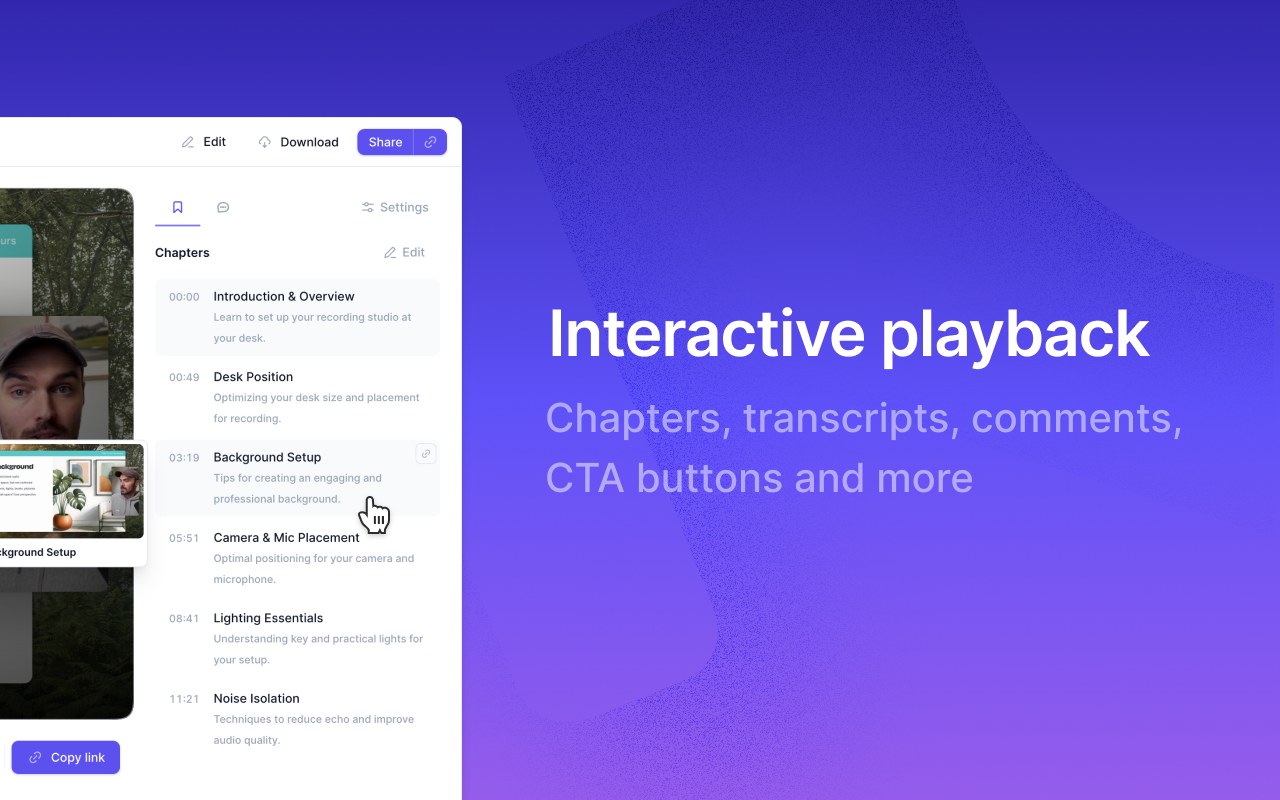
Tella video page with a recording on the left and a chapters list with timestamps and descriptions on the right, beside the words Interactive playback

Video pages with chapters, transcripts, comments and buttons

Screen recorder and video editor for Mac, Windows and Chrome, with AI editing, video hosting and viewer analytics

from$13a month per user, billed yearly

Tella has a 7-day free trial with no card needed. Prices in US dollars as Tella's pricing page showed them on 11 October 2026.

  • Web
  • Mac
  • Windows
  • Chrome extension
  • API

What Tella does

Tella is a screen recorder and video editor for Mac, Windows and the browser, built for product demos, tutorials, sales videos and courses as well as quick video messages. There is no free plan, only a 7-day trial with no card needed. Pro costs $26 per user a month, or $13 billed annually, so annual billing halves the price. Educators and students get six months free, and verified charities get 50% off.

  • Recorder

    Captures screen, camera, microphone and system audio from the Mac app, Windows app, Chrome extension or browser, with a teleprompter for speaker notes. Screen and camera are separate tracks, so the layout can change after recording.

  • Edit by transcript

    Delete mistakes, filler words and silences by editing the transcript instead of a timeline. An AI mistakes finder flags retakes for you to accept or reject.

  • Auto Layouts and zooms

    Switches between screen, camera, side-by-side and picture-in-picture layouts automatically, adds zoom effects that follow the cursor, and applies backgrounds, borders and subtitles by default.

  • Studio-quality sound

    Removes background noise and echo and normalises voices in one click, with background music and audio level editing.

  • Hosted video pages

    Videos render instantly as share links or embeds with AI titles, descriptions and chapters, comments, reactions and call-to-action buttons. Premium adds a custom domain and removes Tella branding.

  • Viewer analytics

    Shows views, unique viewers, watch time, engagement, conversion funnels, individual viewers, traffic sources and viewer locations, with history depending on the plan.

  • Loom migration

    A migration tool imports public Loom videos and folders into Tella playlists, and the free Tella Transfer app for Mac and Windows exports a private Loom library.

  • API and MCP server

    An API, webhooks and an MCP server let AI agents such as Claude, ChatGPT and Cursor edit, export, publish and organise videos and read transcripts.

Works with

  • Slack
  • Linear
  • Notion
  • Intercom
  • GitHub
  • Zapier
  • YouTube
  • LinkedIn
  • X
  • TikTok
  • Instagram
  • Facebook
  • Claude
  • ChatGPT
  • Cursor
  • Codex
  • Okta
  • Microsoft Entra ID
  • Google Workspace
  • Loom importer

How much Tella costs

Billing

Pro

$26a month per user

$156 a year per user billed annually

  • Unlimited videos, clips up to 6 hours
  • Transcription in 106 languages
  • Export in 4K, 60 FPS up to 5 minutes
  • Transcript editing, filler word and silence removal
  • Auto Layouts, Auto Zoom and AI audio enhancement
  • Team collaboration and playlists
  • Analytics with 30 days of history
  • Loom migration tool

Premium

$39a month per user

$228 a year per user billed annually

  • Everything in Pro
  • Custom domain for video pages
  • Domain restriction for embeds
  • Remove Tella branding
  • Share and play back in 4K
  • Export at 60 FPS at any length
  • Advanced analytics with all-time history
  • Priority support

Enterprise

Contact sales

Custom pricing

  • Everything in Premium
  • SSO and SCIM included
  • Shared Slack channel
  • Personalised onboarding
  • Volume discounts
  • Help migrating a video library

Prices in US dollars; VAT not mentioned. Viewers are free seats. SSO and SCIM are paid add-ons on any plan. Educators and students get 6 months of Pro free then 50% off; verified charities, including UK charities, get 50% off. Prices in US dollars, from Tella's pricing page on 11 October 2026. Tella may charge VAT on top, and prices can change.

Tella pros and cons

Pros

  • Annual billing halves the price: Pro drops from $26 to $13 a month per user
  • Viewers are free seats, so only people who record and edit are billed
  • Clips up to 6 hours, unlimited videos and no storage or bandwidth limits on paid plans
  • Transcript editing, Auto Cut, Auto Zoom and Auto Layouts are included in Pro rather than sold as an AI add-on
  • Imports Loom libraries, including private ones through the free Tella Transfer app
  • Six months free for educators and students, and 50% off for registered charities

Cons

  • No free plan: after the 7-day trial you can't record, edit or export without paying
  • Monthly billing is expensive at $26 per user for Pro and $39 for Premium
  • Custom domain, removing branding and full analytics history need Premium
  • Windows app is described as beta in Tella's own migration guide
  • Reviewers on Product Hunt and the Chrome Web Store report bugs
  • Prices only in US dollars, with no VAT information

Good for

  • Founders, marketers and sales teams who record product demos and want them to look edited
  • Course creators and YouTubers who record screen-based tutorials
  • Teams leaving Loom who want a stronger editor and a migration tool
  • Educators and charities, who get large discounts

Look elsewhere if

  • Anyone who only needs occasional quick video messages and wants a free plan
  • Linux users, as Tella has no Linux app
  • People who want to record and edit on a phone

What reviewers say about Tella

“I was using Loom before this, but Tella is much better.”

“pretty buggy at times + a relatively limited feature set”

“Basic functions like Find and Replace or automatic column width adjustment etc do not work in Google Sheets when the extension is enabled.”

What reviewers like

  • Polished-looking videos with little editing effort
  • Flexible camera layouts, zooms and trimming
  • Better branding and editing than Loom
  • Helpful support, including refunds for billing mistakes

What reviewers complain about

  • Bugs, such as corrupt segments
  • A narrower feature set than full video editors
  • The Chrome extension interfering with other web apps
  • No free plan once the trial ends

What members think

Rating Tella

Not enough ratings yet. Shopped here? Yours helps the next person.

Tella: what to know before you pay

What is Tella and who is it for?

Tella records your screen, camera, microphone and system audio, then gives you a full editor before you share a link or export in up to 4K. It suits people who make videos other people will judge: product demos, tutorials, onboarding videos, sales videos and YouTube content.

Screen and camera are recorded as separate tracks, so you can switch between side-by-side, picture-in-picture and full-screen layouts after recording. Auto Layouts, Auto Zoom and Auto Cut handle the busywork, and you can delete mistakes, filler words and silences by editing the transcript instead of a timeline. Transcription covers 106 languages. Videos are hosted with chapters, comments, reactions, call-to-action buttons and viewer analytics. Tella runs on a native Mac app, a Windows app (labelled beta in Tella's own Loom migration guide), a Chrome extension and a web recorder. There is no phone app; a mobile browser can record quick camera videos but can't edit.

How much does Tella cost in the UK?

Tella charges in US dollars per paid seat: Pro is $26 a month or $13 a month billed annually, and Premium is $39 a month or $19 a month billed annually.

  • Pro: unlimited videos, 6-hour clips, 4K export, 60 FPS for videos up to 5 minutes, analytics history of 30 days
  • Premium: everything in Pro plus a custom domain, removal of Tella branding, embed domain restriction, 60 FPS at any length and all-time analytics
  • Enterprise: custom pricing with SSO, SCIM, a shared Slack channel and volume discounts

Viewers are free seats, so only the people who record and edit count towards the bill. SSO and SCIM can be added to any paid plan; Tella's help centre lists SSO at $125 a month. The pricing page doesn't mention VAT or pounds.

Tella vs Loom: which is better?

Tella is the stronger choice for polished, edited videos, while Loom is cheaper to start with because it has a free plan.

Loom's free Starter plan allows 25 videos of up to five minutes at 720p, and its pricing page lists Business at $18 and Business + AI at $24 per user a month. Tella has no free plan, but annual Pro at $13 a seat undercuts both, and its editor goes further: layouts, zooms, backgrounds, transcript editing and 4K export are all included. Tella also imports public Loom videos and folders, and its free Tella Transfer app for Mac and Windows exports a private Loom library. Loom remains the simpler pick for teams that mainly record quick async updates and already use Atlassian tools.

Tella vs Cap: which should you pick?

Cap is the cheaper option, and Tella is the more complete editor and video host.

Cap is open source, free for personal use, offers a $29 a year commercial desktop licence, and Cap Pro costs $12 per user a month or $8.16 billed annually. It also runs on Linux and can be self-hosted. Tella costs more but adds transcript-based editing, AI audio clean-up, conversion funnels and viewer-level analytics, call-to-action buttons on video pages and publishing straight to YouTube, LinkedIn, X and TikTok.

Is Tella worth paying for?

For people who publish demos, tutorials or course videos every week, reviewers suggest it is, mainly because editing takes minutes rather than hours.

Tella scores 4.8 out of 5 on the Chrome Web Store from 67 ratings and 4.8 on Product Hunt from 38 reviews, where users often mention producing more videos in less time and leaving Loom. The criticisms are bugs and a narrower feature set than full video editors, both raised by a Product Hunt reviewer. For occasional quick messages, a free tool will do.

How do you get Tella cheaper?

Annual billing is the biggest saving, cutting the monthly price roughly in half.

Teachers, professors and students at accredited institutions get six months of Pro free through Tella for Education, then 50% off for as long as they qualify. Registered charities, including UK charities, get 50% off Pro or Premium through Tella for Good. Enterprise customers get volume discounts.

  • Free plan

    Cap

    Open source screen recorder for Mac, Windows and Linux with instant share links, a built-in editor and self-hosting

    Free plan · from $2.42 a month per user 3.9 on Product Hunt (8)
  • Free plan

    Kite

    Mac screen recorder that turns recordings into product demo videos with auto zoom, 3D mockups, animated text and AI voiceovers

    Free plan · from $40 a month 5.0 on Product Hunt (5)
  • CleanShot X

    Mac app for screenshots and screen recordings with annotation, scrolling capture, OCR, a video editor and cloud sharing

    from $10 a month per user 4.9 on Product Hunt (55)
  • Supercut

    Screen recorder for team video messages on Mac and Windows, with AI auto-editing, chapters, summaries and an MCP server

    14-day free trial · from $15 a month per seat 5.0 on Product Hunt (10)
  • Free plan

    Medal

    Free game clipping app that saves your best PC gameplay moments with a hotkey and turns them into shareable links

    Free plan · from £6.42 a month 4.8 on Google Play (24,100)

Questions about Tella

Are there any Tella discount codes?

We don't currently list a confirmed discount code. That doesn't mean the store has no promotions; check its website for current prices.

Is there a free version of Tella?

No. Tella has a 7-day free trial of Pro with no card required, but no free-forever plan. Trial exports are HD at 30 FPS and clips are capped at two hours.

What happens to my videos if I cancel Tella?

Your videos stay in your workspace and can still be viewed and shared, but you can't record, edit or export until you subscribe again. You keep access until the end of the period you've paid for.

Can I pause a Tella subscription?

No. Tella says subscriptions can't be paused, so the alternative is to cancel and resubscribe later. Your videos are kept while the subscription is inactive.

Is there a Tella app for iPhone or Android?

No. Tella works in a phone or tablet browser for quick camera recordings, watching and sharing videos, but editing needs a Mac, Windows PC or Chrome on a computer.

Do people who only watch videos need a paid seat?

No. Owners and Members are billed, while Viewers are free and can sign in to watch and share videos without taking a paid seat.

Does Tella support single sign-on?

Yes. SAML and OIDC single sign-on and SCIM directory sync are included with Enterprise and can be added to any paid plan.

Cookie settings

These choices apply to this browser. They do not change your email subscription.

Essential: always on. Used for editor sessions and remembering this choice.