Vouchernaut Weekly

The week, sorted.

One email every Thursday at 7am, free. Here's what's in it:

  • New guides
  • Real price drops
  • Fresh codes
  • Sales ahead
Add stories from the magazineOptional
Stories to add

Pause or stop it from any email. I never sell or share your address. See this week's · Privacy

  1. Software
  2. AI assistants & agents
  3. Viktor
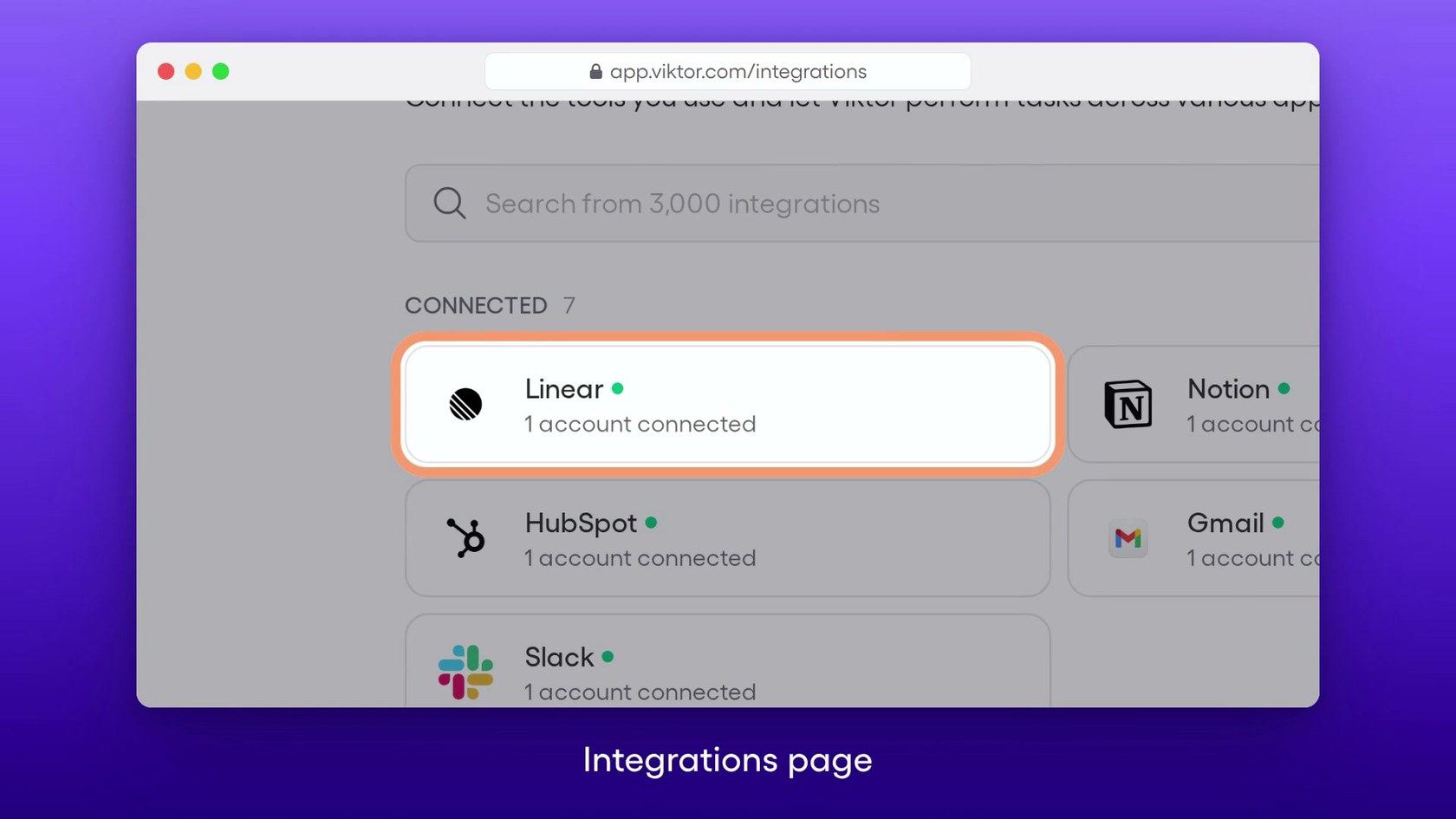
Viktor integrations page with Linear, HubSpot, Notion, Gmail and Slack connected and a search box for 3,000 integrations

Connecting tools on the integrations page

What Viktor does

Viktor is an AI agent that works inside Slack and Microsoft Teams: you message it like a colleague and it pulls reports, updates your CRM, runs ad analysis, writes code and runs scheduled jobs across 3,200+ connected tools. It suits small teams that already live in Slack. New workspaces get $100 of credits with no card, then paid plans start at $50 a month for 20,000 shared credits. Registered non-profits get 15% off.

  • Works in Slack and Teams

    You message Viktor in a channel or thread like a colleague, and it replies with results, files and follow-up questions. Several channels can each run separate tasks at once.

  • 3,200+ integrations

    Viktor connects to tools such as HubSpot, Salesforce, Notion, Linear, GitHub, Stripe, Meta Ads and Google Ads, and can build a custom connection when one is missing.

  • Scheduled work

    Recurring jobs such as daily metrics digests, weekly audits and monthly reconciliations run on a schedule. Each run uses credits.

  • Reports and documents

    Viktor produces PDFs, Excel models, slide decks and dashboards with charts and tables rather than plain chat replies.

  • Code and web apps

    It can clone repositories, open pull requests, triage bugs and deploy web apps with a database and sign-in from a single message.

  • Company memory

    Viktor keeps a persistent memory of past decisions, team preferences and processes for each workspace, which can be exported or deleted on request.

  • Approvals for risky actions

    Moving money, pushing code and emailing customers wait for a person to approve them in Slack, and admins can revoke any integration or stop a task.

Works with

  • Slack
  • Microsoft Teams
  • HubSpot
  • Salesforce
  • Pipedrive
  • Attio
  • Notion
  • Linear
  • Jira
  • Confluence
  • GitHub
  • Google Drive
  • Google Sheets
  • Google Analytics
  • Google Ads
  • Meta Ads
  • LinkedIn Ads
  • Mailchimp
  • Stripe
  • PostHog
  • QuickBooks
  • PayPal
  • Airtable
  • ClickUp

How much Viktor costs

Free start

Free

$100 of credits once, no card needed

  • Every integration and capability
  • Free credits never expire
  • Slack and Microsoft Teams

Team

$50a month per workspace

20,000 credits a month, shared by the team

  • Slack-native agent in threads and mentions
  • Persistent workspace memory
  • Integrations and tool execution
  • Scheduled tasks
  • Reports, dashboards, apps and code
  • Unused credits roll over for one month

Team 300k

$750a month per workspace

300,000 credits a month, the tier marked most popular

  • Everything in Team
  • Same credit rate as the $50 tier

Enterprise

Contact sales

Custom credits and terms

  • Invoicing and custom billing terms
  • Security review support and DPA
  • SLA and priority support
  • Dedicated onboarding
  • EU data residency

Prices in US dollars; VAT not mentioned. No per-seat fees. Team pots run from 20,000 credits ($50) to 20 million ($50,000) a month at the same rate. Non-profits get 15% off every monthly plan. Prices in US dollars, from AdViktor's pricing page on 11 October 2026. Viktor may charge VAT on top, and prices can change.

Viktor pros and cons

Pros

  • $100 of free credits with no card, and those credits never expire
  • No per-seat fees: one credit pot covers the whole workspace
  • Rated 4.8 out of 5 on G2 from 63 reviews, with reviewers citing hours saved each week
  • Connects to more than 3,200 tools and can build missing integrations
  • Sensitive actions such as payments and customer emails need approval in Slack

Cons

  • Long Slack threads use credits quickly, a complaint repeated on G2 and Trustpilot
  • No volume discount: $500 buys credits at the same rate as $50
  • Prices only in US dollars, with no annual discount listed
  • Data is US-hosted unless you sign an Enterprise contract for EU residency
  • Some Trustpilot reviewers report slow replies from support

Good for

  • Small teams that already run their work through Slack or Microsoft Teams
  • Founders and operators who want reports, CRM updates and ad analysis without hiring
  • Agencies and e-commerce teams juggling many connected tools
  • Non-profits, which get 15% off monthly plans

Look elsewhere if

  • People who want an AI to chat and brainstorm with at length, since long threads burn credits
  • Teams that don't use Slack or Teams
  • UK firms that need UK or EU data hosting without an Enterprise contract

What reviewers say about Viktor

“Viktor works like a paralegal and office manager in Slack, connected to my Outlook, OneDrive, calendar, and the Florida e-filing portal.”

★★★★★ · Attorney, small business, G2, 6 October 2026

“I think we need to be very careful about credit usage and spend at times.”

★★★★★ · Executive assistant, small business, G2, 31 July 2026

“In reality though there is almost no support - I’ve had a glitch in my second day and no one responds to help fix it”

★★ · Reviewer in the UK, Trustpilot, 17 June 2026

What reviewers like

  • It acts like a teammate, taking initiative and suggesting improvements without being asked
  • The range of integrations, from CRMs and ad accounts to Microsoft 365
  • Working inside Slack, so there is no new app to learn
  • Recurring admin such as inbox triage and weekly reports runs on its own

What reviewers complain about

  • Credits run out fast, especially in long threads
  • Credit use feels like a black box for the first month or two
  • Support replies can take a day or longer
  • No cheaper rate for buying credits in bulk

What members think

Rating Viktor

Not enough ratings yet. Shopped here? Yours helps the next person.

Viktor: what to know before you pay

How much does Viktor cost in the UK?

Viktor has no seat fees: a workspace buys a monthly pot of credits, starting at $50 for 20,000 credits, and everyone on the team draws from it. Prices are shown in US dollars only, so a UK card is charged in dollars and your bank may add a foreign transaction fee.

The pricing page lists larger pots in steps, from 30,000 credits for $75 up to 20 million credits for $50,000 a month, with 300,000 credits for $750 marked as the most popular. The rate stays the same at every size, at roughly 400 credits per dollar, so buying more doesn't buy cheaper credits. Enterprise contracts add invoicing, a DPA, an SLA and onboarding at a custom price. No annual discount is listed.

How far do Viktor's credits go?

Viktor's own FAQ estimates that 20,000 credits cover roughly 40 to 200 tasks, so the $50 pot suits light use rather than a full-time assistant. A quick task costs 100 to 300 credits, a complex workflow 500 to 1,500 and a full project 2,000 to 5,000.

Credits pass through the cost of the underlying AI models without a markup, and scheduled jobs use credits every time they run, so a daily report costs more than a weekly one. Unused plan credits roll over for one month; the free $100 and any bonus credits never expire. Reviewers on G2 and Trustpilot most often warn that long Slack threads burn credits fast, because Viktor rereads the thread each time, so keeping requests short and starting fresh threads keeps the bill down.

Is Viktor worth paying for?

For a small team that runs on Slack and a stack of tools such as HubSpot, Notion, Meta Ads and Google Sheets, reviewers say it is. Viktor holds a 4.8 out of 5 average on G2 from 63 reviews and 4.9 on Product Hunt, where users credit it with saving hours on reports, CRM updates and inbox triage.

The Trustpilot picture is more mixed at 4.2 from 22 reviews, with complaints about slow support replies, a pricing chart that one reviewer felt didn't match the real cost, and credits running out quickly. Several G2 reviewers say they now use a chat assistant such as Claude or ChatGPT for thinking and keep Viktor for tasks it can act on, which is cheaper on credits.

Viktor vs Lindy: which is better?

Viktor works through Slack and Teams messages and leans on its own memory of your company, while Lindy is a broader agent builder with its own web app, email and phone agents and templates. Viktor suits teams who want one assistant they talk to in Slack; Lindy suits people who want to design several separate automations.

Other options in the same space include Marblism, which sells a set of named AI employees for small businesses, Runable, a general agent for documents, slides and websites, and Littlebird, which reads what is on your screen to answer questions about your own work.

Is Viktor safe to connect to work accounts?

Viktor states it is SOC 2 Type 1 compliant, with Type 2 and ISO 27001 in progress, encrypts data in transit and at rest, and keeps each workspace isolated. Inference runs on OpenAI, Anthropic and Google models under no-training agreements, and sensitive actions such as moving money, pushing code or emailing customers wait for approval in Slack.

Data is hosted in the US by default. EU data residency is only available on Enterprise contracts, which matters for UK firms with strict data rules. The company behind it is Zeta AI, Inc., registered in Delaware.

How do you get Viktor cheaper?

The cheapest route is to start on the free $100 of credits, which needs no card, and watch the usage page before choosing a pot. Registered non-profits get 15% off every monthly plan with an EIN or charity registry number, verified within a business day. Plans can be moved up or down at any time, so starting on the $50 tier and stepping up only when credits run short avoids paying for unused capacity.

  • Lindy

    An AI assistant in Slack, Gmail and iMessage that records meetings, sends daily briefs, drafts replies and runs scheduled tasks

    7-day free trial · from $29.99 a month per active user 4.9 on G2 (171)
  • Marblism

    Seven AI agents for small businesses that handle email, social posts, leads, SEO articles, phone calls, websites and contracts

    from $24 a month 4.8 on Trustpilot (1,161)
  • Free plan

    Runable

    A general AI agent that builds websites, apps, slide decks, videos, carousels and research reports from a plain-English prompt

    Free plan · from $15 a month 3.8 on App Store (62)
  • Free plan

    Littlebird

    An AI assistant that remembers what is on your screen, takes meeting notes and answers questions about your past work

    Free plan · from $17 a month 5.0 on Product Hunt (10)
  • Chipp

    AI agents for websites, Slack, Teams, messaging and phone, plus an AI software factory that writes and ships code for you

    from $299 a month

Questions about Viktor

Are there any Viktor discount codes?

We don't currently list a confirmed discount code. That doesn't mean the store has no promotions; check its website for current prices.

Does Viktor have a free plan?

There is no free-forever plan. New workspaces get $100 of credits with no card needed, and those free credits never expire.

Do you pay per user for Viktor?

No. Pricing is per workspace, and the whole team shares one monthly pot of credits.

Can you cancel or change a Viktor plan?

Viktor says you can upgrade or downgrade at any time. Unused plan credits roll over for one month before they expire.

Does Viktor work with Microsoft Teams?

Yes. Viktor works in Slack and Microsoft Teams, with a web dashboard at app.viktor.com for settings, integrations, tasks and billing.

Does Viktor train AI models on your data?

Viktor states your conversations and files never enter a training set, and its model providers are under no-training agreements.

Where is Viktor's data stored?

Data is hosted in the US by default. EU data residency is offered on Enterprise contracts.

Cookie settings

These choices apply to this browser. They do not change your email subscription.

Essential: always on. Used for editor sessions and remembering this choice.