1. Software
  2. Dictation & voice typing
  3. Wispr Flow
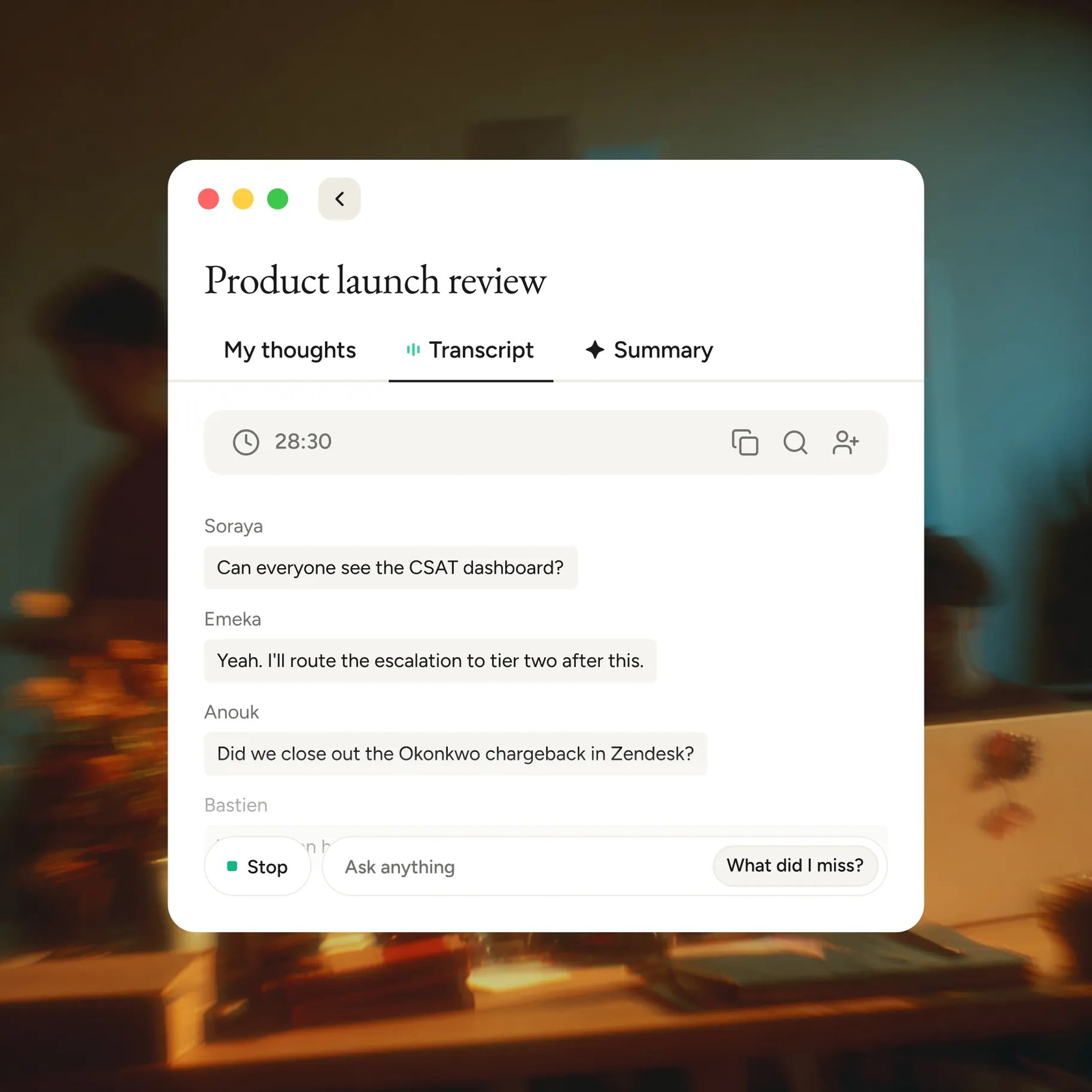
Wispr Flow Notetaker window on a Mac showing a live meeting transcript with speaker names, a timer and tabs for My thoughts, Transcript and Summary

Notetaker transcribes meetings on Mac and Windows without a bot

Voice dictation that types cleaned-up, punctuated text into any app on Mac, Windows, iPhone and Android

from$12a month per user, billed yearly

Wispr Flow has a free plan. Prices in US dollars as Wispr Flow's pricing page showed them on 11 October 2026.

Try Wispr Flow free

Vouchernaut may earn commission when you sign up through links on this page. It never changes what we say about a product or the order we list them in.

  • Mac
  • Windows
  • iPhone and iPad
  • Android

What Wispr Flow does

This is Wispr Flow, a voice dictation app from a US company founded in 2021. You speak, and it types clean, punctuated text into any app on Mac, Windows, iPhone and Android, with the ums and false starts removed.

  • Dictation in any app

    Flow types wherever the cursor is, so it works in Gmail, Slack, Notion, a terminal, a code editor or ChatGPT without plugins. On desktop it runs from a keyboard shortcut, and dictation sessions can last up to 20 minutes.

  • Automatic clean-up

    Flow removes filler words, repetitions and false starts, and keeps only the final version of a correction, so "5 pm, no actually 6 pm" becomes "6 pm". It adds punctuation, paragraphs and numbered lists as it goes.

  • Dictionary and snippets

    Flow learns names and jargon automatically, and words can also be added by hand. Snippets expand a spoken shortcut into saved text such as an address, a bio or a scheduling link, and Pro teams can share both.

  • Styles and Context Awareness

    Flow sorts the active app into email, work messaging, personal messaging or other, and applies a Formal, Casual or Very casual style to each. Context Awareness reads text near the cursor to spell on-screen names correctly, and can be switched off.

  • Command Mode

    On Mac and Windows, holding a second shortcut and speaking an instruction edits selected text, drafts a reply or runs a web search. It is off by default and needs a paid plan or trial.

  • 100+ languages

    Flow detects the language being spoken and can switch between languages mid-dictation, including mixes such as Hinglish. Spoken Command Mode triggers are English only.

  • Notetaker for meetings

    Wispr Flow Notetaker records meetings and in-person conversations on Mac and Windows without a bot joining the call. It identifies speakers, answers questions across past meetings and passes notes to Claude, ChatGPT and other tools over MCP.

  • Team admin and compliance

    Paid plans add centralised billing, shared dictionaries and usage dashboards, and Growth adds SAML single sign-on. Wispr states SOC 2 Type II and ISO 27001 certification and offers a HIPAA business associate agreement on any plan, which turns off Notetaker.

Works with

  • Gmail
  • Slack
  • iMessage
  • WhatsApp
  • Notion
  • Microsoft Outlook
  • Microsoft Teams
  • ChatGPT
  • Claude
  • Cursor
  • Windsurf
  • VS Code
  • Perplexity
  • Google Calendar
  • Outlook Calendar
  • Granola (meeting import)
  • Otter (meeting import)

How much Wispr Flow costs

Billing

Free

Free

2,000 words a week on desktop, 1,000 on mobile

  • Speech-to-text in any app, 100+ languages
  • Dictation on Mac, Windows, iOS and Android
  • Learns your names and jargon
  • Dictionary and snippets
  • Limited Notetaker access
  • Use meeting notes in Claude and ChatGPT

Pro

$15a month per user

$144 per user a year on annual billing

  • Unlimited dictation
  • Longer Notetaker history
  • Shared dictionary and snippets
  • Shared team workspace
  • Centralised billing and user management
  • Team usage analytics
  • Priority support
  • Early access to new features

Growth

$23a month per user

Dictation only; $33 a month or $26 billed annually with unlimited Notetaker

  • Everything in Pro
  • Single sign-on (SSO) with SAML
  • Org-wide HIPAA enforcement with a signed BAA
  • Multiple domains for one organisation
  • Admin control over model training for the whole team
  • Individual usage reporting
  • Admin tools for members, departments and billing

Enterprise

Contact sales

Custom pricing, billed annually

  • Everything in Growth
  • Free IT admin seats
  • Model training locked off
  • User provisioning (SCIM)
  • Audit logs and managed deployment (MDM)
  • Domain capture
  • Invoicing and PO billing
  • Dedicated support with SLAs

Annual billing saves 20%. Checkout sets the currency by region; the UK App Store lists Pro at £15 a month or £143.99 a year. Wispr adds no VAT. Students and educators get 50% off Pro; non-profit, military, senior and accessibility discounts need verification. Prices in US dollars, from Wispr Flow's pricing page on 11 October 2026. Wispr Flow may charge VAT on top, and prices can change.

Wispr Flow pros and cons

Pros

  • Free plan gives 2,000 words a week on desktop and 1,000 on mobile, with no card needed
  • One subscription covers Mac, Windows, iPhone and Android, with dictionary and settings synced across devices
  • Removes filler words and mid-sentence corrections, which reviewers say cuts editing time
  • Students and educators get 50% off Pro, and some student accounts can claim a free annual plan
  • Pro includes the bot-free Notetaker for meetings at no extra cost
  • Rated 4.8 from 2,516 ratings on the UK App Store and 4.75 from 81 Product Hunt reviews

Cons

  • Transcription always happens in the cloud and data is processed in the US, so there is no offline mode
  • Model training is on by default for Free and Pro users until it is switched off
  • On iPhone the keyboard switches to the Flow app to start dictating, which App Store reviewers call fiddly
  • Command Mode works only on Mac and Windows and is switched off by default
  • Some reviewers report dropped dictations and accuracy that varies after updates
  • Growth costs $23 per user a month, or $33 with unlimited Notetaker, before annual savings

Good for

  • People who write lots of emails, chat messages and AI prompts and want them typed and punctuated from speech
  • Developers dictating prompts into Cursor, Windsurf or VS Code
  • People with dyslexia, ADHD, RSI or other conditions that make typing slow or painful
  • Teams that want a shared dictionary, central billing and SSO for dictation
  • Students and educators, who get 50% off Pro

Look elsewhere if

  • Anyone who needs dictation to work offline or stay entirely on the device
  • Organisations that cannot send dictated text to servers in the United States
  • iPad or Linux users looking for a native app

What reviewers say about Wispr Flow

“Wispr Flow stood out because it works everywhere and actually adapts to how you write.”

“Its free tier is insanely generous, and I've not found anything quite like it.”

“As someone with dyslexia, Wispr Flow seemed like the perfect app. Unfortunately, I’ve experienced so many problems that it has become practically useless.”

What reviewers like

  • Accurate transcription with punctuation and formatting handled automatically
  • Works in every app where text can be typed, on desktop and phone
  • Saves time on emails, messages and prompts for AI tools
  • A big help for people with dyslexia, ADHD or difficulty typing
  • Handles several languages and mixed-language speech

What reviewers complain about

  • The iPhone keyboard has to hop to the Flow app to start dictating
  • Reliability varies between updates, with dropped or garbled dictations
  • Privacy worries about cloud processing and the access the app needs
  • High CPU and memory use on desktop
  • Plans not always carrying across between desktop and phone accounts

What members think

Rating Wispr Flow

Not enough ratings yet. Shopped here? Yours helps the next person.

Wispr Flow: what to know before you pay

The product

Wispr Flow is dictation software that works in whatever app you already use, from email and chat to documents and AI prompts. You talk naturally, and it removes filler words, fixes mid-sentence corrections and adds punctuation, so the text reads as if you had typed it.

It supports more than a hundred languages with automatic detection and learns your names and jargon through a personal dictionary and snippets. Its Notetaker feature adds meeting notes. On phones it works through its own keyboard, and on desktop through a shortcut you hold while you talk, so the text lands wherever your cursor already is.

The story

Wispr describes itself as the voice interface company, a team of designers, researchers and engineers rethinking how people interact with their devices. Flow is its first product, and the company's stated aim is to make talking to technology as easy as talking to a friend.

It was founded in 2021 by Tanay Kothari and Sahaj Garg.

Pricing

Wispr Flow is free to start, with a weekly word allowance on the free plan. Pro removes that limit, and team plans add admin tools, single sign-on and more. The site shows US dollars, though checkout sets the currency by region. Annual billing is cheaper than monthly, so check the pricing page for current figures.

Saving

Students and educators can get a discount on Pro, and Wispr takes requests from some other groups through support. A referral scheme gives both people a free period of Pro when a friend joins and uses the app.

Privacy

Dictation is processed in the cloud, so it does not work offline. Wispr says it holds SOC 2 Type II and ISO 27001 certification. It also has settings for context awareness and model training, which you can switch off if you work with sensitive material.

Who it suits

It suits people who write a lot, such as email, messages and prompts, and want the same dictation on every device.

Alternatives to Wispr Flow

Every dictation & voice typing tool →
  • Discount

    Superwhisper

    Voice dictation that types formatted text into any app on Mac, Windows, iPhone and Android, with offline models

    Free plan · from $7.08 a month 4.3 on App Store (102)40% off your first 6 months of Superwhisper
  • VoiceOS

    Voice dictation and a voice agent that sends emails, replies in Slack and finds files on Mac and Windows

    7-day free trial · from $11.99 a month 5.0 on Product Hunt (3)
  • Free plan

    Granola

    AI notepad that transcribes meetings from your device's audio, with no bot, and turns your rough notes into a full write-up

    Free plan · from $14 a month per user 4.9 on Google Play (3,050)
  • Free plan

    Circleback

    AI meeting notes, action items and automations for online and in-person meetings, with or without a bot

    Free plan · from $15 a month per user 4.7 on App Store (38)

Guides that cover Wispr Flow

  • The best dictation software in the UK

    Dictation software types what you say into any app. Most people should start with the free dictation in Mac, iPhone and Windows 11; Wispr Flow gives the most polished British text everywhere, Superwhisper keeps it offline, and Dragon still suits Windows users who want to pay once.

Questions about Wispr Flow

Are there any Wispr Flow discount codes?

We don't currently list a confirmed discount code. That doesn't mean the store has no promotions; check its website for current prices.

What is Wispr Flow?

It is a voice dictation app that turns speech into polished text in any app. It removes filler words and adds punctuation as you talk.

Does Wispr Flow work offline?

No. Wispr says transcription always happens in the cloud.

Is there a free version of Wispr Flow?

Yes. The free plan has a weekly word allowance and needs no card. Pro removes the limit.

Does Wispr Flow work on Android and iPhone?

Yes. It runs on Mac, Windows, iPhone and Android, so you get the same dictation on each.

Is there a student discount for Wispr Flow?

Yes. Students and educators get a reduced Pro price, and Wispr says student status is recognised from listed university domains.

Got a question about Wispr Flow?