

20%off
20% off your first Clico purchase
Code
Last worked 32 minutes ago Opened by 1 shopper today
Terms and conditions
New Clico customers get 20% off their first purchase with this code.
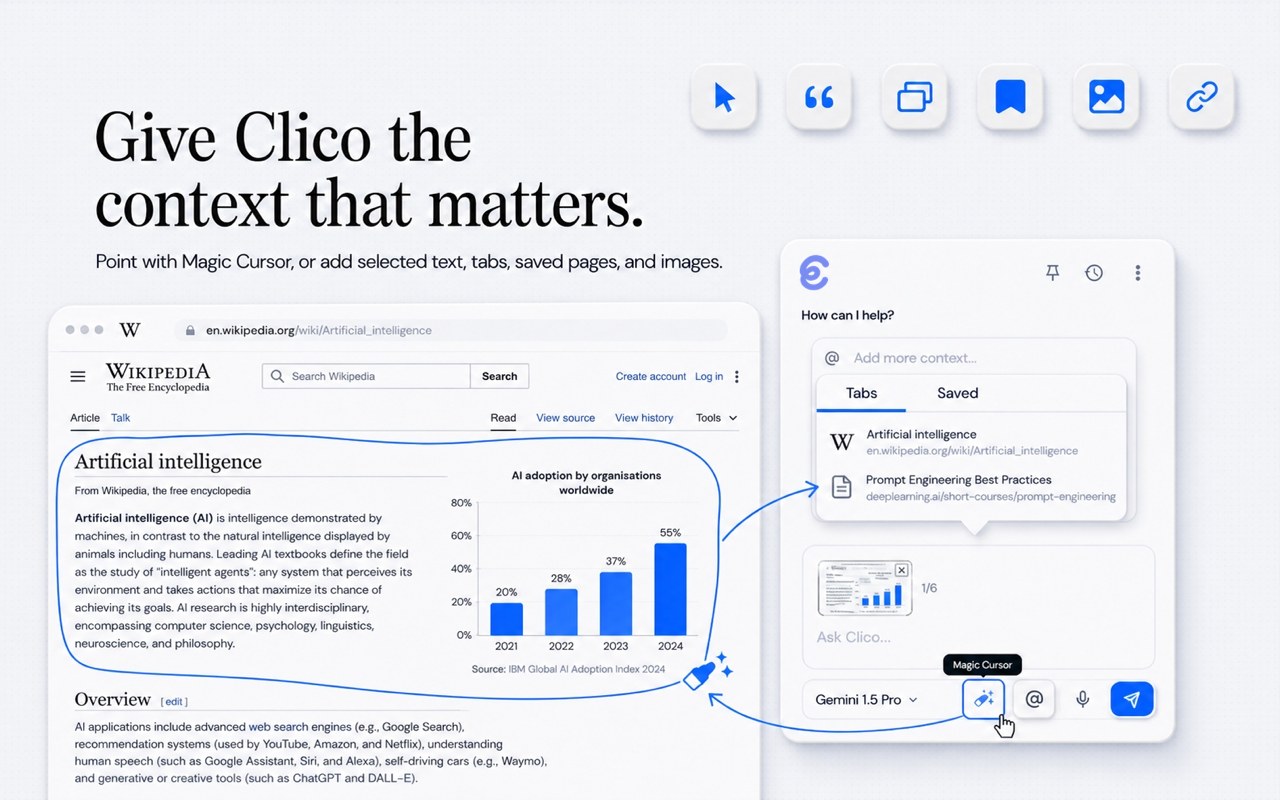
Pointing Clico at part of a page with Magic Cursor
Claude, GPT, Gemini and other AI models in a Chrome extension, Mac app and web studio for writing, summaries, research, images and video
Clico has a free plan. Prices in US dollars as Clico's pricing page showed them on 11 October 2026.
20%off
Code
Last worked 32 minutes ago Opened by 1 shopper today
New Clico customers get 20% off their first purchase with this code.
Clico puts AI models such as Claude, GPT, Gemini and Grok in a Chrome extension, a Mac app and a web studio, for writing on any page, summarising pages, PDFs and videos, research, and making images and video. It suits students and knowledge workers tired of copying text into a separate chatbot. The free plan gives 200 credits a month; Pro costs $19.90 a month, and annual billing saves about 20%.
In Gmail, Google Docs, LinkedIn, Reddit and most text boxes, Clico drafts, rewrites, finishes or changes the tone of text and inserts the result back into the page.
Keyboard shortcuts summarise the current web page or PDF, and Clico can summarise YouTube videos from their transcripts, with follow-up questions in the same chat.
You point at a chart, error message, image or paragraph, or paste a screenshot, and ask Clico about it.
A model picker covers Claude, GPT, Gemini, Grok, Kimi, DeepSeek and others, or an Auto setting chooses for you. The free plan has 7 chat models and paid plans all 27.
The web studio generates and edits images, turns stills into video, and builds browser games and simple websites you can preview, change and publish. Video needs Pro or Max.
Deep Research combines your attached files with public web sources and returns an answer with source links.
Writing personas guide tone and style, including one for making AI text sound more natural, and Auto Typer types longer drafts into Google Docs at a human pace.
Holding Fn lets you ask about whatever is on screen by voice, and double-tapping Command suggests a next step for the open app. Clico asks before it writes, sends or clicks.
Works with
Free
200 credits a month, no card needed
$19.90a month
2,000 credits a month
$49.90a month
5,000 credits a month
Prices in US dollars; taxes shown at checkout. Annual billing saves about 20%, charged upfront, with credits issued monthly and no rollover. Refunds can be requested within 14 days of a charge. Prices in US dollars, from Clico's pricing page on 11 October 2026. Clico may charge VAT on top, and prices can change.
“I no longer need to constantly switch tabs to look up information or copy-paste text; I can just invoke AI right on the page.”
“Still early days for the extension but it's been reliable for me so far.”
“The redesigned Web App organizes the workspace around images, videos, research, and files, making everything easier to find.”
Clico has a free-forever plan and two paid plans, Pro at $19.90 a month and Max at $49.90 a month, priced in US dollars. Taxes and the final total are shown at checkout, so a UK buyer should expect VAT to be added and a possible foreign transaction fee from their bank.
The plans differ mainly in credits and model access:
Clico estimates 2,000 credits cover about 500 GPT Image 2.5 images or about 20 short Seedance videos, and credits are shared across the extension, the Mac app and the web studio. Annual plans save about 20% but are charged upfront, and credits are still issued monthly without rolling over.
The Chrome extension opens beside the page you are on with Cmd or Ctrl and O, and can read the page, your selected text, screenshots, open tabs and saved context. It drafts and rewrites replies in Gmail, LinkedIn, Reddit and Google Docs and inserts the result back into the page.
Double-pressing Cmd or Ctrl summarises the current page, and separate shortcuts summarise PDFs and YouTube videos with follow-up questions. Magic Cursor lets you point at a chart, error or paragraph and ask about it, and Auto Typer types text into Google Docs at a natural pace. Personas, including a Natural Writing Master, rewrite AI text to sound less generic.
The free plan is enough to judge whether the extension fits how you work, and reviewers on the Chrome Web Store most often praise not having to switch tabs to paste text into ChatGPT. Pro at $19.90 is worth it mainly for access to all 27 chat models, including the top Claude and GPT models, and for video generation.
Clico is young. It launched as an extension in January 2026, took over the Mac app Invoko in August and added the web studio in September, so features differ between the three and change often. The extension holds 4.6 out of 5 from 16 ratings on the Chrome Web Store, with about 2,000 users.
Both bundle many AI models into one subscription, but they work differently. Clico lives beside the page or app you are already in and focuses on writing, summarising and image and video creation, while Magica is a web and mobile agent that runs longer multi-step tasks in its own cloud browser and computer.
Clico is cheaper to start, with a free plan and Pro at $19.90, while Magica's entry plan costs $14.99 a month with no free plan. AI Fiesta is another single subscription for several chat models, and Littlebird reads what is on your screen to answer questions about your own work.
Clico says it only uses the page, screen, voice or file context you choose for a task, and does not upload a continuous screen or browsing history. Relevant parts of that context are sent to Clico's servers and to the chosen AI model provider to produce an answer.
On the Mac, Desktop task history is mainly stored locally, while web studio conversations are stored in the cloud. The service is run by Ampliftai Inc. under Delaware law, so anyone handling confidential work documents should check the privacy policy and their employer's rules first.
The cheapest way in is the free plan, which needs no card. Choosing annual billing saves about 20% on Pro or Max, though it is charged upfront. Clico's terms also allow a refund request within 14 days of a charge by emailing the team.

An AI agent with chat, image, video and voice models, a cloud browser and connected apps under one credit-based subscription

One subscription to 100+ AI models with side-by-side answers, plus image, video, website and slide tools
 Free plan
An AI assistant that remembers what is on your screen, takes meeting notes and answers questions about your past work
 Free plan
A general AI agent that builds websites, apps, slide decks, videos, carousels and research reports from a plain-English prompt

An AI assistant in Slack, Gmail and iMessage that records meetings, sends daily briefs, drafts replies and runs scheduled tasks
We currently list 1 discount code. Check each offer's terms, country and expiry date before using it. The retailer confirms eligibility at checkout.
Yes. The free plan gives 200 credits a month, 7 chat models and image generation, with no card needed. Video needs Pro or Max.
Clico's terms say you can request a refund within 14 days of a charge by emailing [email protected]. Cancelling stops renewal at the end of the billing period.
No. Credits are issued monthly and don't roll over, even on annual plans.
Clico runs as a Chrome extension, a Mac app called Clico Desktop and a web studio at app.tryclico.com. Windows desktop, iPhone and Android apps are not mentioned.
PDF, DOCX, PPTX, TXT, MD, CSV and XLSX, plus images, audio or video where the chosen model supports them, up to 10 files of 8 MB each and 20 MB in total per request.