Vouchernaut Weekly

The week, sorted.

One email every Thursday at 7am, free. Here's what's in it:

  • New guides
  • Real price drops
  • Fresh codes
  • Sales ahead
Add stories from the magazineOptional
Stories to add

Pause or stop it from any email. I never sell or share your address. See this week's · Privacy

  1. Software
  2. Dictation & voice typing
  3. VoiceOS
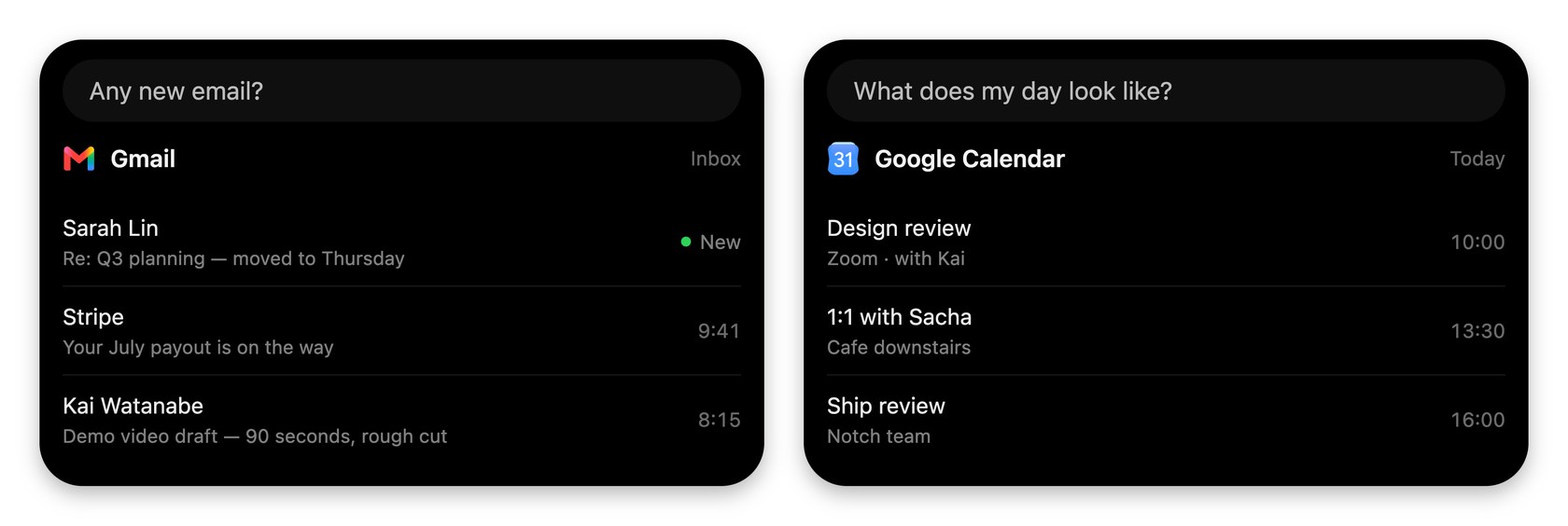
VoiceOS result cards answering Any new email with a Gmail inbox summary and What does my day look like with Google Calendar events

Agent Mode answers with cards from Gmail and Google Calendar

Voice dictation and a voice agent that sends emails, replies in Slack and finds files on Mac and Windows

from$11.99a month, billed yearly

VoiceOS has a 7-day free trial (card needed). Prices in US dollars as AdVoiceOS's pricing page showed them on 11 October 2026.

  • Mac
  • Windows

What VoiceOS does

VoiceOS is a voice app for Mac and Windows with two modes: Dictation Mode cleans up speech into polished text in any app, and Agent Mode carries out spoken tasks such as sending an email or replying in Slack. It suits people who want voice control as well as typing. There is no free plan; after a 7-day trial Pro costs $29.99 a month, or $11.99 a month billed annually. Students get 50% off.

  • Agent Mode

    Speak a request and VoiceOS carries it out in the right app, such as sending an email, replying to a Slack message, scheduling a meeting or filing a ticket. Actions that change something ask for confirmation.

  • Dictation Mode

    Turns speech into clean text in any app, removing filler words, fixing grammar and formatting, in 100 languages.

  • Point at your screen

    Uses what is under your cursor as context, so a request like finding someone's LinkedIn profile works from what you are looking at.

  • Find files and messages

    Finds files, emails, documents and notes when you ask for them, across apps such as Finder, Gmail, Google Drive and Notion.

  • Reminders

    The agent tracks tasks and reminders you mention and brings them back at the right time.

  • Integrations and MCP

    Works with Gmail, Slack, Google Calendar, Notion, Linear, Obsidian and more, and connects to your own MCP servers. Developers can build integrations that answer with cards in the Mac notch.

  • Privacy controls

    Settings let you keep transcripts on the device, keep audio out of the cloud and stop your dictation being used to train AI models.

Works with

  • Gmail
  • Slack
  • Google Calendar
  • Finder
  • Notion
  • Messages
  • Linear
  • Chrome
  • Google Drive
  • Google Docs
  • Obsidian
  • WhatsApp
  • Messenger
  • Cursor
  • ElevenLabs
  • MCP servers

How much VoiceOS costs

Billing

Pro

$29.99a month

7-day free trial included

  • Unlimited Dictation Mode sessions in 100 languages
  • Unlimited Agent Mode sessions
  • App integrations and your own MCP servers
  • Web search with sources and screen awareness
  • Reminders and scheduling
  • Custom vocabulary, polish styles and editing selected text by voice
  • Transcripts stored on your device
  • Priority support

Enterprise

Contact sales

Contact sales

  • Everything in Pro
  • Zero data retention
  • Enforced Private Mode
  • Security review support
  • SSO and SAML

Prices shown in US dollars and, per the maker, update to your region at checkout. Students get 50% off Pro; builders of VoiceOS integrations can apply for 50% off. One trial per email address. Prices in US dollars, from AdVoiceOS's pricing page on 11 October 2026. VoiceOS may charge VAT on top, and prices can change.

VoiceOS pros and cons

Pros

  • Agent Mode carries out tasks across apps, not just dictation
  • Annual billing cuts Pro from $29.99 to $11.99 a month
  • Audio is not stored on its servers by default and is not used for training
  • Unlimited dictation and agent sessions on Pro
  • 50% student discount and a discount for integration builders

Cons

  • No free plan, and the 7-day trial needs a card
  • $29.99 a month on monthly billing is high for a dictation app
  • No iPhone or Android app yet
  • No SOC 2 report yet; the company says it is working towards Type I
  • Very few independent reviews so far

Good for

  • People who want to send emails, Slack replies and calendar invites by voice
  • Heavy Mac or Windows users who prefer talking to clicking through apps
  • Students, who get 50% off Pro
  • Developers who want to build their own voice integrations

Look elsewhere if

  • Anyone who only needs dictation and wants a free plan
  • People who want to dictate on iPhone or Android
  • Organisations that require a SOC 2 report today

What reviewers say about VoiceOS

“controlling your computer directly with voice, not just transcribing it”

“The subscriptions plans are abit exppensive and they should be reduced.”

“Yeah, I would love to see them launching things for mobile - ios and android”

What reviewers like

  • The idea of acting on the computer by voice rather than only transcribing
  • Works across the apps people already use
  • Clean dictation output with filler words removed

What reviewers complain about

  • Subscription price on monthly billing
  • No mobile apps yet
  • Card required for the trial

What members think

Rating VoiceOS

Not enough ratings yet. Shopped here? Yours helps the next person.

VoiceOS: what to know before you pay

Is VoiceOS worth paying for?

VoiceOS is worth paying for if you want your voice to do things on your computer, not just type, because Agent Mode is what sets it apart from dictation apps. If you only want clean dictation, Wispr Flow and Superwhisper both have free plans and cost less per month.

Dictation Mode removes filler words, fixes grammar and formats text in 100 languages, with custom vocabulary and the option to edit selected text by voice. Agent Mode takes a spoken request and runs it in the right app: sending an email, replying to a Slack message, scheduling a meeting, finding a file or setting a reminder. It can use what is under your cursor as context, search the web with sources and connect to your own MCP servers, and actions that change something ask for confirmation first. The product is young and reviews are few: Product Hunt reviewers like the voice-to-action idea but call the subscription expensive and want mobile apps.

How much does VoiceOS cost in the UK?

VoiceOS Pro costs $29.99 a month on monthly billing or $11.99 a month on annual billing, which the maker describes as 60% less. The pricing page says prices update to your region automatically, so UK visitors may see a local figure at checkout.

  • Pro: unlimited Dictation Mode and Agent Mode, app integrations, your own MCP servers, web search, screen awareness, reminders and priority support
  • Enterprise: priced on request, adding zero data retention, enforced Private Mode, security review support and SSO

Every new account starts with a 7-day trial of Pro, and a card is needed at sign-up. One trial is allowed per email address, and the plan starts automatically when the trial ends.

VoiceOS vs Wispr Flow vs Superwhisper: which is better?

VoiceOS is the only one of the three built around carrying out tasks by voice; Wispr Flow and Superwhisper focus on dictation. For dictation alone, the other two are cheaper and offer free plans.

  • VoiceOS: Mac and Windows, no free plan, Pro at $29.99 a month or $11.99 billed annually
  • Wispr Flow: Mac, Windows, iPhone and Android, a free plan capped at 2,000 words a week on desktop, Pro at $15 a month or $12 billed annually
  • Superwhisper: Mac, Windows, iPhone and Android, unlimited free offline dictation, Pro at $8.49 a month, $84.99 a year or $249.99 for life

VoiceOS has no phone apps yet, while both rivals do. On annual billing, VoiceOS costs about the same as Wispr Flow per month.

Is VoiceOS safe to use with work email and documents?

VoiceOS states that audio is not stored on its servers unless you opt in and is never used to train models, and that transcripts can be kept on your own device. Data is processed in the region closest to you, with Frankfurt listed for Europe.

The security page lists AES-256 encryption for stored data and account deletion completed within 40 days. It also says the company is still working towards a SOC 2 Type I examination, so it holds no SOC 2 report yet, and the subprocessor list is only available on request. Because Agent Mode can send messages and change calendars on your behalf, it asks you to confirm actions, and Enterprise can enforce Private Mode and zero data retention across a team.

How do you get VoiceOS cheaper?

Annual billing is the biggest saving, cutting Pro from $29.99 to $11.99 a month. The maker also lists two discounts on its pricing page.

  • Students get 50% off Pro while enrolled, with enrolment checked once a year
  • Builders making their own VoiceOS integrations can apply for 50% off Pro
  • Both discounts are short application forms read by hand

Cancelling keeps Pro until the end of the paid period, after which existing accounts drop to limited access of 100 dictation sessions and 25 Agent Mode sessions a week.

  • Free plan

    Wispr Flow

    Voice dictation that types cleaned-up, punctuated text into any app on Mac, Windows, iPhone and Android

    Free plan · from $12 a month per user 4.5 on Google Play (11,000)
  • Free plan

    Superwhisper

    Voice dictation that types formatted text into any app on Mac, Windows, iPhone and Android, with offline models

    Free plan · from $7.08 a month 4.3 on App Store (102)

Guides that cover VoiceOS

Questions about VoiceOS

Are there any VoiceOS discount codes?

We don't currently list a confirmed discount code. That doesn't mean the store has no promotions; check its website for current prices.

Does VoiceOS have a free plan?

No. New accounts get a 7-day free trial of Pro, which needs a card. After cancelling, existing accounts keep limited access of 100 dictation sessions and 25 Agent Mode sessions a week, but this is not offered at sign-up.

How do I cancel VoiceOS?

Cancellation is in Settings, then Billing, inside the app. You keep Pro until the end of the period you have paid for.

Is VoiceOS available on iPhone or Android?

Not yet. VoiceOS runs on Mac and Windows, and the maker says mobile apps are coming, with a waitlist on its mobile page.

Which apps does VoiceOS work with?

The maker lists Gmail, Slack, Google Calendar, Notion, Google Docs, Google Drive, Linear, Obsidian, Messages, WhatsApp and Cursor, and you can add your own MCP servers.

Does VoiceOS have a team plan?

Teams buy Enterprise through sales, which adds zero data retention, enforced Private Mode, security review support and SSO.

Cookie settings

These choices apply to this browser. They do not change your email subscription.

Essential: always on. Used for editor sessions and remembering this choice.