Valve has made a wireless VR headset. It costs £889, and you still can't just buy one. When I checked Valve's Steam Frame page on 10 October, it only offered a waitlist. So the real question isn't whether to buy it today. It's whether it's what you actually want when your turn comes.
What is the Steam Frame?
The Steam Frame is Valve's wireless VR headset, sold with two tracked controllers. It's really two ways of playing in one headset, and they need very different things from you. It can stream games from your PC, or run some games on the headset itself. When you stream, your PC does the hard work and sends the picture across. When you play on the headset alone, it has to run the game on its own chip. So a huge Steam library is a nice start, but not all of it will run on the Frame without a PC.
Valve's launch announcement links to a Steam Frame Standalone Verified collection. That's the list that matters if you're hoping to leave the PC out of it. If your favourite game isn't on it, there's no promise it ever will be.
Why is everyone talking about the Steam Frame?
Because it comes from the company that runs  SteamSteamSteam is Valve's PC games store and library, selling full games, DLC, in-game items and some Steam hardware through one account. It is a useful first stop for PC gamers who want puBuying guide · View store →, and it's built to play the Steam library you already own, with or without a PC. It's also scarce: Valve offered the first units through a reservation draw, and the first purchase emails only went out from 18 September.
Why should you care before joining the waitlist?
The price is the obvious reason. The 256GB kit launched at £889 and the 1TB kit at £1,089, both including VAT, and that's before the charger Valve leaves out of the box. The second is timing. The first reservation window closed on 17 September 2026, and with no delivery date it's a risky thing to plan a Christmas present around.
The short answer: if you've got a decent gaming PC and you want proper VR, the Frame looks like a great idea, and the 256GB kit is enough for a library you'll mostly stream. If you mostly want to play your Steam games on the sofa, it's a very expensive way to do it: a handheld, a controller or a cable to the telly might already sort that out. Our Steam store guideSteamSteam is Valve's PC games store and library, selling full games, DLC, in-game items and some Steam hardware through one account. It is a useful first stop for PC gamers who want puBuying guide · View store → covers the wider setup, and the shops we cover for games and kit are on our gaming page.
VR headset, or a very expensive virtual telly?
This is the bit that decides whether the Frame is for you.
In a proper VR game, the world moves with your head and your hands. A normal game in a headset is still a normal game, just on a big virtual screen. It doesn't turn into VR. That virtual screen could be handy if someone else in the house always has the TV. But it also means strapping something to your face every time you want to play. If most of your gaming is twenty minutes between dinner and bed, that extra step might be enough to put you off.
Valve's own setup video shows what using it is really like, better than any spec sheet. It's worth watching with your own living room in mind: the coffee table, the sofa and whatever the cat has knocked over.
Watch Valve's setup guide on YouTube.
Why the little wireless adapter matters
If you're planning to stream from your PC, the most important thing in the box might be the smallest.
Valve includes a wireless adapter just for the link between your PC and the headset. The headset has separate radios for streaming and for normal Wi-Fi. It also uses eye tracking to put the most detail where you're looking, which Valve calls foveated streaming. The official feature rundown goes into more detail.
Your broadband speed doesn't really come into it. What counts is the link between your computer and the headset. Where the PC lives, where you'd play and what's in between (walls, a fridge, a pile of other gadgets) all make a difference. A headset that's great next to your desk could be a pain in the room you actually wanted to play in. That's why it's worth testing the setup you'll really use while you can still change your mind.
Which specs actually matter?
Spec sheets are where headset buying goes wrong, so it's worth knowing what the numbers do and don't tell you.
Valve lists a Snapdragon 8 Gen 3 chip, 16GB of shared memory, a 2160 × 2160 LCD panel per eye and a microSD slot. The refresh rate is 72–144Hz, with 144Hz marked experimental. Those are Valve's numbers.
Resolution tells you how many pixels each panel has. It doesn't tell you whether small text is easy to read through the lenses, or whether the headset fits your face. Refresh rate is how often the screen can update, not how many frames a game will actually hit. Fit, the games you'll really play and the room you'll play in matter more than any one number. And a comfort score from someone who hasn't worn one for hours isn't worth much.
Is the 1TB model worth another £200?
That £200 gap is the first bit of maths, and for lots of people the answer is no.
More storage matters if you'll install lots of games on the headset itself. If you mostly stream from a PC, it matters much less. Adding up the games you plan to install, plus room for the system, updates and a few you haven't thought of yet, gives you a rough total. The number on the box isn't all free space.
The microSD slot is another way to add room, though not every card works like built-in storage, so Valve's guidance and each game's requirements are worth reading. For a library that's mostly streamed, I'd get the smaller kit unless there's a clear reason not to. “Just in case” isn't much of a reason when it's £200.
The two Steam Frame storage kits side by side
Compare side by side. Scroll across to see every option.
| What matters | 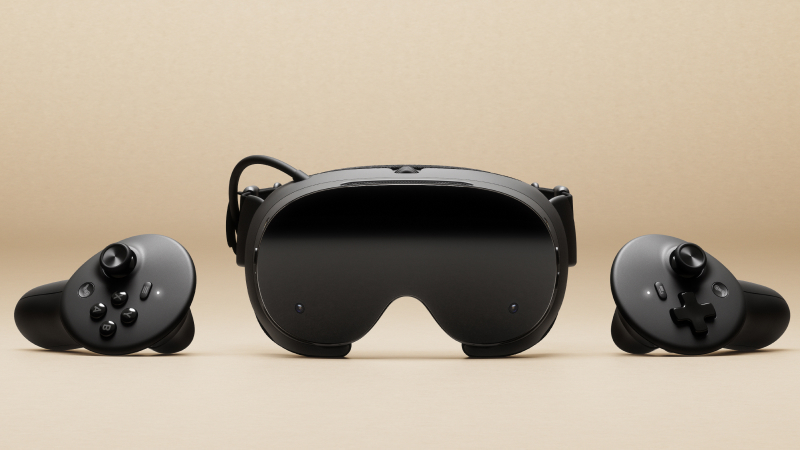 Steam Frame 256GB Kit | Steam Frame 1TB Kit |
|---|---|---|
| Who it suits | The lower-storage kit suits buyers who mainly stream from a PC or keep only a few standalone games installed. | More built-in space for a larger standalone library; do the storage maths before paying extra. |
| Storage | 256GB | 1TB |
| Memory | 16GB | 16GB |
| Display | 2160 × 2160 LCD per eye | 2160 × 2160 LCD per eye |
| Price & retailer | Check current priceSteamView product | Check current priceSteamView product |
Check the exact model, availability and delivery at the retailer. Prices are shown for seven days after a check.
What does the whole thing really cost?
The headline price isn't the whole bill, and the first extra is a bit cheeky at this price.
There's no power supply in the box. Valve says a Steam Deck charger works, or any USB-C charger rated 45W or more. Its own 45W charger is £29. So the 256GB kit with Valve's charger comes to £918, and the 1TB kit to £1,118, before any other checkout charges. Those are my sums from Valve's launch prices, not a delivery quote.
Half-Life: Alyx is included, but Valve says people who already own it can't redeem a second copy. If it's already in your library, it isn't a saving. Straps, prescription inserts and spare face cushions can wait until you know you've got a problem they fix.
If you're buying more than one big gadget this autumn, our UK Black Friday planning guide shows how to compare the whole basket. An expensive thing doesn't become affordable because a strap got knocked down by a fiver.
Can you actually buy one yet?
Not straight away. This is where the queue stands.
The first sign-up and random draw are done. Valve's launch announcement said people with reservations would be offered units as stock came in, with the first purchase emails going out from 18 September. Everyone else can join the waitlist, which only promises to tell you when units are available. Being on it doesn't mean one's been put aside for you.
Your own SteamSteamSteam is Valve's PC games store and library, selling full games, DLC, in-game items and some Steam hardware through one account. It is a useful first stop for PC gamers who want puBuying guide · View store → account is the only place that shows where you stand. Nobody else knows your place in the queue, and someone on Reddit getting theirs next week says nothing about when yours will come. For a present, it's worth having a backup you can actually get hold of. Our Christmas gifts for people with specific hobbies starts with exactly that problem.
Who should hold off?
The Frame isn't for everyone yet, and there's no shame in waiting for the reviews.
Waiting makes sense if you can't name the games you'd play on it, if buying it means buying a new PC too, or if you need a firm delivery date. It also makes sense if you want a proper verdict on comfort, tracking or picture quality. That comes from people wearing it for hours, not from a product page.
The waitlist is worth joining if you know which games and setup make it worth the money, you understand the full cost, and you don't mind not knowing when it'll turn up. And if what you really want is “more Steam, less desk”, our guide to Steam Deck, Machine, Frame and Controller is the better starting point.
Can Steam Frame replace a Steam Deck?
They share a library, so it's tempting to see them as alternatives. They're not, really.
The Deck has its screen and controls in your hands. The Frame means wearing the screen. They can share an account and some games, but one won't stand in for the other on a Tuesday night when you just want twenty minutes of something.
Do I need a Steam Machine as well?
Valve now has three big bits of hardware with its name on them, so it's easy to end up with all of them in your basket.
You don't need one. Streaming from the computer you already own is the place to start, and standalone games are a separate question. Another computer only makes sense if it fixes a problem you can actually name, and our Steam hardware guide sets out which problem each of Valve's devices is for.
BallparkA daily price game
Higher or lower?
Eleven things from UK shops, the same for everyone today. Does each cost more or less than the one before? Ten quick calls.