Vouchernaut Weekly

The week, sorted.

One email every Thursday at 7am, free. Here's what's in it:

  • New guides
  • Real price drops
  • Fresh codes
  • Sales ahead
Add stories from the magazineOptional
Stories to add

Pause or stop it from any email. I never sell or share your address. See this week's · Privacy

  1. Software
  2. Meeting notes & calls
  3. Krisp
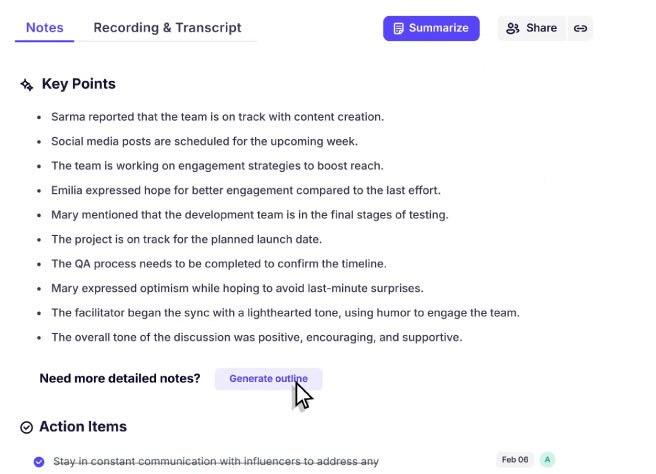
Krisp meeting notes view listing key points from a call with a Summarize button and action items below

AI notes with key points and action items

Noise cancellation and bot-free AI meeting notes for Zoom, Teams, Google Meet and other call apps

from$8a month per user, billed yearly

Krisp has a 7-day free trial with no card needed. Prices in US dollars as Krisp's pricing page showed them on 11 October 2026.

  • Mac
  • Windows
  • Web
  • iPhone and iPad
  • Android
  • Chrome extension
  • API

What Krisp does

Krisp is a desktop app that removes background noise from calls and takes AI meeting notes without sending a bot into the call. It suits people who spend their day on Zoom, Teams or Google Meet and want cleaner audio plus transcripts in one tool. There is no free plan, only a 7-day trial; Core costs $16 a month per user, or $8 a month when billed annually, which halves the price.

  • Noise cancellation in any call app

    Removes background noise, echo and cross-talk from your microphone and from other people's audio. It works with Zoom, Microsoft Teams, Google Meet, Slack, Webex, Discord and other conferencing apps.

  • Bot-free meeting notes

    Records and transcribes meetings from your computer without a bot joining the call, then writes a summary, key points and action items. An optional bot is available when needed.

  • On-device English transcription

    Krisp states that English transcripts are generated on your own device for privacy and speed. Other languages are transcribed on its servers.

  • Accent conversion

    Changes how your accent sounds to the other side in real time (Indian, Filipino and Latin American accents on the speaker side) and can make other people's accents easier to follow. Core includes one hour a day.

  • CRM sync and integrations

    Pushes notes and action items to HubSpot, Salesforce, Slack, Notion and Zapier. An MCP connection lets Claude, ChatGPT and Cursor read meeting notes.

  • Recording presets and in-person notes

    Choose transcript only, audio or video recording per meeting, and capture in-person meetings from the mobile app.

  • Ask Krisp

    An AI chat that answers questions across your meeting history, alongside a central list of action items and suggested agendas based on earlier calls.

Works with

  • Zoom
  • Microsoft Teams
  • Google Meet
  • Slack
  • Webex
  • Discord
  • Salesforce
  • HubSpot
  • Notion
  • Zapier
  • ConnectWise
  • Google Calendar
  • Outlook
  • Loom
  • Claude (MCP)
  • ChatGPT (MCP)
  • Cursor (MCP)
  • Webhooks

How much Krisp costs

Billing

Core

$16a month per user

For individuals and small teams

  • Unlimited bot-free AI note taker with transcripts and recordings
  • Unlimited noise cancellation
  • AI notes, action items and AI chat
  • Mobile app and outbound phone call recorder
  • 1 hour a day of accent conversion
  • HubSpot, Slack, Notion, Zapier and Teams integrations, plus API and MCP
  • 10 GB storage

Advanced

$30a month per user

Most popular

  • Everything in Core
  • 4 hours a day of speaker accent conversion, unlimited listener side
  • Salesforce and ConnectWise integrations
  • Manager view and company deal grouping
  • Admin controls for link sharing and note-taking mode
  • Team-level webhooks
  • 60 GB storage

Enterprise

Contact sales

Contact sales

  • Everything in Advanced
  • SSO and SCIM
  • Private on-device transcription and recordings
  • Choice of data centre location
  • SOC 2 report access and HIPAA support
  • Dedicated account manager and unlimited storage

Prices are in US dollars. Annual billing halves the monthly price. Volume pricing for teams over 50 members through sales. No student or non-profit discount is listed. Prices in US dollars, from Krisp's pricing page on 11 October 2026. Krisp may charge VAT on top, and prices can change.

Krisp pros and cons

Pros

  • Noise cancellation works on both your microphone and the other side's audio in almost any call app
  • English transcription runs on your device, and Krisp says customer data is not used for model training
  • Annual billing halves the price, bringing Core to $8 a month per user
  • No bot appears in the call unless you choose to send one
  • 7-day trial needs no card

Cons

  • No free plan, unlike Granola and Circleback
  • Stored data is kept in the US with no UK or EU option
  • Priced in US dollars, so the cost in pounds varies and cards may add a fee
  • Some Trustpilot reviewers complain about automatic renewals and refunds

Good for

  • People who take lots of calls from noisy homes, cafés or shared offices
  • Sales and customer teams who want notes pushed into HubSpot or Salesforce
  • Remote teams with mixed accents who want clearer calls
  • Anyone who wants one app for audio clean-up and meeting notes

Look elsewhere if

  • Anyone who only needs meeting notes and wants a free plan
  • UK organisations that need meeting data stored in the UK or EU

What reviewers say about Krisp

“It ACTUALLY WORKS. Legit. In a coffee shop.”

“Signed up for the yearly plan and I can't even access my own calls. Says I need to request access.”

“They turned on auto renew without notifying and now not refunding.”

What reviewers like

  • Noise cancellation that copes with cafés, conferences and busy homes
  • Automatic transcripts and summaries without a bot in the call
  • Works with whichever call app a team already uses
  • Simple to switch on and leave running

What reviewers complain about

  • Aggressive filtering can change how a voice sounds
  • Billing, renewal and refund complaints on Trustpilot

What members think

Rating Krisp

Not enough ratings yet. Shopped here? Yours helps the next person.

Krisp: what to know before you pay

Is Krisp worth paying for?

Krisp is worth paying for if noisy calls are a daily problem, because few meeting note takers also clean up your microphone and the other side's audio. If you only want meeting notes, cheaper or free note takers cover that job.

The app sits between your microphone and whichever call app you use, so noise cancellation works in Zoom, Microsoft Teams, Google Meet, Slack huddles, Webex and Discord. On top of that it records and transcribes meetings on your computer, writes summaries and action items, and can push them to Salesforce, HubSpot, Slack or Notion. One Product Hunt reviewer says the noise cancellation works even in a coffee shop.

How much does Krisp cost in the UK?

Krisp charges in US dollars: Core is $16 a month per user billed monthly or $8 a month billed annually, and Advanced is $30 a month or $15 a month billed annually. Your card provider converts the charge into pounds, so the sterling amount moves with the exchange rate and may carry a foreign transaction fee.

  • Core: unlimited bot-free note taking, noise cancellation, AI chat, the mobile app, one hour a day of accent conversion and 10 GB of storage
  • Advanced: everything in Core plus four hours a day of speaker accent conversion, a manager view, Salesforce and ConnectWise integrations and 60 GB of storage
  • Enterprise: priced on request, with SSO, SCIM, on-device private transcription, a choice of data centre location and unlimited storage

There is no free-forever plan. New accounts get a 7-day trial of the paid features without entering a card.

Krisp vs Granola vs Circleback: which is better?

Krisp is the better pick when audio quality matters as much as the notes; Granola and Circleback are more focused on the notes themselves. Both rivals have free plans, which Krisp does not.

Granola also captures meetings without a bot and is built around a notepad you type into during the call, which the AI then fills out. Circleback offers either a bot or a bot-free desktop app, adds Apple Watch and mobile recording for in-person meetings, and lists Pro at $18 a month or $15 billed annually. Neither cancels background noise on your own microphone, which is the job Krisp started with and still leads on.

Is Krisp safe to use for confidential meetings?

Krisp states that English transcripts are created on your own device, that meeting data is only stored in its cloud if you opt in, and that customer data is never used to train its models. The catch for UK organisations is location: Krisp says all stored data sits on servers in the United States and it does not offer regional storage.

The company states it holds a SOC 2 Type II report and PCI DSS certification, encrypts data at rest with AES-256 and uses TLS 1.2 in transit. Summaries are generated with Microsoft Azure. HIPAA business associate agreements are only offered on the top tier for teams of 100 seats or more. Anyone handling client data under UK GDPR should check the transfer arrangements with their data protection lead before rolling it out.

How do you get Krisp cheaper?

Annual billing is the main way to pay less: Krisp shows it as a 50% saving, taking Core from $16 to $8 a month per user. Teams of more than 50 members can ask sales for volume pricing.

Krisp's pricing page does not mention student, education or charity discounts. The 7-day trial is the way to test noise cancellation and note quality on your own calls before committing to a year.

  • Free plan

    Granola

    AI notepad that transcribes meetings from your device's audio, with no bot, and turns your rough notes into a full write-up

    Free plan · from $14 a month per user 4.9 on Google Play (3,050)
  • Free plan

    Circleback

    AI meeting notes, action items and automations for online and in-person meetings, with or without a bot

    Free plan · from $15 a month per user 4.7 on App Store (38)

Guides that cover Krisp

Questions about Krisp

Are there any Krisp discount codes?

We don't currently list a confirmed discount code. That doesn't mean the store has no promotions; check its website for current prices.

Does Krisp have a free plan?

No. Krisp offers a 7-day free trial of its paid meeting features with no card required, then you need the Core plan or above.

Does Krisp join meetings as a bot?

No by default. Krisp records from your computer without a bot appearing in the call, and it also offers an optional bot for meetings you cannot attend from the desktop app.

Which devices does Krisp work on?

Krisp has desktop apps for Mac and Windows, a Chrome extension for Google Meet, a web app and mobile apps for iPhone and Android.

Where does Krisp store my meeting data?

Krisp states that all stored data is kept on servers in the United States and that it does not offer regional storage. Transcription for English happens on your device.

Can I use Krisp in languages other than English?

Yes. Krisp says it produces transcripts and summaries in 16 languages, though transcription for languages other than English runs on its servers rather than on your device.

Cookie settings

These choices apply to this browser. They do not change your email subscription.

Essential: always on. Used for editor sessions and remembering this choice.