Vouchernaut Weekly

The week, sorted.

One email every Thursday at 7am, free. Here's what's in it:

  • New guides
  • Real price drops
  • Fresh codes
  • Sales ahead
Add stories from the magazineOptional
Stories to add

Pause or stop it from any email. I never sell or share your address. See this week's · Privacy

  1. Software
  2. Scheduling & forms
  3. Howie
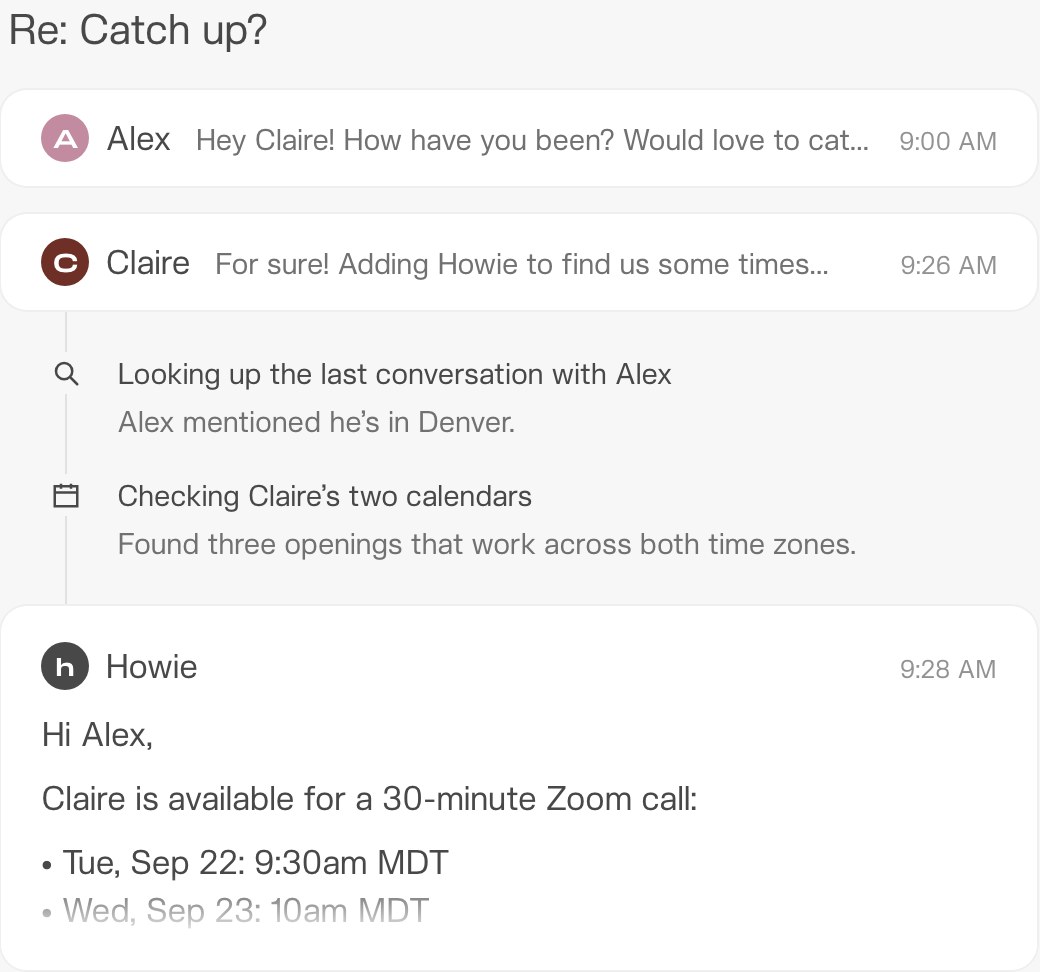
Email thread titled Re: Catch up? where Howie checks a past conversation and two calendars, then replies offering three Zoom call times

Howie finds times across two calendars and time zones

AI scheduling assistant you copy into email, SMS or iMessage to book meetings and manage your Google Calendar

from$25a month per workspace

Prices in US dollars as Howie's pricing page showed them on 11 October 2026.

  • Web

What Howie does

Howie is an AI scheduling assistant you copy into email threads, or message by SMS and iMessage, to find times, send calendar invites, follow up and keep your Google Calendar in order. It suits founders, investors and small teams who arrange lots of external meetings in Gmail. The Team plan starts at $25 a month for 1,250 shared credits, with unlimited teammates and $25 of free credits to start.

  • Scheduling by email and text

    Once copied into an email thread, or messaged by SMS or iMessage, Howie reads the conversation, checks availability, offers times and sends the calendar invite. It handles group threads and waits for everyone before booking.

  • Follow-ups

    When someone goes quiet, Howie chases them on a schedule you set, such as twice 48 hours apart, and then checks back with you.

  • Calendar protection

    Howie finds blocks for focus time, adds holds, buffers, commutes and travel time, and watches for conflicts and overloaded days.

  • Remembered preferences

    Rules you give it in plain English, such as meeting lengths, preferred video tool or a limit on back-to-back meetings, are applied to every booking.

  • Rescheduling and booking links

    One message can clear a day and move every meeting to new times. Howie also creates booking links and can click other people's scheduling links for you.

  • Admin and briefings

    Howie tracks reminders, to-dos and who you are waiting on, sends a daily briefing and connects to tools such as Granola, Notion, Linear and Todoist.

  • Your own branded assistant

    For $20 a month extra the assistant can carry a name you choose, a matching signature and an email address at your company's domain.

Works with

  • Gmail
  • Google Calendar
  • Zoom
  • iMessage
  • SMS
  • Granola
  • Notion
  • Todoist
  • Linear
  • PostHog
  • Stripe

How much Howie costs

Team

$25a month per workspace

1,250 credits a month; tiers up to 150,000 credits for $2,500

  • Shared workspace credits, from 1,250 a month
  • Unlimited teammates
  • Email-based scheduling assistant
  • Instant-response iMessage agent
  • Proactive calendar audits and daily briefings
  • Follow-ups and reminders
  • Custom assistant email at your domain for $20 a month extra

Enterprise

Contact sales

Custom credit pool and support package

  • Everything in Team
  • Invoicing and custom billing terms
  • Security review support and DPA
  • SLA and priority support
  • Dedicated onboarding and tailored limits

Prices in US dollars, billed monthly; VAT is not mentioned. New workspaces get $25 of free credits. Credits per meeting or task are not published. Prices in US dollars, from Howie's pricing page on 11 October 2026. Howie may charge VAT on top, and prices can change.

Howie pros and cons

Pros

  • Works by email, SMS and iMessage, so there is no new app for you or the people you meet
  • Unlimited teammates share one pool of credits instead of paying per seat
  • Applies written preferences such as follow-up timing and back-to-back limits on every booking
  • Custom assistant name and domain email available for $20 a month
  • $25 of free credits to start, enough to cover a month on the lowest tier
  • Shows SOC 2 Type II and CASA badges with a public trust centre

Cons

  • Gmail and Google Calendar only, with no Outlook or Microsoft 365 support
  • The maker does not say how many credits a meeting, follow-up or briefing uses
  • Prices in US dollars, billed monthly only, with no stated yearly or student discount
  • Terms rule out refunds for fees already paid, including prorated refunds
  • No ratings yet on G2, Capterra, Trustpilot or Product Hunt to judge accuracy at scale
  • Earlier descriptions said tasks could take 15 minutes or longer while uncertain cases were checked

Good for

  • Founders, investors and recruiters who book many meetings with people outside their company
  • Google Workspace users who want scheduling handled in the email thread rather than through a booking page
  • Small teams sharing one assistant, since the plan has unlimited teammates
  • Executives who want an assistant with their company's name and email domain

Look elsewhere if

  • Anyone on Outlook or Microsoft 365, which Howie does not support
  • People who mainly need a public booking page, where a tool like Cal.com is cheaper and simpler
  • Buyers who need a predictable bill, since credits per meeting are not published

What reviewers say about Howie

What reviewers like

  • Emails that read naturally, to the point that recipients take Howie for a human assistant
  • Reliable follow-ups that keep chasing until a meeting is booked
  • Handling messy group threads and time zones without back-and-forth
  • Onboarding that infers sensible defaults and lets users adjust them

What reviewers complain about

  • No support for Outlook or Microsoft 365
  • Replies are slower than instant tools, by design
  • No clear idea of how many credits each task uses
  • Early beta mistakes, which the founder acknowledged publicly in 2024

What members think

Rating Howie

Not enough ratings yet. Shopped here? Yours helps the next person.

Howie: what to know before you pay

Is Howie worth paying for?

For people whose week is full of meetings with outsiders, the public feedback suggests it often is: users posting about Howie mostly praise how naturally it writes and how reliably it chases people for a reply. Its limits are just as clear, since it works only with Gmail and Google Calendar and the maker does not say how many credits each meeting uses.

Howie works like a human assistant with an email address. You copy it into a thread, it reads the conversation, checks your calendars, offers times across time zones, handles the replies and sends the invite. It also creates booking links, adds holds, buffers and travel time, flags conflicts and overloaded days, and sends a daily briefing. Standing preferences, such as following up twice 48 hours apart or never booking more than three hours back to back, are remembered and applied every time.

Howie has no ratings on G2, Capterra, Trustpilot or Product Hunt yet, so most of what is known about its accuracy comes from its own site, social posts and a handful of third-party write-ups.

How much does Howie cost in the UK?

Howie charges in US dollars only, from $25 a month for the Team plan with 1,250 shared credits. Your bank converts the charge to pounds, and the site does not mention VAT or a UK price.

  • Team: $25 a month for 1,250 credits, rising through set tiers to $2,500 a month for 150,000 credits. Credits are shared across a workspace with unlimited teammates.
  • Custom assistant email: $20 a month extra for an assistant with a name you choose and an address at your own company's domain.
  • Enterprise: custom pricing with invoicing, a data processing agreement, an SLA and dedicated onboarding.

Only monthly prices are shown. The pricing does not say how many credits a scheduled meeting, a follow-up or a briefing costs, so the $25 of free credits each new workspace receives is the way to gauge your own usage before paying.

Howie vs Cal.com and Jace: which is better?

Howie and Cal.com solve the same problem in different ways: Cal.com gives people a booking page to pick a slot themselves, while Howie negotiates times in the email thread the way a human assistant would. Howie can also click other people's booking links for you, which a booking page cannot.

Jace is a broader AI email assistant that drafts replies to all your mail and can suggest meeting times in its drafts, but you still send them. Howie focuses on scheduling and acts on its own once you have copied it in. Lindy and Fyxer are other assistants that cover scheduling as part of wider email help, and both work with Outlook as well as Gmail.

Does Howie work with Outlook?

No. Howie's site lists Gmail and Google Calendar as its email and calendar connections, and third-party reviews from 2026 confirm there is no Outlook or Microsoft 365 support.

That rules it out for most businesses running on Microsoft 365. Users on Google Workspace can connect more than one Google calendar, and the assistant checks all of them before offering times.

Is Howie safe to use with work email?

Howie shows a SOC 2 Type II badge and a CASA badge, the security assessment Google requires of apps that read Gmail, and links to a trust centre run on Vanta. Its privacy policy says the service is hosted on US servers and covers UK and EU users under GDPR, with transfers made under standard data protection clauses.

The terms say Howie has access to all email and calendar data you share with it. Earlier descriptions of the service said a team of trained scheduling staff reviewed tasks when the AI was unsure, and the current policy neither confirms nor rules out human review, so it is sensible to assume scheduling threads may be read by staff.

How do you get Howie cheaper?

The maker states no yearly billing, student or non-profit discount. The main ways to keep costs down are to start on the lowest credit tier, share one workspace across a team rather than paying per person, and skip the $20 custom email add-on unless clients need to see your company's domain.

The terms say fees already paid are not refunded and there are no prorated refunds after cancelling, so moving up a credit tier only once the free credits show you need it avoids paying for unused months.

  • Discount

    Cal.com

    Scheduling app with booking links, calendar sync, reminders, payments and team routing, free for individuals

    Free plan · from $12 a month per user 4.7 on Trustpilot (427)20% off your first 12 months of Cal.com
  • Jace

    AI email assistant for Gmail and Outlook that labels mail, drafts replies in your style and answers questions about your inbox

    7-day free trial · from $20 a month 4.2 on Trustpilot (74)
  • Lindy

    An AI assistant in Slack, Gmail and iMessage that records meetings, sends daily briefs, drafts replies and runs scheduled tasks

    7-day free trial · from $29.99 a month per active user 4.9 on G2 (171)
  • Discount

    Fyxer

    AI assistant inside Gmail and Outlook that labels email, drafts replies in your tone, takes meeting notes and tracks follow-ups

    Free plan · from $37 a month per person 4.0 on Trustpilot (744)20% off your first two months of Fyxer

Guides that cover Howie

Questions about Howie

Are there any Howie discount codes?

We don't currently list a confirmed discount code. That doesn't mean the store has no promotions; check its website for current prices.

Does Howie have a free plan or free trial?

There is no free-forever plan or trial period. New workspaces get $25 of free credits to start, which covers the cost of the lowest monthly tier.

Can I cancel Howie and get a refund?

You can cancel by contacting [email protected] and keep access until the end of the period you have paid for. The terms say fees already paid are not refunded and there are no prorated refunds.

Is there a Howie app?

Howie has a web app for settings and sign-up, but you talk to it by email, SMS or iMessage, so there is nothing to install on your phone.

Can Howie use my company's name and email domain?

Yes, for $20 a month extra. The custom assistant email lets you choose the assistant's name, signature and an address at your own domain.

Does Howie charge per user?

No. The Team plan shares one pool of monthly credits across a workspace with unlimited teammates, so cost depends on usage rather than headcount.

Cookie settings

These choices apply to this browser. They do not change your email subscription.

Essential: always on. Used for editor sessions and remembering this choice.