

20%off
20% off your first two months of Fyxer
Deal
Terms and conditions
New Fyxer customers who sign up through our link get 20% off their first two months, on top of Fyxer's free trial. It's applied automatically: no code needed.
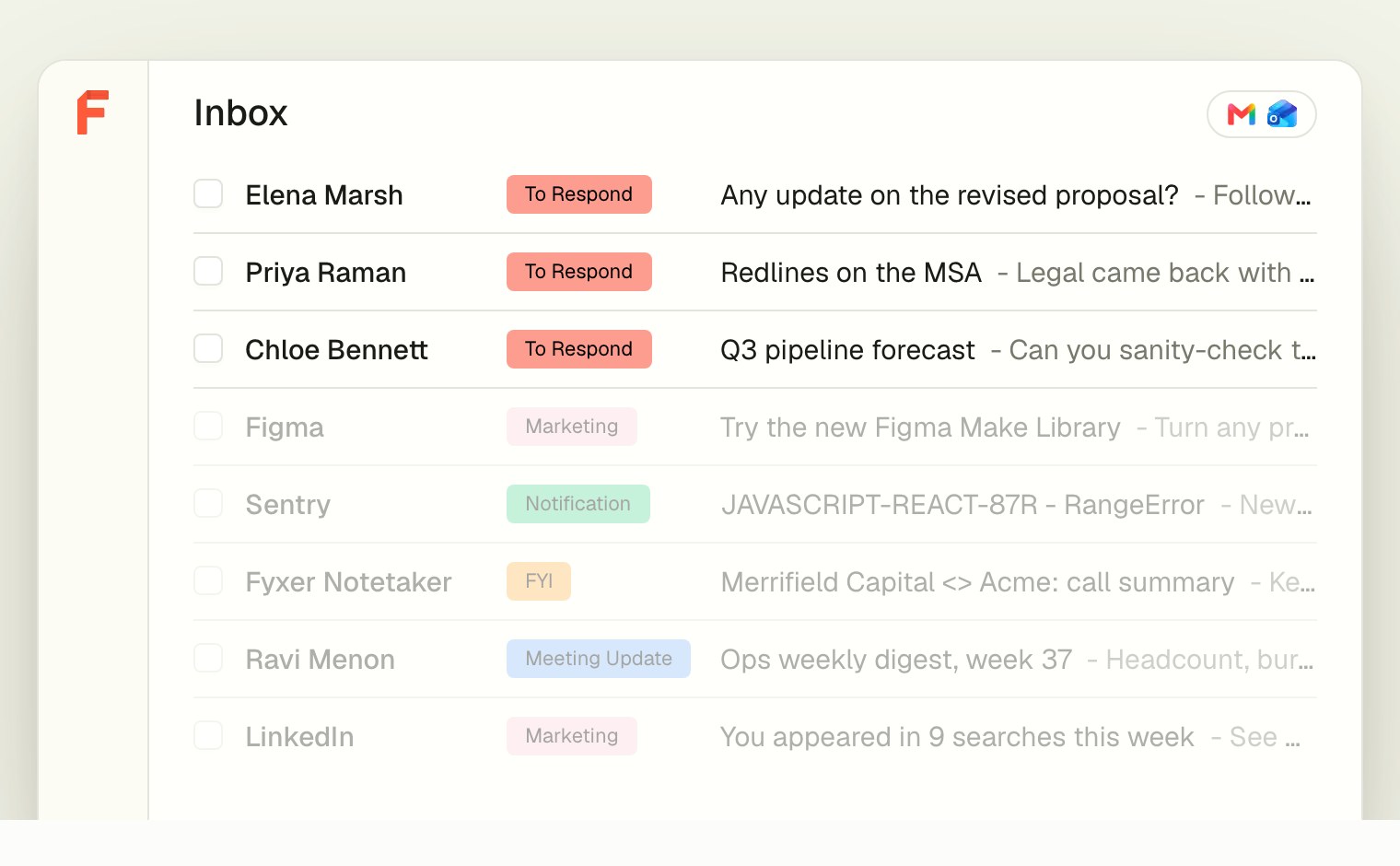
Inbox sorted into labels
AI assistant inside Gmail and Outlook that labels email, drafts replies in your tone, takes meeting notes and tracks follow-ups
Fyxer has a free plan and a 14-day free trial. Prices in US dollars as AdFyxer's pricing page showed them on 11 October 2026.
20%off
Deal
New Fyxer customers who sign up through our link get 20% off their first two months, on top of Fyxer's free trial. It's applied automatically: no code needed.
Fyxer is a London-built AI assistant that works inside Gmail and Outlook: it labels incoming email, drafts replies in your tone, records video calls and keeps a follow-up list. It suits busy professionals and client-facing teams. A free plan gives 400 credits a month for chat and audio notes; Pro is $37 a month per person billed annually or $49 monthly. Annual billing saves up to 35%, and every plan starts with a 14-day trial.
Labels every new email into categories such as To respond, FYI, Marketing and Notification, and lifts the ones that need you to the top. You choose which categories stay in the inbox, and corrections teach it.
Writes draft replies to important emails based on how you write and who matters to you. Nothing is sent until you review it.
Joins Zoom, Google Meet and Teams calls, records audio or video, and sends a summary with action items and a drafted follow-up email afterwards.
Tracks promises made in email and meetings, such as a contract you said you'd send, and keeps a list of what still needs you. On Team, follow-ups can be assigned to an owner.
Answers questions about clients and conversations from your email and meetings, and sends a daily briefing of priorities.
Spaces gather notes, transcripts and context on a client or project and can be shared, while Flows run automated routines.
Spots when a meeting is needed and drafts a reply with your scheduling link, so recipients book a free slot within your meeting hours. Team links share one booking page across several calendars.
Works with
Free
400 credits a month; no inbox sorting or drafted replies
$49a month per person
3,000 credits a month after 3 months of unlimited credits
$99a month per person
6,000 credits a month per member, pooled, after 3 unlimited months
Contact sales
Annual contract priced for your organisation
Prices in US dollars; VAT isn't mentioned. Annual billing saves 25% on Pro and 35% on Team. Volume quotes from 10 members. Viewer seats are free. Prices in US dollars, from AdFyxer's pricing page on 11 October 2026. Fyxer may charge VAT on top, and prices can change.
“Love the way it compiles and saves to drafts, shame so much difficulty setting up the signature.”
“I really like Fyxer; one area of improvement would be the AI needs to learn how emails are sorted better.”
“overly managed, hard to keep track of where emails were filed.”
Fyxer has a free plan, then Pro at $37 a month per person billed annually or $49 monthly, and Team at $64 annually or $99 monthly. Enterprise is an annual contract priced on request.
Prices are shown in US dollars, and Fyxer's refund policy warns that currency conversion and bank fees can change the amount you see, so UK cards are charged in dollars. The pricing page doesn't mention VAT. A seat is one paid member however many inboxes or calendars they connect, and viewers who only read shared notes and Spaces are free. Teams of 10 or more can ask for a volume quote.
Each plan includes monthly credits that pay for the AI work. Sorting costs one credit per five emails, recording costs one credit a minute, a chat message costs 20 and a deep research question 175. Pro includes 3,000 credits a month and Team 6,000 pooled across the team, and a launch offer gives unlimited credits for the first three months on paid plans.
It is a taster rather than an inbox assistant. The free plan doesn't sort your email or draft replies, which are the reasons most people sign up.
Free accounts get a daily dashboard briefing, a weekly email briefing, a follow-up list, three personal Spaces and 400 credits a month, which Fyxer says is about 20 chat messages or six hours and 40 minutes of audio meeting notes. When the 14-day trial ends, accounts that don't pay move to this plan.
For people who get hundreds of emails a week and spend time on client calls, reviewers say it saves real time. People with quiet inboxes will struggle to justify $37 a month.
Fyxer reports that most users save more than an hour a day and that nine in ten are still using it after three months. On Trustpilot it scores 4.0 from 744 reviews, with many five-star reviews praising quick, helpful support and drafts that save typing. The critical reviews describe a drafts folder filling with replies to emails that didn't need one, messages filed where they are hard to find, fiddly signature setup and charges after a trial or cancellation.
Fyxer adds AI to the inbox you already have; Superhuman Mail replaces it with a new, faster app. Which suits you depends on whether you want to change how you read email.
Superhuman Mail costs $25 a month per member annually and is built around keyboard shortcuts, Split Inbox, read statuses and reminders, with AI drafts on its $33 Business plan. Fyxer keeps you in Gmail or Outlook, sorts mail into labels such as To respond, FYI and Marketing, and adds a meeting notetaker that drafts follow-up emails. Jace and Howie are other assistants that draft or schedule over email, and Granola and Circleback cover meeting notes on their own.
Fyxer states it holds SOC 2 Type II and ISO 27001 certification, is GDPR compliant and offers HIPAA compliance on Enterprise. It never sends an email for you: every reply is a draft you review.
Fyxer says your data is never used to train third-party models such as OpenAI's, and you can opt out of its own model training. Meeting participants are told before the notetaker joins, and recordings are private to the calendar owner unless shared. Data stored in a chosen region (UK, EU or US), single sign-on and audit logs are Enterprise features. Deleting your account returns your inbox to how it was.
Annual billing is the main saving: 25% off Pro and 35% off Team.

Keyboard-driven AI email app for Gmail and Outlook, sold alone or in a suite with Grammarly, Docs and the Go assistant

AI email assistant for Gmail and Outlook that labels mail, drafts replies in your style and answers questions about your inbox

AI scheduling assistant you copy into email, SMS or iMessage to book meetings and manage your Google Calendar

An AI assistant in Slack, Gmail and iMessage that records meetings, sends daily briefs, drafts replies and runs scheduled tasks
 Free plan
AI notepad that transcribes meetings from your device's audio, with no bot, and turns your rough notes into a full write-up
 Free plan
AI meeting notes, action items and automations for online and in-person meetings, with or without a bot
An AI note taker transcribes your meetings and writes the summary and action items for you. If you meet on Teams, Zoom or Meet, the built-in notes may be enough; Fathom is the best free app, Granola the pick for no bot and Circleback for notes sent straight to your other tools.
We don't currently list a confirmed discount code. That doesn't mean the store has no promotions; check its website for current prices.
Read the retailer's current policy before buying. Eligibility can depend on the product, its condition and whether it has been used or activated. Fyxer refund policy
No. Fyxer writes drafts in your inbox and you decide what to send. Meeting follow-up drafts can also be switched off.
Fyxer gives a full refund if you ask within 7 days of your first monthly charge, or within 30 days of your first annual charge, by emailing [email protected]. Requests outside those windows are reviewed but not guaranteed.
Admins cancel from Billing, then Manage subscription, which opens the Stripe billing portal. Cancelling disconnects your inbox, calendar and notetaker, and Fyxer says deleting your account returns your inbox to how it was before.
You choose: all meetings, only external ones, only the ones you host, or none. Fyxer joins Zoom, Google Meet and Microsoft Teams calls as an attendee, and the host can refuse or remove it. The free plan records audio only; Pro and above record video.
On the free plan, metered actions pause until your credits renew. On paid plans Fyxer warns you at 80% and 100%, pauses inbox sorting first while recording carries on, and then discusses a bigger plan.
A seat covers one person however many inboxes and calendars they connect, but working across several inboxes at once is a Team plan feature.
